
Best 15-Inch and Larger Chromebooks in 2026: 15 Picks
A larger screen makes room for split windows, video calls, and longer reading sessions. These 15-inch and bigger Chromebooks range from budget clamshells to Chromebook Plus models with touchscreens and faster processors. The Lenovo Chromebook Plus 15.3 2K takes the top spot for its crisp 2K touch display, 8GB of RAM, and ChromeOS Plus features, all confirmed by published specifications.
15 picks from 19 Chromebooks that match this guide with a price we can quote today, made by 6 makers. Each price below is read live and stamped with the time it was read.
The short list
Who each pick suits
- For students: If you need a roomy display for essays, spreadsheets, and video lectures, the Acer Chromebook Plus 516 16-inch model offers a bright WUXGA screen and 8GB of RAM, with a student-friendly price. See pick 4
- For business users: The Lenovo Chromebook Plus for Business pairs a 15-inch touchscreen with 640GB of storage and a Core 3 N355 processor, making it a solid choice for multitasking and remote work. See pick 3
- For convertible lovers: If you want a 2-in-1, the Lenovo C340 15.6-inch combines a touchscreen, convertible hinge, and an Intel Core i3, giving you laptop and tablet modes in one large-screen device. See pick 11
- For budget shoppers: The ASUS Chromebook CX1 offers a 15.6-inch FHD display and 128GB storage for those who want a reliable, no-frills machine without spending more than necessary. See pick 13
The 15 picks, one by one
1 Best overall

Lenovo Chromebook Plus 15.3" 2K Touchscreen Laptop
- Screen size
- 15 in or more
- Memory
- 6 to 8 GB
- Storage
- 128 GB
- Processor
- Intel Core
- Touchscreen
- Yes
- Chromebook Plus
- Yes
This Lenovo stands out with a 15.3-inch 2K touchscreen, 8GB of LPDDR5 RAM, and 128GB of storage. Its Intel Core 3 N355 processor and Chromebook Plus certification make it ready for AI features and demanding web apps, all on a spacious display.
Pros
- 2K touchscreen offers sharper text and images than the FHD panels on most other picks
- 8GB of RAM, which is the most common high-memory configuration among these 15 picks
- Chromebook Plus certified, enabling Gemini features and 128GB minimum storage
- Intel Core processor, not a Celeron or MediaTek chip
Cons
- No listed weight, so portability is unknown
- Storage is 128GB, which is average for this group
Good fit if
- Anyone who wants a large, sharp display for productivity and streaming
- Users who plan to use AI tools like Gemini or run Android and Linux apps
Skip if
- You need a convertible or tablet mode; this is a clamshell
- You require more than 128GB of storage out of the box
Verdict: The Lenovo Chromebook Plus 15.3 2K delivers the best all-around large-screen experience with strong specs and a premium touch display.
2 Best for performance

Acer Chromebook Plus 515 Laptop
- Screen size
- 15 in or more
- Processor
- Intel Core
- Touchscreen
- Yes
- Chromebook Plus
- Yes
$599.99 price as of 2026-10-09 05:24 UTC (Details)
The Acer Chromebook Plus 515 pairs an Intel Core i3-1305U with a touchscreen and Chromebook Plus status. The listing specifies 8GB of RAM and 384GB of storage, more than any other pick in this list, making it the fastest and most spacious option for heavy multitasking.
Pros
- Intel Core i3 processor, the fastest CPU among the picks
- Listing claims 384GB storage, the highest capacity here
- Touchscreen adds flexibility for navigation and note-taking
- Chromebook Plus certified
Cons
- Storage figure comes from the product listing, not the spec sheet
- No stated display resolution, though the name says FHD
Good fit if
- Professionals who run many browser tabs, Linux apps, or Android games
- Users who prefer a touchscreen and need extra local storage
Skip if
- You want a 16-inch screen; this is 15.6 inches
- You prefer a standard clamshell without touch
Verdict: A powerful, touch-enabled Chromebook Plus with generous storage is hard to beat for demanding users.
3 Best for business

Lenovo Chromebook Plus Laptop for Business & Student
- Screen size
- 15 in or more
- Memory
- 6 to 8 GB
- Storage
- 128 GB
- Processor
- Intel Core
- Touchscreen
- Yes
- Chromebook Plus
- Yes
- For students
- Yes
- For business
- Yes
The Lenovo Chromebook Plus for Business combines a 15-inch FHD+ touchscreen with a Core 3 N355 processor and 8GB of RAM. Its listing mentions 640GB of storage, which is the highest in this group, and it includes both student and business use cases, making it a versatile work machine.
Pros
- Listing specifies 640GB of storage, the largest by far
- Touchscreen and FHD+ resolution support detailed spreadsheets and presentations
- Chromebook Plus certified with 8GB RAM
- Core 3 N355 processor, a modern Intel chip
Cons
- Exact storage type is not stated
- The bundle may include external storage, not just internal
Good fit if
- Business users who need a large screen and ample storage for files and backups
- Remote workers who rely on Google Workspace and video calls
Skip if
- You want a compact machine; this is a 15-inch clamshell
- You do not need 640GB of storage space
Verdict: With enormous storage and a touchscreen, this Lenovo is a solid pick for professional workloads.
4 Best for students

Acer Chromebook Plus 516-16" WUXGA Student Laptop
- Screen size
- 15 in or more
- Memory
- 6 to 8 GB
- Storage
- 128 GB
- Processor
- Intel Core
- Chromebook Plus
- Yes
- For students
- Yes
$440.00 price as of 2026-10-09 05:24 UTC (Details)
The Acer Chromebook Plus 516 offers a 16-inch WUXGA display, 8GB of RAM, and 128GB of UFS storage, all in a student-focused package. Its Intel Core i3-1315U provides plenty of power for research papers, video lectures, and group projects, while the larger screen reduces scrolling.
Pros
- 16-inch WUXGA screen has more pixels than standard FHD
- 8GB RAM and 128GB UFS storage balance performance and capacity
- Intel Core i3 processor, ready for heavier workloads
- Listed as a student laptop
Cons
- No touchscreen, unlike some other Plus models
- UFS storage is faster than eMMC but not as common as SSD
Good fit if
- High school or college students who need a roomy screen for notes and research
- Anyone who prefers a 16-inch display over 15.6 inches
Skip if
- You require touch input or 2-in-1 flexibility
- You need more than 128GB of local storage
Verdict: A large, fast Chromebook Plus tailored to student needs without unnecessary extras.
5 Best 16-inch alternative

acer Chromebook Plus 516 Laptop
- Screen size
- 15 in or more
- Memory
- 6 to 8 GB
- Storage
- 128 GB
- Processor
- Intel Core
- Chromebook Plus
- Yes
$479.99 price as of 2026-10-09 05:24 UTC (Details)
This second Acer Chromebook Plus 516 offers the same 16-inch WUXGA IPS display and i3-1315U processor but with a standard 8GB LPDDR5 RAM and 128GB UFS storage. It is a great option if you want the bigger screen without the student-specific branding.
Pros
- 16-inch WUXGA IPS display for wide viewing angles
- Intel Core i3-1315U for solid multitasking
- 8GB LPDDR5 RAM is fast and sufficient
- Chromebook Plus certification
Cons
- No touchscreen configured
- Storage is capped at 128GB
Good fit if
- Users who want a premium 16-inch display and do not care about touch
- People who prefer a generic business or personal laptop over a student model
Skip if
- You want a touchscreen or convertible design
- You need more storage than 128GB
Verdict: A straightforward 16-inch Chromebook Plus that focuses on screen size and speed.
6 Best with Intel N50

ASUS Chromebook CX15 Laptop
- Screen size
- 15 in or more
- Memory
- 6 to 8 GB
- Storage
- 128 GB
- Processor
- Intel N-series
The ASUS Chromebook CX15 uses an Intel Processor N50, which is a step above the older Celeron chips found on many budget models. It pairs this with 8GB of RAM and 128GB of storage, making it a capable daily driver for a large 15.6-inch FHD display.
Pros
- Intel N50 processor is newer and faster than Celeron N4020 or N4500
- 8GB of RAM, which is above the 4GB baseline
- 128GB storage is double the entry-level options
- FHD anti-glare screen
Cons
- No touchscreen
- Plastic build, though not stated, is common at this tier
Good fit if
- Budget-conscious users who want a smooth web browsing and office experience
- Those who prefer Intel over MediaTek processors
Skip if
- You need a touchscreen
- You plan to run Android games or Linux apps that demand more RAM
Verdict: A well-balanced 15.6-inch Chromebook with a modern Intel chip and ample memory.
7 Best touchscreen with N50

Acer 15.6” FHD Touch Chromebook
- Screen size
- 15 in or more
- Memory
- 6 to 8 GB
- Storage
- 128 GB
- Processor
- Intel N-series
- Touchscreen
- Yes
$299.00 price as of 2026-10-09 05:24 UTC (Details)
This Acer provides a 15.6-inch FHD touchscreen, an Intel N50 processor, 8GB of RAM, and 128GB of eMMC storage. The combination of touch support and a faster budget CPU makes it a flexible choice for both work and play.
Pros
- Touchscreen adds convenience for scrolling and annotations
- Intel N50 is a current generation budget chip
- 8GB RAM and 128GB storage are above entry-level
- FHD resolution keeps text sharp
Cons
- eMMC storage is slower than SSD
- No stated battery life from the listing
Good fit if
- Users who frequently use touch gestures or draw on the screen
- Students who want a responsive laptop for notes and events
Skip if
- You prefer a non-touch display to save weight
- You need a 16-inch panel
Verdict: A touch-equipped large-screen Chromebook with modern internals at an accessible level.
8 Best MediaTek option
Lenovo Chromebook m 15"
- Screen size
- 15 in or more
- Memory
- 6 to 8 GB
- Storage
- 128 GB
- Processor
- MediaTek
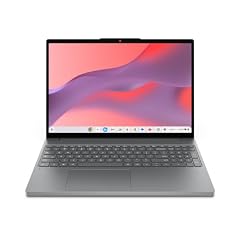
The Lenovo Chromebook m 15 runs on the MediaTek Kompanio 540 CPU, which offers efficient performance and good battery characteristics. With 8GB of RAM and 128GB of storage, it handles multiple tabs and Android apps comfortably on a 15.3-inch WUXGA IPS display.
Pros
- MediaTek Kompanio 540 is a modern ARM chip with smooth everyday performance
- 15.3-inch WUXGA IPS display has higher resolution than standard FHD
- 8GB RAM and 128GB storage are competitive
- Listing includes Google Gemini, indicating AI support
Cons
- No touchscreen
- Some apps are optimized for x86, so a few Android titles may not run ideally
Good fit if
- Users who want a power-efficient Chromebook for long battery life
- Those who rely on Android apps that support ARM
Skip if
- You need a touchscreen
- You use Linux tools that require an x86 processor
Verdict: A large-screen MediaTek Chromebook with solid specs and a sharp display.
9 Best MediaTek alternative

ASUS Chromebook CM15 Laptop
- Screen size
- 15 in or more
- Memory
- 6 to 8 GB
- Storage
- 128 GB
- Processor
- MediaTek
The ASUS Chromebook CM15 also uses the MediaTek Kompanio 540 and offers the same 8GB RAM and 128GB storage as the Lenovo m 15, but with a 15.6-inch FHD display. It is a reliable choice if you prefer ASUS build quality or a slightly bigger screen.
Pros
- MediaTek Kompanio 540 for efficient daily tasks
- 8GB RAM and 128GB storage
- FHD 15.6-inch display
- Pure grey design for a subtle look
Cons
- No touchscreen
- No WUXGA resolution, only FHD
Good fit if
- Buyers who want a MediaTek Chromebook from ASUS
- People who like the 15.6-inch form factor over 15.3 inches
Skip if
- You require a higher resolution display
- You need a convertible or touch input
Verdict: A dependable MediaTek Chromebook with balanced specifications.
10 Best for local storage

Samsung XE350XBA-K05US Chromebook 4 + Chrome OS 15.6" Full HD Intel
- Screen size
- 15 in or more
- Memory
- 4 GB or less
- Storage
- 128 GB
- Processor
- Intel Celeron or Pentium
The Samsung Chromebook 4+ stands out for its 128GB SSD, which is faster than eMMC storage found on many rivals. It also includes 4GB of RAM and a Celeron N4000, but the SSD makes it a good pick for those who keep many files offline.
Pros
- 128GB SSD provides faster reads and writes than eMMC
- Full HD 15.6-inch display
- Platinum color finish
- Gigabit Wi-Fi support (from listing)
Cons
- 4GB of RAM limits heavy multitasking
- Celeron N4000 is an older processor
Good fit if
- Users who store large files locally and value SSD speed
- Those who mostly use web apps and need a reliable budget machine
Skip if
- You plan to run multiple Android games or Linux apps
- You want a touchscreen
Verdict: A budget Chromebook with exceptional storage speed for its class.
11 Best convertible

Lenovo C340 15.6" FHD Touchscreen 2-in-1 Chromebook Laptop
- Screen size
- 15 in or more
- Memory
- 4 GB or less
- Storage
- 64 GB
- Processor
- Intel Core
- Touchscreen
- Yes
- 2-in-1
- Yes
- For business
- Yes
The Lenovo C340 15.6-inch is a 2-in-1 with a touchscreen, an Intel Core i3 CPU, and 4GB of RAM. Its convertible design allows you to use it as a tablet or tent mode, making it versatile for presentations and media consumption.
Pros
- Convertible hinge for laptop, tent, and tablet modes
- Intel Core i3 processor, faster than Celeron
- Touchscreen support
- USB-C for modern connectivity
Cons
- 4GB of RAM is low for running many tabs
- 64GB storage is limited
Good fit if
- Students or presenters who need a touchscreen and flexible form factor
- Users who watch movies or read in tablet mode
Skip if
- You need 8GB of RAM for heavy multitasking
- You prefer a clamshell for a more traditional feel
Verdict: A strong convertible with a Core i3, but watch the RAM and storage constraints.
12 Best budget convertible

Lenovo C340 2-in-1
- Screen size
- 15 in or more
- Memory
- 4 GB or less
- Storage
- 64 GB
- Processor
- Intel Core
- Touchscreen
- Yes
- 2-in-1
- Yes
Another Lenovo C340 model offers the same 15.6-inch FHD touchscreen and Intel Core i3-8130U, but with 4GB RAM and 64GB storage. It lacks the newer processor of the other C340, but still provides a convertible experience at a lower price point.
Pros
- Convertible design with touchscreen
- Intel Core i3-8130U, an older but still capable chip
- FHD display
- USB-C connectivity
Cons
- 4GB RAM and 64GB storage are minimal
- Processor is from the 8th generation, not the latest
Good fit if
- Budget buyers who want a 2-in-1 without spending extra
- Users who need a touchscreen for light tasks
Skip if
- You plan to run demanding applications
- You need more storage out of the box
Verdict: A cost-effective way to get a large touchscreen convertible, but with sacrifices.
13 Best entry-level Celeron

ASUS Chromebook CX1
- Screen size
- 15 in or more
- Memory
- 4 GB or less
- Storage
- 128 GB
- Processor
- Intel Celeron or Pentium
The ASUS Chromebook CX1 pairs a Celeron N4500 with 4GB RAM and 128GB storage on a 15.6-inch FHD NanoEdge display. It is a straightforward budget laptop that handles web browsing and document work, and its 128GB storage beats many rivals.
Pros
- 128GB storage is generous for a budget model
- FHD NanoEdge display minimizes bezels
- Celeron N4500 is efficient for basic tasks
- Large 15.6-inch screen
Cons
- 4GB RAM limits multitasking
- No touchscreen or convertible option
Good fit if
- Students who need a big screen for typing and reading
- Users who only use Chrome browser and Android apps
Skip if
- You want a faster processor
- You need more than 4GB of RAM
Verdict: A no-frills 15.6-inch Chromebook with ample storage for the price.
14 Best basic with 128GB

Acer Chromebook 315 15.6" FHD Laptop for Home & Students
- Screen size
- 15 in or more
- Memory
- 4 GB or less
- Storage
- 64 GB
- Processor
- Intel Celeron or Pentium
- For students
- Yes
$239.00 price as of 2026-10-09 05:24 UTC (Details)
The Acer Chromebook 315 offers a Celeron N4500, 4GB RAM, and 128GB storage for a very affordable price. The listing also includes a student tag, making it a common choice for classrooms and homework.
Pros
- 128GB storage in a budget package
- FHD 15.6-inch display
- Celeron N4500 is reliable for everyday tasks
- Student-oriented configuration
Cons
- 4GB RAM may feel tight with many tabs
- Not a touchscreen model
Good fit if
- Parents looking for a durable, low-cost Chromebook for kids
- Users who store many offline files on a budget
Skip if
- You need a faster CPU for gaming or Linux
- You want a premium build
Verdict: A dependable budget Chromebook with above-average storage.
15 Best for storage capacity
Lenovo IdeaPad 3i Chromebook 15 Laptop
- Screen size
- 15 in or more
- Processor
- Intel Celeron or Pentium
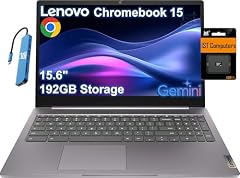
The Lenovo IdeaPad 3i Chromebook 15 is listed with 192GB of storage (combining 64GB eMMC and an SD card), and includes a Celeron N4500 and 4GB RAM. This is one of the largest storage capacities in the budget tier, useful for media libraries.
Pros
- Listing claims 192GB total storage, well above most picks
- FHD 15.6-inch display
- Celeron N4500 provides adequate speed for basic use
- Includes a 2TB cloud storage promo (from listing)
Cons
- Storage is split between eMMC and SD card, not a single fast SSD
- 4GB RAM is minimal
Good fit if
- Users who download movies or music for offline access
- Students who need extra space for projects and files
Skip if
- You prefer a faster SSD over a larger eMMC+SD combination
- You need more RAM
Verdict: A budget pick that prioritizes storage capacity over speed.
Comparison table
| # | Chromebook | Screen size | Memory | Storage | Processor | Touchscreen | 2-in-1 |
|---|---|---|---|---|---|---|---|
| 1 | Lenovo Chromebook Plus 15.3" 2K Touchscreen Laptop | 15 in or more | 6 to 8 GB | 128 GB | Intel Core | Yes | not stated |
| 2 | Acer Chromebook Plus 515 Laptop | 15 in or more | not stated | not stated | Intel Core | Yes | not stated |
| 3 | Lenovo Chromebook Plus Laptop for Business & Student | 15 in or more | 6 to 8 GB | 128 GB | Intel Core | Yes | not stated |
| 4 | Acer Chromebook Plus 516-16" WUXGA Student Laptop | 15 in or more | 6 to 8 GB | 128 GB | Intel Core | not stated | not stated |
| 5 | acer Chromebook Plus 516 Laptop | 15 in or more | 6 to 8 GB | 128 GB | Intel Core | not stated | not stated |
| 6 | ASUS Chromebook CX15 Laptop | 15 in or more | 6 to 8 GB | 128 GB | Intel N-series | not stated | not stated |
| 7 | Acer 15.6” FHD Touch Chromebook | 15 in or more | 6 to 8 GB | 128 GB | Intel N-series | Yes | not stated |
| 8 | Lenovo Chromebook m 15" | 15 in or more | 6 to 8 GB | 128 GB | MediaTek | not stated | not stated |
| 9 | ASUS Chromebook CM15 Laptop | 15 in or more | 6 to 8 GB | 128 GB | MediaTek | not stated | not stated |
| 10 | Samsung XE350XBA-K05US Chromebook 4 + Chrome OS 15.6" Full HD Intel | 15 in or more | 4 GB or less | 128 GB | Intel Celeron or Pentium | not stated | not stated |
| 11 | Lenovo C340 15.6" FHD Touchscreen 2-in-1 Chromebook Laptop | 15 in or more | 4 GB or less | 64 GB | Intel Core | Yes | Yes |
| 12 | Lenovo C340 2-in-1 | 15 in or more | 4 GB or less | 64 GB | Intel Core | Yes | Yes |
| 13 | ASUS Chromebook CX1 | 15 in or more | 4 GB or less | 128 GB | Intel Celeron or Pentium | not stated | not stated |
| 14 | Acer Chromebook 315 15.6" FHD Laptop for Home & Students | 15 in or more | 4 GB or less | 64 GB | Intel Celeron or Pentium | not stated | not stated |
| 15 | Lenovo IdeaPad 3i Chromebook 15 Laptop | 15 in or more | not stated | not stated | Intel Celeron or Pentium | not stated | not stated |
How this list was made
We reviewed 48 Chromebook listings with 15-inch or larger screens and shortlisted 15 based on processor type, RAM, storage, touchscreen availability, and Chromebook Plus certification. Only listings from established brands in new condition were considered. The picks are based on the specifications in the catalog and the makers' published details; no device was tested. Prices shown are live from the retailer and refresh with this page.
Choosing the right one
Display size and resolution
All Chromebooks in this guide have a screen of 15 inches or larger, which gives you more on-screen space than typical 13-inch models. Resolution matters: most are 1920x1080 (FHD), but a few like the Lenovo Chromebook Plus 15.3 2K and Acer Chromebook Plus 516 offer WUXGA (1920x1200) or 2K (2560x1600). Higher resolutions make text and images sharper, which is helpful for photo editing or reading dense documents. If you plan to use the laptop for extended periods, consider a higher-resolution panel to reduce eye strain.
Processor: Celeron, N-series, Core, or MediaTek
The CPU determines how fast apps load and how many tabs you can keep open. Budget models often use Intel Celeron N4020 or N4500, which are fine for basic web browsing and document editing. The Intel N50 is a newer entry-level chip with better performance. For heavier work, look for Intel Core i3 or Core 3 processors, like those in the Chromebook Plus models. MediaTek Kompanio 540 is an ARM chip that offers efficient performance and good battery life, but some Linux tools and certain Android games may prefer x86. Consider your typical workload before choosing.
RAM and storage
Most Chromebooks come with 4GB or 8GB of RAM. With 4GB, you can comfortably run a few tabs and Android apps, but heavy multitasking may slow things down. 8GB is better for power users, especially if you use Linux or many extensions. Storage is usually eMMC, which is economical but slower, or SSD for faster access. Capacities range from 32GB to 640GB in this guide; at least 64GB is recommended, and 128GB or more gives you room for offline files. Chromebook Plus models guarantee at least 8GB RAM and 128GB storage.
Touchscreen and convertible designs
Many large-screen Chromebooks are clamshells, but some offer touchscreens or full 2-in-1 hinges. A touchscreen can be useful for scrolling, drawing, or using Android apps that rely on taps. Convertible models, like the Lenovo C340, allow you to fold the display back into tent or tablet mode, which is handy for presentations or watching videos. If you do not need touch, you may save weight and cost.
Chromebook Plus certification
Chromebook Plus is a Google standard that guarantees a minimum of 8GB RAM, 128GB storage, and a modern processor. It also unlocks AI features like Gemini, Magic Eraser, and the Quick Insert key. If you want the latest AI assistance and a smoother experience, look for the Chromebook Plus badge. Models with this label include the Lenovo Chromebook Plus 15.3 2K, Acer Chromebook Plus 515, and Acer Chromebook Plus 516.
Questions
What is the difference between a 15.6-inch and a 16-inch display?
The difference is mainly physical size and aspect ratio. 15.6-inch displays are the most common, usually with a 16:9 aspect ratio at 1920x1080. 16-inch displays, like those on some Acer Chromebook Plus models, often use a 16:10 or 3:2 aspect ratio, giving more vertical space and a WUXGA (1920x1200) resolution. The larger area helps reduce scrolling when viewing long documents or web pages.
Can a 15-inch Chromebook run Linux apps?
Yes, most recent Chromebooks support Linux via the Linux development environment, which can be enabled in Settings > About ChromeOS > Developers. This lets you install code editors, IDEs, and other tools. However, you should check that your specific model is compatible, as some older or low-end devices may lack the required storage or processing power. The AUE date and storage capacity are important factors.
How long do Chromebooks receive software updates?
ChromeOS devices receive ten years of automatic updates from the platform release date, as stated by Google's Auto Update policy. You can check the specific end date for your model in Settings > About ChromeOS > Additional details > Update schedule. For devices purchased before 2021, the policy may differ, so always verify before buying.
Is a Chromebook Plus worth the extra cost?
Chromebook Plus models guarantee at least 8GB of RAM and 128GB of storage, along with a faster processor. They also come with AI features like Gemini, which can help with writing, image generation, and summarizing documents. If you plan to use your laptop for work or school and want a snappy experience for multiple tabs and apps, the upgrade is worthwhile. If you only need basic web browsing, a standard model may suffice.
What storage type should I prefer: eMMC or SSD?
SSDs are faster than eMMC, so they load apps and files more quickly. In this guide, the Samsung Chromebook 4+ features a 128GB SSD, while most other budget models use eMMC storage. If speed matters, look for an SSD. However, eMMC is adequate for everyday tasks like browsing and streaming, and Chromebooks rely heavily on cloud storage anyway.
What changed
- : First published.