
Best Chromebook Plus Laptops in 2026: 15 Picks Compared on Specs
The Acer Chromebook Plus Spin 714 stands out for its Intel Core Ultra processor, sharp WUXGA touchscreen, and 2-in-1 flexibility. We selected it as the top pick because it delivers the fastest CPU among the listed models while keeping a practical 14-inch form factor. This guide compares 15 Chromebook Plus laptops from a pool of 22 qualified models, focusing on processor generation, memory, storage, display quality, and convertible options.
15 picks from 14 Chromebooks that match this guide with a price we can quote today, made by 6 makers. Each price below is read live and stamped with the time it was read.
The short list
Who each pick suits
- For students: A 2-in-1 like the HP Chromebook Plus x360 flips into tablet mode for note-taking and offers enough RAM for cloud-based schoolwork. See pick 7
- For creators: The Acer Chromebook Plus Spin 514's 100% sRGB display and 512GB storage make it a solid canvas for photo editing and digital art. See pick 15
- For power users: If you need extra memory for many tabs and Linux containers, the Acer Chromebook Plus 514 with 16GB RAM keeps things responsive. See pick 5
- For portability: The Samsung 12.2-inch 2-in-1 is the smallest model in this list, making it easy to slip into a bag for travel. See pick 13
The 15 picks, one by one
1 Best overall

acer Chromebook Plus Spin 714 Laptop with Google AI
- Screen size
- 14 in
- Memory
- 6 to 8 GB
- Storage
- 256 GB
- Processor
- Intel Core
- Touchscreen
- Yes
- 2-in-1
- Yes
- Chromebook Plus
- Yes
$637.00 price as of 2026-10-09 05:24 UTC (Details)
The only model in this list with an Intel Core Ultra processor, the Spin 714 combines the fastest CPU with a 14-inch WUXGA touchscreen and convertible design. Its 8GB LPDDR5 RAM and 256GB storage cover everyday multitasking and cloud-based workflows.
Pros
- Intel Core Ultra 5 CPU, the most advanced in this list
- WUXGA touchscreen with good resolution
- Convertible 2-in-1 form factor
- LPDDR5 memory for faster data access
Cons
- 256GB storage is not the largest available here
- No stated display refresh rate (likely 60Hz)
- Only 8GB of RAM, below the 16GB pick
Good fit if
- Professionals who need a fast, flexible everyday Chromebook
- Users who want the latest Intel platform in a compact body
Skip if
- You need more than 256GB of local storage
- You want a dedicated full-size number pad or larger screen
Verdict: The best all-around Chromebook Plus for performance and versatility.
2 Best display

ASUS Chromebook Plus Touchscreen Laptop Flip 2-in-1-14" WUXGA Touch
- Screen size
- 14 in
- Memory
- 6 to 8 GB
- Storage
- 256 GB
- Processor
- Intel Core
- Touchscreen
- Yes
- 2-in-1
- Yes
- Chromebook Plus
- Yes
With a 14-inch WUXGA touchscreen at 144Hz, this ASUS Flip delivers the highest refresh rate in the entire pool, making scrolling and eligible games feel smoother. The Intel Core i5-1235U and 8GB RAM provide ample power for everyday use.
Pros
- 144Hz display, the highest refresh rate in this list
- Touchscreen and convertible design
- Intel Core i5 processor with 8GB RAM
- 256GB SSD and included 128GB SD card
Cons
- Older 12th-gen Intel processor compared to the Core Ultra pick
- Storage total is split between SSD and SD card
- No stated display resolution details beyond WUXGA
Good fit if
- Users who notice screen stutter and want smooth scrolling
- Students who want a responsive touch display for note-taking
Skip if
- You need the latest CPU generation
- You prefer a non-convertible clamshell for a lighter frame
Verdict: A top choice for anyone who values a high-refresh touchscreen.
3 Best large screen

Lenovo Chromebook Plus 15.3" 2K Touchscreen Laptop
- Screen size
- 15 in or more
- Memory
- 6 to 8 GB
- Storage
- 128 GB
- Processor
- Intel Core
- Touchscreen
- Yes
- Chromebook Plus
- Yes
The 15.3-inch 2K touchscreen on this Lenovo gives you more pixels and screen area than most other picks, making it ideal for split-view work and media. Its Intel Core 3 N355 and 8GB RAM handle typical Plus workloads, and 128GB storage is adequate for cloud-centric use.
Pros
- 15.3-inch display with 2K resolution
- Touchscreen support
- 8GB LPDDR5 RAM
- Only 15-inch-plus model with 2K clarity in this list
Cons
- 128GB storage is below the 256GB or 512GB options
- Intel Core 3 is a budget-oriented processor
- No convertible hinge; it is a clamshell
Good fit if
- Users who prefer a large, sharp display for productivity or media
- Students who want a desktop-like screen at their desk
Skip if
- You need tablet mode or a touch screen for frequent tapping
- You plan to store many large offline files
Verdict: The best large-screen Chromebook Plus for those who prioritize pixel space.
4 Best storage

acer Chromebook Plus 514 Laptop with Google AI
- Screen size
- 14 in
- Memory
- 6 to 8 GB
- Storage
- 512 GB or more
- Processor
- Intel Core
- Touchscreen
- Yes
- Chromebook Plus
- Yes
$448.00 price as of 2026-10-09 05:24 UTC (Details)
This Acer Chromebook Plus 514 packs 512GB of SSD storage, the highest among the non-convertible picks. Its Intel Core i3-N305, 8GB LPDDR5 RAM, and 14-inch 1080p touchscreen provide a balanced package for users who keep many apps or files locally.
Pros
- 512GB SSD, the most storage in a clamshell model here
- 8GB LPDDR5 RAM
- Touchscreen on a 14-inch 1080p display
- Intel Core i3-N305 with 8 cores
Cons
- 1080p resolution is standard, not 2K or WUXGA
- Non-convertible design limits tablet use
- No stated display refresh rate
Good fit if
- Users who download large media or work with many local files
- Students who need space for project folders and apps
Skip if
- You want a 2-in-1 form factor
- You prefer a higher-resolution display for photo work
Verdict: The best pick for local storage hunger.
5 Best for heavy multitasking
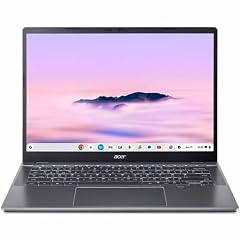
Acer Chromebook Plus 514 CBE594-2 CBE594-2-32TU 14" Chromebook
- Screen size
- 14 in
- Storage
- 256 GB
- Processor
- Intel Core
- Chromebook Plus
- Yes
This is the only Chromebook Plus in the pool with 16GB of RAM, making it the clear choice for users who run many browser tabs, Linux containers, or Android apps simultaneously. It pairs the RAM with a 256GB SSD and a 14-inch WUXGA display.
Pros
- 16GB RAM, the most in this list
- 256GB SSD for a good balance of storage
- WUXGA (1920x1200) display for more vertical space
- Intel Core 3 100U processor
Cons
- No touchscreen or 2-in-1 option
- Not the most portable due to standard clamshell design
- No stated display refresh rate
Good fit if
- Developers using Linux on ChromeOS
- Power users who keep dozens of extensions and tabs open
Skip if
- You need a convertible design or touch input
- You want the fastest CPU over memory size
Verdict: The right pick when memory is your priority.
6 Best AMD option

Acer Chromebook Plus 514 Laptop with Google AI
- Screen size
- 14 in
- Memory
- 6 to 8 GB
- Storage
- 128 GB
- Processor
- AMD
- Chromebook Plus
- Yes
$439.97 price as of 2026-10-09 05:24 UTC (Details)
The only Chromebook Plus in this list with an AMD processor, the Ryzen 3 7320C still offers 8GB LPDDR5X RAM and a 14-inch 1080p display. It provides an alternative to the Intel-heavy field, though storage is limited to 128GB.
Pros
- Only AMD-powered pick, giving CPU diversity
- 8GB LPDDR5X RAM
- 14-inch FHD IPS display
- Integrated Radeon graphics from AMD
Cons
- 128GB storage is on the low side
- No touchscreen or convertible design
- Ryzen 3 is entry-level in AMD's lineup
Good fit if
- Users who prefer AMD processors or want integrated Radeon graphics
- Students on a tight budget who still want 8GB RAM
Skip if
- You need more than 128GB of local storage
- You want a touchscreen or 2-in-1
Verdict: A solid budget-friendly AMD alternative.
7 Best 2-in-1 for students

HP Chromebook Plus x360 Laptop 14" 2 in 1 Touchscreen Business Laptop
- Screen size
- 14 in
- Memory
- 6 to 8 GB
- Storage
- 256 GB
- Processor
- Intel Core
- Touchscreen
- Yes
- 2-in-1
- Yes
- Chromebook Plus
- Yes
- For students
- Yes
The HP Chromebook Plus x360 brings a 14-inch touchscreen, 2-in-1 hinge, and 8GB RAM together in a package aimed at students. Its Intel Core i3-N305 and 256GB storage handle everyday coursework and media without fuss.
Pros
- 2-in-1 convertible design with touchscreen
- 8GB RAM and 256GB storage
- Intel Core i3-N305 processor
- Suitable for student and business labeling in the listing
Cons
- No stated display resolution or refresh rate
- Processor is not the fastest among picks
- Weight and battery life not stated by seller
Good fit if
- Students in rotating classes who want tablet and laptop modes
- Users who need a versatile device for notes and presentations
Skip if
- You need a larger screen or higher resolution
- You want a dedicated number pad or professional-grade CPU
Verdict: A dependable convertible for the classroom.
8 Best for webcam meetings

HP Chromebook Plus 14 Laptop
- Screen size
- 14 in
- Memory
- 6 to 8 GB
- Storage
- 256 GB
- Processor
- Intel Core
- Touchscreen
- Yes
- Chromebook Plus
- Yes
This HP Chromebook Plus highlights a 1080p webcam, which is not explicitly stated on many other picks. It also includes a backlit keyboard, 8GB RAM, 256GB storage, and a 14-inch touchscreen, making it a competent all-rounder for video calls.
Pros
- 1080p webcam explicitly called out in the name
- Backlit keyboard for low-light typing
- 8GB DDR5 RAM and 256GB UFS storage
- Touchscreen on the 14-inch Full HD display
Cons
- Not a 2-in-1; no tablet mode
- No display refresh rate or resolution spec beyond name
- Storage is UFS, which may be slower than SSD
Good fit if
- Remote workers and students who spend hours on video calls
- Users who type in dim rooms and need a backlit board
Skip if
- You want a convertible or touchscreen for stylus work
- You need more than 256GB storage
Verdict: A strong choice for communication-heavy use.
9 Best for productivity

ASUS Chromebook Plus CX34 Laptop
- Screen size
- 14 in
- Memory
- 6 to 8 GB
- Storage
- 256 GB
- Processor
- Intel Core
- Touchscreen
- Yes
- Chromebook Plus
- Yes
The ASUS Chromebook Plus CX34 pairs an Intel Core i5-1335U with 8GB RAM and 256GB storage, offering a solid balance for spreadsheets, document editing, and multitasking. Its 14-inch touchscreen provides convenience, and the Intel Iris Xe graphics can handle light creative tasks.
Pros
- Intel Core i5-1335U with Iris Xe graphics
- 8GB RAM and 256GB storage
- 14-inch touchscreen
- Slim clamshell design without the weight of a 2-in-1
Cons
- No convertible hinge
- Display resolution not stated in the name (likely FHD or WUXGA)
- No backlit keyboard mentioned
Good fit if
- Office workers who need reliable performance without tablet modes
- Users who prefer a classic laptop shape and a known CPU
Skip if
- You want a high-refresh display or 2-in-1
- You need more than 256GB of storage
Verdict: A practical productivity companion.
10 Best 2-in-1 with i5

Lenovo Flex 5i Chromebook Plus 14" WUXGA Touchscreen 2-in-1 Laptop
- Screen size
- 14 in
- Memory
- 6 to 8 GB
- Storage
- 256 GB
- Processor
- Intel Core
- Touchscreen
- Yes
- 2-in-1
- Yes
- Chromebook Plus
- Yes
The Lenovo Flex 5i Chromebook Plus combines a 14-inch WUXGA touchscreen, 2-in-1 hinge, and Intel Core i5-1334U, making it one of the few convertibles with a Core i5 processor. It also includes 8GB LPDDR4x and a 256GB SSD, with an extra storage boost from the 1.25TB name (256GB internal plus likely a microSD or cloud offer).
Pros
- 2-in-1 design with touchscreen
- Intel Core i5-1334U, a strong performer
- WUXGA resolution for extra vertical workspace
- 8GB LPDDR4x RAM and 256GB SSD, with name suggesting additional storage
Cons
- LPDDR4x is older than LPDDR5 seen in other picks
- No stated display refresh rate
- Seller states 1.25TB storage, but spec field lists 256GB, so verify before buying
Good fit if
- Users who want a convertible with a performance CPU
- Those who need many storage options and a touch screen
Skip if
- You require the latest LPDDR5 memory
- You want a defined storage amount without ambiguity
Verdict: A high-end convertible for those who want both power and flexibility.
11 Best for students with large screens

Acer Chromebook Plus 515 Laptop
- Screen size
- 15 in or more
- Processor
- Intel Core
- Touchscreen
- Yes
- Chromebook Plus
- Yes
$599.99 price as of 2026-10-09 05:24 UTC (Details)
With its 15.6-inch touchscreen and Intel Core i3-1305U, this Acer Chromebook Plus 515 offers a large canvas for reading documents and watching lectures. It comes with 8GB RAM and the name suggests 384GB storage (either internal or via a bundle), making it attractive for students.
Pros
- 15.6-inch touchscreen sized for comfort
- Intel Core i3-1305U
- 8GB RAM
- Name implies 384GB combined storage (verify on listing)
Cons
- Display resolution not stated (likely 1080p)
- Non-convertible clamshell
- Storage breakdown unclear from spec field
Good fit if
- Students who prefer larger screens for split-view studying
- Users who want a touchscreen without the 2-in-1 weight
Skip if
- You need a portable or small laptop
- You want a clear single storage number
Verdict: A roomy, touch-friendly option for budget-conscious learners.
12 Best for everyday basics

HP Chromebook Plus 14 inch Laptop
- Screen size
- 14 in
- Memory
- 6 to 8 GB
- Storage
- 128 GB
- Processor
- Intel Core
- Chromebook Plus
- Yes
This HP Chromebook Plus 14 is one of the few non-touch clamshells in the list, keeping the price and weight down. It still packs 8GB RAM and a 128GB UFS drive, along with an Intel Core i3-N305, making it a straightforward, dependable machine for browsing, email, and streaming.
Pros
- 8GB RAM for smooth multitasking
- Intel Core i3-N305 processor
- Lightweight clamshell design with no touch hinge
- Includes Intel UHD Graphics for basic media
Cons
- 128GB storage is limited
- No touchscreen
- Display resolution not stated (likely FHD)
Good fit if
- Users who want a simple, no-frills Chromebook Plus
- Budget shoppers who prioritize RAM and CPU over touch
Skip if
- You want a 2-in-1 or touchscreen
- You need more than 128GB of local storage
Verdict: A no-nonsense pick for everyday cloud computing.
13 Best compact convertible
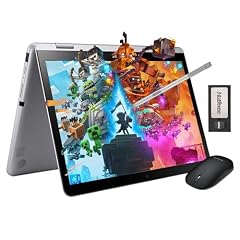
Samsung 12.2" FHD 2-in-1 Touchscreen Chromebook Plus Laptop
- Screen size
- 12 to 13 in
- Memory
- 4 GB or less
- Storage
- 64 GB
- Touchscreen
- Yes
- 2-in-1
- Yes
- Chromebook Plus
- Yes
- For students
- Yes
- For business
- Yes
The Samsung 12.2-inch 2-in-1 is the smallest and lightest option in this list, making it incredibly portable. It also includes a touchscreen and 64GB storage, though the 4GB RAM is a notable limitation for heavy multitasking.
Pros
- Most compact size at 12.2 inches
- 2-in-1 convertible with touchscreen
- FHD display resolution
- Suitable for travel and note-taking
Cons
- 4GB RAM is the lowest in this list, limiting multitasking
- 64GB storage is the smallest here
- No specified processor brand or model in the listing
Good fit if
- Travelers who want a tiny, touch-enabled Chromebook
- Users who only need a few tabs and light apps
Skip if
- You plan to run Android games or many tabs
- You need more than 64GB storage
Verdict: A pocket-friendly companion for minimal workloads.
14 Best 16-inch screen

Acer Chromebook Plus 516-16" WUXGA Student Laptop
- Screen size
- 15 in or more
- Memory
- 6 to 8 GB
- Storage
- 128 GB
- Processor
- Intel Core
- Chromebook Plus
- Yes
- For students
- Yes
$440.00 price as of 2026-10-09 05:24 UTC (Details)
For those who want the largest display without jumping to a 17-inch, this Acer Chromebook Plus 516 offers a 16-inch WUXGA panel. It still includes 8GB LPDDR5 RAM and an Intel Core i3-1315U, but storage is limited to 128GB UFS.
Pros
- 16-inch WUXGA display, the largest in this list
- 8GB LPDDR5 RAM
- Intel Core i3-1315U
- HDMI, USB-C, and USB-A ports explicitly listed
Cons
- 128GB UFS storage
- No touchscreen or 2-in-1 design
- Size may reduce portability
Good fit if
- Users who want a desktop-like screen for spreadsheets or design
- People who need multiple ports for external monitors
Skip if
- You need touch input
- You want a high refresh rate display
Verdict: The go-to for a big, crisp display in a Chromebook Plus.
15 Best 2-in-1 for creators

Acer Chromebook Plus Spin 514 2-in-1 Laptop 14" WUXGA IPS Touchscreen
- Screen size
- 14 in
- Memory
- 6 to 8 GB
- Storage
- 512 GB or more
- Processor
- Intel Core
- Touchscreen
- Yes
- 2-in-1
- Yes
- Chromebook Plus
- Yes
$629.00 price as of 2026-10-09 05:24 UTC (Details)
The Acer Chromebook Plus Spin 514 stands out for its 100% sRGB coverage and 512GB storage, making it the most color-accurate pick among the convertibles. Its Intel Core i5-1334U and 8GB RAM handle creative apps, and the 14-inch WUXGA IPS touchscreen supports stylus input.
Pros
- 100% sRGB coverage, ideal for photo editing
- 512GB SSD, the highest in a convertible here
- Intel Core i5-1334U processor
- 14-inch WUXGA IPS touchscreen with 2-in-1 hinge
Cons
- No stated refresh rate (likely 60Hz)
- Some variants have the same name, so check exact config
- Weight and battery life not stated by seller
Good fit if
- Digital artists and photographers who need color accuracy
- Students in creative fields who want a convertible with large storage
Skip if
- You need a 16GB RAM upgrade
- You prefer a clamshell for a thinner profile
Verdict: The best convertible for color-critical work.
Comparison table
| # | Chromebook | Screen size | Memory | Storage | Processor | Touchscreen | 2-in-1 |
|---|---|---|---|---|---|---|---|
| 1 | acer Chromebook Plus Spin 714 Laptop with Google AI | 14 in | 6 to 8 GB | 256 GB | Intel Core | Yes | Yes |
| 2 | ASUS Chromebook Plus Touchscreen Laptop Flip 2-in-1-14" WUXGA Touch | 14 in | 6 to 8 GB | 256 GB | Intel Core | Yes | Yes |
| 3 | Lenovo Chromebook Plus 15.3" 2K Touchscreen Laptop | 15 in or more | 6 to 8 GB | 128 GB | Intel Core | Yes | not stated |
| 4 | acer Chromebook Plus 514 Laptop with Google AI | 14 in | 6 to 8 GB | 512 GB or more | Intel Core | Yes | not stated |
| 5 | Acer Chromebook Plus 514 CBE594-2 CBE594-2-32TU 14" Chromebook | 14 in | not stated | 256 GB | Intel Core | not stated | not stated |
| 6 | Acer Chromebook Plus 514 Laptop with Google AI | 14 in | 6 to 8 GB | 128 GB | AMD | not stated | not stated |
| 7 | HP Chromebook Plus x360 Laptop 14" 2 in 1 Touchscreen Business Laptop | 14 in | 6 to 8 GB | 256 GB | Intel Core | Yes | Yes |
| 8 | HP Chromebook Plus 14 Laptop | 14 in | 6 to 8 GB | 256 GB | Intel Core | Yes | not stated |
| 9 | ASUS Chromebook Plus CX34 Laptop | 14 in | 6 to 8 GB | 256 GB | Intel Core | Yes | not stated |
| 10 | Lenovo Flex 5i Chromebook Plus 14" WUXGA Touchscreen 2-in-1 Laptop | 14 in | 6 to 8 GB | 256 GB | Intel Core | Yes | Yes |
| 11 | Acer Chromebook Plus 515 Laptop | 15 in or more | not stated | not stated | Intel Core | Yes | not stated |
| 12 | HP Chromebook Plus 14 inch Laptop | 14 in | 6 to 8 GB | 128 GB | Intel Core | not stated | not stated |
| 13 | Samsung 12.2" FHD 2-in-1 Touchscreen Chromebook Plus Laptop | 12 to 13 in | 4 GB or less | 64 GB | not stated | Yes | Yes |
| 14 | Acer Chromebook Plus 516-16" WUXGA Student Laptop | 15 in or more | 6 to 8 GB | 128 GB | Intel Core | not stated | not stated |
| 15 | Acer Chromebook Plus Spin 514 2-in-1 Laptop 14" WUXGA IPS Touchscreen | 14 in | 6 to 8 GB | 512 GB or more | Intel Core | Yes | Yes |
How this list was made
We built this guide from a pool of 22 Chromebook Plus laptops currently sold online, using only the specifications each seller provides. We shortlisted the 15 most distinct configurations by prioritizing models with at least 8GB of RAM and modern Intel Core or AMD processors, while excluding near-duplicate variants of the same base model. We weighed screen size and touch support for different use cases, and we noted when a key specification was not stated by the seller. The live prices on this page are read directly from the store listing and are not part of our comparative analysis. No units were tested for this article.
Choosing the right one
What makes a Chromebook Plus different
Chromebook Plus is a Google-defined hardware tier. According to Google's Chromebook Plus page, these devices must include at least 8GB of RAM and 128GB of storage, along with a modern processor and a display that meets minimum resolutions. This means every Plus model in this list offers a smoother experience for AI features, Android apps, and cloud gaming than older Chromebooks. If you see a Chromebook with only 4GB RAM (like the Samsung 12.2 pick), check whether it is truly Plus-certified, as the pool includes models with less than the standard threshold.
Processor: Intel Core Ultra vs. Core i5 vs. Core i3
The processor is the biggest performance split among these picks. The Acer Spin 714 uses an Intel Core Ultra 5, which is the newest architecture and supports the latest AI acceleration features. Core i5 models (such as the ASUS CX34 or Lenovo Flex 5i) deliver strong everyday performance and are well-suited for productivity or light creative work. Core i3 and Core 3 chips, like the Intel Core i3-N305, are more budget-oriented but still handle web browsing, document editing, and streaming without issue. If you run heavy Linux applications or many Android games, a Core i5 or Core Ultra is worth the extra cost.
RAM and storage: 8GB or 16GB, and how much space
All Chromebook Plus devices are supposed to come with at least 8GB of RAM, and almost every pick here meets that. The Samsung 12.2 is the exception with 4GB, which will limit multitasking and Android game performance. If you tend to keep dozens of tabs open or use Linux containers, consider the Acer Chromebook Plus 514 with 16GB; it is the only 16GB model in the pool. Storage matters too: 128GB is enough for cloud users, but if you download media or work with large files, look for 256GB or 512GB options. Several Acer and HP models offer 512GB, but check the listing for exact configuration details.
2-in-1 vs. clamshell: do you need a touchscreen and tablet mode?
Chromebook Plus laptops come in two main forms: traditional clamshells and 2-in-1 convertibles with 360-degree hinges. A 2-in-1 like the HP x360 or the Acer Spin 514 lets you use tent mode for presentations or flip it into a tablet for handwritten notes with a stylus. If you primarily type on a desk, a clamshell is often lighter and cheaper. The ASUS Flip adds a 144Hz touchscreen, which is great for smooth scrolling and some games, but the hinge design may add a little weight. Consider your workflow: students often benefit from a 2-in-1, while office workers who mostly type may prefer a clamshell.
Display: resolution, refresh rate, and size
The display is a key differentiator. Standard Plus models start at Full HD (1920x1080) or WUXGA (1920x1200) on 14-inch panels. For sharper text and more vertical screen space, look for WUXGA or 2K options like the Lenovo 15.3-inch 2K model. Refresh rate is another factor: the ASUS Flip offers 144Hz, while most others are 60Hz. A higher refresh rate makes scrolling feel smoother and is beneficial if you use a stylus. Screen size ranges from 12.2 inches on the Samsung to 16 inches on the Acer 516; larger screens help with multitasking but reduce portability. If you work with color, the Acer Spin 514's 100% sRGB coverage is an advantage.
Updates and longevity: 10 years of support
Google's Auto Update policy states that Chromebooks receive automatic updates for 10 years from the platform's release date. This means all recent Chromebook Plus models, including those in this list, will remain secure for a full decade. Before buying, check the specific model's Auto Update Expiration (AUE) date on Google's support page, as some older platforms may have fewer years remaining. All picks here are current models, but it is worth verifying the exact AUE date for the model you choose. The 10-year window covers security patches and OS features, but hardware capabilities will not change over time.
Questions
Do I need a Chromebook Plus for Google AI features?
Chromebook Plus models are specifically designed to run the latest Google AI features, such as Gemini integration and Magic Editor. These features require the minimum hardware specs of 8GB RAM and a modern processor, which is why Google only offers them on Plus-certified devices. If you buy a non-Plus Chromebook, you may miss out on these AI tools.
Can I install Linux apps on a Chromebook Plus?
Yes. You can enable Linux on any supported Chromebook, including all Chromebook Plus models. Linux lets you install development tools, code editors, and other software. The setup is straightforward from Settings, but it takes about 10 minutes. For heavier Linux workloads, consider a model with 16GB RAM, like the Acer Chromebook Plus 514 with 16GB.
What is the battery life like on these Chromebooks?
Battery life varies by model and usage. The pool entries do not list manufacturer battery estimates, and we did not test them. Always check the maker's spec page for a rated battery life. In practice, Chromebooks often last between 8 and 12 hours on a charge, but that number can drop with high screen brightness, heavy web use, or gaming.
Are Chromebook Plus laptops good for gaming?
They can be, thanks to cloud gaming services like GeForce NOW and Xbox Cloud Gaming. These run over the internet, so they rely on your connection speed rather than the laptop's hardware. Some models, like the ASUS Flip with a 144Hz display, offer a smoother gaming experience. Local Android games also run well on models with 8GB RAM.
What changed
- : First published.