
Best Intel N-Series Chromebooks in 2026: 12 Picks Compared on Specs
The HP 2-in-1 Chromebook with a 14-inch 2K IPS touchscreen, Intel N150 processor, and 8GB of RAM is the best Intel N-series Chromebook in this guide. It pairs N150 with enough memory for everyday multitasking and a convertible design. The selection is based on stated specifications from the catalogue and public ChromeOS resources.
12 picks from 3 Chromebooks that match this guide with a price we can quote today, made by 6 makers. Each price below is read live and stamped with the time it was read.
The short list
Who each pick suits
- For a student Chromebook: The HP Chromebook x360 14 is the pick the catalogue tags for student use, with a touchscreen, FHD IPS display, and a convertible hinge. It covers the typical school needs for ChromeOS apps and note-taking. See pick 11
- For a large touchscreen: The Acer 15.6-inch FHD touchscreen Chromebook gives you the biggest display in this guide with 8GB RAM and 128GB storage. Pick it if your work benefits from a roomy screen and touch input. See pick 2
- For a compact 2-in-1: The Lenovo IdeaPad Flex 3i is a 12.2-inch convertible with an N100 processor and 4GB DDR5 RAM. It is a good fit for a small desk, a bag, or a laptop that rarely leaves your side. See pick 6
- For N150 and 128GB in a 2-in-1: The Lenovo 2-in-1 pairs an N150 processor with a 14-inch WUXGA IPS touchscreen and 128GB of storage. Choose it when you want a recent N-series chip and more local capacity in a convertible. See pick 3
The 12 picks, one by one
1 Best overall
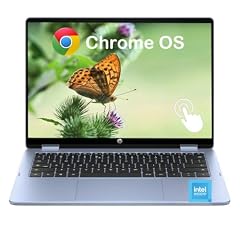
HP 2-in-1 Chromebook Laptop
- Screen size
- 14 in
- Memory
- 6 to 8 GB
- Storage
- 64 GB
- Processor
- Intel N-series
- Touchscreen
- Yes
- 2-in-1
- Yes
This HP is the most balanced N-series Chromebook in the guide: an N150 processor, 8GB of RAM, a 14-inch 2K IPS touchscreen, and a convertible hinge all in one listing. It is the only 2-in-1 pick that combines N150, 8GB RAM, and a 2K display name, giving it an edge over the 4GB Lenovo 2-in-1 and the 64GB HP student model.
Pros
- 8GB LPDDR5 RAM named in the listing
- N150 processor with 8GB RAM in the same config
- 14-inch 2K IPS touchscreen, the highest stated resolution among the 2-in-1 picks
- Convertible design for tent and tablet positions
Cons
- 64GB storage, less than the 128GB clamshell and 2-in-1 picks
- The listing does not state stylus or pen support
Good fit if
- Users who want one convertible with 8GB for notes, documents, and streaming
- Shoppers who prioritize display quality in an N-series machine
Skip if
- Those who need 128GB of local storage out of the box
- Those who prefer a fixed clamshell without a touchscreen
Verdict: The HP 2-in-1 with N150 and 8GB RAM is the strongest all-round choice among the Intel N-series Chromebooks in this catalogue.
2 Best 15-inch touchscreen

Acer 15.6” FHD Touch Chromebook
- Screen size
- 15 in or more
- Memory
- 6 to 8 GB
- Storage
- 128 GB
- Processor
- Intel N-series
- Touchscreen
- Yes
$299.00 price as of 2026-10-09 05:24 UTC (Details)
This Acer is the one 15-inch touchscreen pick in the guide, with a 15.6-inch FHD panel, 8GB RAM, and 128GB eMMC. It offers the same memory and storage as the ASUS CX15 while adding touch input, but without the 2-in-1 hinge of the smaller HP, Lenovo, and Acer convertibles.
Pros
- 15.6-inch FHD touchscreen, the largest display in this guide
- 8GB RAM and 128GB storage
- Touchscreen on a conventional clamshell
Cons
- No convertible hinge, so touch is not paired with a tablet mode
- Weight is not stated by the seller, so portability is hard to compare
Good fit if
- Users who want touch on a large screen
- People who keep the laptop mostly at a desk
Skip if
- Travel-focused buyers who want a smaller, convertible body
- Those who want a non-touch, anti-glare panel like the ASUS CX15
Verdict: The Acer 15.6-inch touchscreen Chromebook is the pick to choose when screen size and touch input matter more than a convertible hinge.
3 Best N150 2-in-1 with 128GB storage
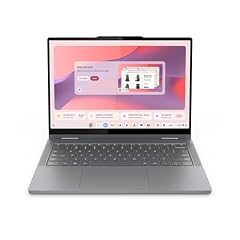
Lenovo Chromebook 2-in-1
- Screen size
- 14 in
- Memory
- 4 GB or less
- Storage
- 128 GB
- Processor
- Intel N-series
- Touchscreen
- Yes
- 2-in-1
- Yes
This Lenovo is the only N150 2-in-1 in the guide with 128GB of storage. It adds a 14-inch WUXGA IPS touchscreen and a convertible hinge, which makes it a direct alternative to the HP 2-in-1 if you prefer more local storage over more RAM.
Pros
- N150 processor named, one of three in this guide
- 128GB storage in a 14-inch 2-in-1
- WUXGA IPS touchscreen listed
- Convertible hinge from Lenovo
Cons
- 4GB RAM, half the memory of the 8GB picks
- No stylus or pen input is stated
Good fit if
- Students who need 128GB for offline files
- Users who want a WUXGA touchscreen with an N150 processor
Skip if
- Those who multitask heavily and should choose 8GB RAM
- Those who prefer a clamshell without a hinge
Verdict: The Lenovo 2-in-1 is the N150 convertible to pick when 128GB of local storage matters more than maximum memory.
4 Best 15-inch anti-glare clamshell

ASUS Chromebook CX15 Laptop
- Screen size
- 15 in or more
- Memory
- 6 to 8 GB
- Storage
- 128 GB
- Processor
- Intel N-series
The CX15 is the straightforward 15-inch pick: a 15.6-inch FHD anti-glare display, N50 processor, 8GB RAM, and 128GB eMMC. Compared with the Acer 15.6 touchscreen, it gives up touch input for an anti-glare finish that is easier to read in bright rooms.
Pros
- 15.6-inch FHD anti-glare display
- 8GB RAM and 128GB storage
- Simple clamshell design with no touch layer
Cons
- N50 processor, shared with only the Acer 15.6 touch pick
- No touchscreen or convertible hinge
- Resolution is FHD, not the 2K named on the HP 2-in-1
Good fit if
- Users who prefer an anti-glare screen in bright rooms
- Desktop-style 15-inch use with 8GB and 128GB
Skip if
- Those who need tablet mode
- Those who want a higher-resolution display
Verdict: The ASUS CX15 is the sensible large clamshell when you want 8GB, 128GB, and an anti-glare FHD screen in a non-touch body.
5 Best 14-inch clamshell with 8GB RAM

HP Chromebook 14 inch Laptop
- Screen size
- 14 in
- Memory
- 6 to 8 GB
- Storage
- 128 GB
- Processor
- Intel N-series
This HP is the plain 14-inch workhorse of the guide: N100, 8GB RAM, 128GB UFS storage, and a 14-inch HD display. It is the only 14-inch non-touch clamshell with 8GB among the picks, and its storage is the same 128GB capacity as several larger machines.
Pros
- 8GB RAM and 128GB storage in one clamshell
- N100 processor and Intel UHD Graphics named in the listing
- UFS storage and HD display stated
- 14-inch size balances screen space and portability
Cons
- Display is HD only, not FHD or 2K
- No touchscreen or convertible hinge
- Resolution is lower than the FHD ASUS CX15 and the WUXGA Lenovo panels
Good fit if
- Users who want a simple 14-inch laptop with room for files
- Shoppers who prefer non-touch clamshells
Skip if
- Those who need a touchscreen
- Those who want a convertible for taking notes
Verdict: The HP 14-inch clamshell with 8GB RAM and 128GB UFS is the no-fuss N100 pick for everyday work.
6 Best compact 2-in-1
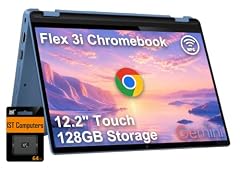
Lenovo IdeaPad Flex 3i Chromebook 12.2" 2-in-1 Laptop
- Screen size
- 12 to 13 in
- Memory
- 4 GB or less
- Processor
- Intel N-series
- 2-in-1
- Yes
At 12.2 inches, the IdeaPad Flex 3i is the compact 2-in-1 option with an N100 processor and 4GB DDR5 memory. It is smaller than the 14-inch convertibles, but the listing does not state its storage capacity, so confirm that before relying on it for large files.
Pros
- 12.2-inch convertible body from Lenovo
- N100 processor and 4GB DDR5 RAM named
- Easier to fit in a bag than the 14-inch and 15-inch picks
Cons
- Storage capacity not stated by the seller
- Touchscreen is not listed, so the convertible body may not guarantee touch input
- 4GB RAM is the lower tier in this guide
Good fit if
- Users who want a 12-inch convertible for light web work
- Travelers who value a smaller keyboard and body
Skip if
- Those who need a stated storage capacity
- Those who expect a touchscreen based on the 2-in-1 label
Verdict: The Lenovo IdeaPad Flex 3i is the compact N100 convertible for buyers who prioritize size over storage certainty.
7 Best 14-inch N100 2-in-1 with 128GB storage

HP Chromebook X360 14b
- Screen size
- 14 in
- Memory
- 4 GB or less
- Storage
- 128 GB
- Processor
- Intel N-series
- 2-in-1
- Yes
This HP x360 is the 14-inch N100 convertible with the largest local storage: 128GB in a 2-in-1 body. It does not state a display resolution or touchscreen separately, so it is a choice for buyers who value capacity and the hinge over screen details.
Pros
- 14-inch 2-in-1 design
- N100 processor named in the listing
- 128GB storage, matching the largest capacity in this guide
- HP x360 convertible series in the listing
Cons
- 4GB RAM
- Display resolution not stated by the seller
- Touchscreen not stated separately from the 2-in-1 label
Good fit if
- Users who want a convertible with 128GB storage
- Those comfortable with a listing that omits display resolution
Skip if
- Those who need 8GB RAM
- Those who want a stated FHD or 2K display
Verdict: The HP Chromebook x360 14b is the N100 convertible to choose when 128GB of local storage is the priority.
8 Best 11-inch 2-in-1

acer Chromebook Spin 511 R756T R756T-C9R9 11.6" Touchscreen 2
- Screen size
- 11 in or less
- Storage
- 32 GB or less
- Processor
- Intel N-series
- Touchscreen
- Yes
- 2-in-1
- Yes
$398.95 price as of 2026-10-09 05:24 UTC (Details)
The Spin 511 is the only 11-inch 2-in-1 in the guide. Its 11.6-inch panel lists the resolution as 1366x768 HD, it runs an N100 quad-core processor, and it is built around a convertible hinge. Local storage is listed as 32GB or less, so plan around cloud or external storage.
Pros
- 11.6-inch touchscreen with the stated 1366x768 resolution
- N100 quad-core processor named
- 2-in-1 hinge in the smallest body among the picks
Cons
- Storage is 32GB or less, the smallest capacity in this guide
- RAM capacity not stated by the seller
- HD resolution, not FHD or higher
Good fit if
- Classrooms that need a compact convertible
- Users who want a true 11-inch screen for portability
Skip if
- Those who need at least 64GB storage
- Those who need 8GB RAM and cannot confirm it from the listing
Verdict: The Acer Spin 511 is the compact convertible pick for classrooms and other small-screen 2-in-1 needs.
9 Best 11-inch touchscreen with 8GB RAM

Lenovo 500e Chromebook Gen 4s 83N8000GUS 11.6" Touchscreen Chromebook
- Screen size
- 11 in or less
- Storage
- 64 GB
- Processor
- Intel N-series
- Touchscreen
- Yes
The Lenovo 500e Gen4s is the only 11-inch pick with 8GB RAM, and the listing names an N150 processor and 64GB of storage. Compared with the Acer Spin 511, it gives up the convertible designation in exchange for more storage in the listing and a stated 60Hz touchscreen.
Pros
- 8GB RAM in an 11-inch body, the most among 11-inch picks
- N150 processor named
- 64GB storage, more than the Spin 511's 32GB-or-less listing
- 11.6-inch touchscreen with a stated 60Hz refresh
Cons
- Not listed as a 2-in-1, so it may be a fixed touchscreen clamshell
- HD resolution rather than FHD
- No stylus or pen support stated
Good fit if
- Schools wanting 8GB in a small touchscreen
- Users who prefer a small screen but want more memory
Skip if
- Those who need a convertible hinge
- Those who need more than 64GB storage
Verdict: The Lenovo 500e Gen4s is the small-screen pick when 8GB RAM matters more than a 2-in-1 hinge.
10 Best 12-inch convertible display

Lenovo 500e Yoga Chromebook Gen 4 82W40009US 12.2" Touchscreen
- Screen size
- 12 to 13 in
- Storage
- 32 GB or less
- Processor
- Intel N-series
- Touchscreen
- Yes
- 2-in-1
- Yes
The 500e Yoga is the 12-inch convertible with the sharpest stated resolution in its class: 1920x1200 WUXGA on a 12.2-inch touchscreen. It combines that panel with a 2-in-1 hinge, though the listing does not state RAM or an exact processor model, and storage is 32GB or less.
Pros
- 12.2-inch touchscreen convertible at 1920x1200 WUXGA
- 2-in-1 hinge for tent and tablet modes
- Lenovo 500e education-series name
Cons
- RAM capacity not stated by the seller
- Storage is 32GB or less
- Processor model is not named in the listing, only Intel N-series
Good fit if
- Users who want a high-resolution compact convertible
- Classrooms that value the 500e series and WUXGA panel
Skip if
- Those who need confirmed 8GB RAM
- Those who need more than 32GB storage
Verdict: The Lenovo 500e Yoga is the compact convertible to choose when a stated WUXGA display is the priority.
11 Best student-ready 2-in-1

HP Chromebook x360 14" 2-in-1 Touch Laptop
- Screen size
- 14 in
- Memory
- 4 GB or less
- Storage
- 64 GB
- Processor
- Intel N-series
- Touchscreen
- Yes
- 2-in-1
- Yes
- For students
- Yes
The catalogue tags this HP specifically for student use, and the listing backs it with a 14-inch FHD IPS touchscreen, an N100 processor listed up to 3.4GHz, 4GB RAM, 64GB eMMC, and a 2-in-1 hinge. It is the most direct answer for a school Chromebook in this guide.
Pros
- Student use case tag in the catalogue
- 14-inch FHD IPS touchscreen and 2-in-1 hinge
- N100 processor with a listed top speed of 3.4GHz
- 64GB eMMC storage
Cons
- 4GB RAM, less than the 8GB models
- 64GB storage, half the capacity of 128GB picks
Good fit if
- Students who need a touchscreen for classroom apps
- Families looking for a dedicated school Chromebook
Skip if
- Those who need 8GB RAM
- Those who plan to store many media files locally
Verdict: The HP Chromebook x360 14 is the student-focused N100 convertible in this guide.
12 Best clamshell with N200 processor

HP 14" HD Chromebook
- Screen size
- 14 in
- Memory
- 4 GB or less
- Storage
- 128 GB
- Processor
- Intel N-series
This HP is the only pick in the guide to name the N200 processor, making it the choice if you want that specific N-series part. It pairs the N200 with 4GB RAM, 128GB UFS storage, Wi-Fi 6, and Bluetooth in a standard 14-inch clamshell.
Pros
- N200 processor and Intel UHD Graphics named
- 128GB UFS storage
- Wi-Fi 6 and Bluetooth listed
- 14-inch clamshell with no touch or hinge
Cons
- 4GB RAM
- HD display, lower stated resolution than FHD picks
- No touchscreen or convertible hinge
Good fit if
- Users who specifically want the N200 chip in a simple laptop
- Those who want 128GB UFS storage and modern wireless listed
Skip if
- Those who need 8GB RAM
- Those who want a touchscreen or convertible
Verdict: The HP 14 with N200 is the straightforward clamshell for buyers who want that specific N-series processor and 128GB of storage.
Comparison table
| # | Chromebook | Screen size | Memory | Storage | Processor | Touchscreen | 2-in-1 |
|---|---|---|---|---|---|---|---|
| 1 | HP 2-in-1 Chromebook Laptop | 14 in | 6 to 8 GB | 64 GB | Intel N-series | Yes | Yes |
| 2 | Acer 15.6” FHD Touch Chromebook | 15 in or more | 6 to 8 GB | 128 GB | Intel N-series | Yes | not stated |
| 3 | Lenovo Chromebook 2-in-1 | 14 in | 4 GB or less | 128 GB | Intel N-series | Yes | Yes |
| 4 | ASUS Chromebook CX15 Laptop | 15 in or more | 6 to 8 GB | 128 GB | Intel N-series | not stated | not stated |
| 5 | HP Chromebook 14 inch Laptop | 14 in | 6 to 8 GB | 128 GB | Intel N-series | not stated | not stated |
| 6 | Lenovo IdeaPad Flex 3i Chromebook 12.2" 2-in-1 Laptop | 12 to 13 in | 4 GB or less | not stated | Intel N-series | not stated | Yes |
| 7 | HP Chromebook X360 14b | 14 in | 4 GB or less | 128 GB | Intel N-series | not stated | Yes |
| 8 | acer Chromebook Spin 511 R756T R756T-C9R9 11.6" Touchscreen 2 | 11 in or less | not stated | 32 GB or less | Intel N-series | Yes | Yes |
| 9 | Lenovo 500e Chromebook Gen 4s 83N8000GUS 11.6" Touchscreen Chromebook | 11 in or less | not stated | 64 GB | Intel N-series | Yes | not stated |
| 10 | Lenovo 500e Yoga Chromebook Gen 4 82W40009US 12.2" Touchscreen | 12 to 13 in | not stated | 32 GB or less | Intel N-series | Yes | Yes |
| 11 | HP Chromebook x360 14" 2-in-1 Touch Laptop | 14 in | 4 GB or less | 64 GB | Intel N-series | Yes | Yes |
| 12 | HP 14" HD Chromebook | 14 in | 4 GB or less | 128 GB | Intel N-series | not stated | not stated |
How this list was made
The catalogue listings for this keyword contain 16 Intel N-series Chromebooks. From those, 12 picks were selected after removing near-duplicate entries. The shortlist favors machines from established makers, complete specification listings, and configurations that add 8GB RAM, a touchscreen, a convertible hinge, a stated display resolution, or 128GB of storage. Every figure in this guide comes from the listing data or the linked ChromeOS sources. Prices on the page are live and read from the store listing at the time of publication. No member of the site has operated the hardware, so the picks are based on published specifications rather than use.
Choosing the right one
Start with the processor, then decide on memory
Every pick here uses an Intel N-series processor, but the listings name four parts: N50, N100, N150, and N200. In the 12 picks, N100 appears five times, N50 twice, N150 three times, and N200 once; one listing does not name its exact model.
The bigger memory decision is RAM. Five picks have 8GB, five are listed at 4GB or less, and two do not state a capacity. For ordinary ChromeOS work, 8GB gives noticeably more room for extra tabs, Android apps, and Linux tools.
Touchscreen versus clamshell
Seven of the twelve picks list a touchscreen, and seven list a 2-in-1 design, though not the same seven. A clamshell like the ASUS CX15 or the HP N200 keeps the price and design simple, while a convertible like the HP x360 or Lenovo Yoga supports tent and tablet positions.
The Acer Spin 511 is the only 11-inch convertible, while the Lenovo 500e Gen4s has a touchscreen but is not listed as a 2-in-1. If you do not need touch input, a non-touch clamshell gives you more storage or memory for the same general shape.
Look for a stated display resolution
The N-series pool is inconsistent about display specifications. Some listings say only HD, others say FHD, WUXGA, or 2K, and a few omit resolution altogether.
In the picks, the sharpest named panels are the HP 2-in-1's 2K IPS display, the Lenovo 2-in-1's WUXGA IPS panel, and the Lenovo 500e Yoga's 1920x1200 WUXGA screen. If a listing does not give a resolution, ask the seller before choosing it for photo work or apps that depend on fine detail.
Check storage and the update clock
Local storage in this guide ranges from 32GB or less to 128GB. If you work mainly online, 64GB can be enough; if you keep Android apps or downloads local, prefer the 128GB picks.
ChromeOS devices receive automatic updates for a defined period, and Google's Auto Update policy states that Chromebooks get 10 years of updates. Before buying, find the model's Auto Update Expiration date so you know how many years of support remain.
Android apps and Linux
ChromeOS runs Android apps from the Play catalog, and Linux can be enabled for code editors, terminals, and development tools. Google's Linux support page notes that hardware acceleration in the Linux environment is not yet supported, including GPU and video decode.
Keep that in mind on an entry-level N-series machine. If you plan to install Linux tools or run many Android apps, start with one of the 8GB picks rather than a 4GB configuration.
AI features and Chromebook Plus
Google sets a Chromebook Plus baseline of at least 8GB RAM and 128GB or more storage, and some Gemini features are tied to the Plus experience. None of the twelve picks in this guide is named as a Chromebook Plus model, so treat the Plus-specific AI bundle as an extra only if a listing clearly advertises it.
If you want the Chromebook Plus label, look for that exact name on a listing instead of assuming an N-series processor qualifies.
Questions
What are the differences between Intel N50, N100, N150, and N200 Chromebooks?
They are Intel's N-series processors used in Chromebooks. The listings in this guide name N50 in two picks, N100 in five, N150 in three, and N200 in one; one pick does not name its exact model. You will find all four in clamshells and convertibles. Treat the exact model as one factor and RAM as the bigger factor for everyday ChromeOS use.
Is 4GB of RAM enough in an Intel N-series Chromebook?
For a single window with a few tabs, 4GB can handle ChromeOS basics. If you open many tabs, use Android apps, or enable Linux tools, start with one of the 8GB picks. In this guide, five picks have 8GB, five are listed at 4GB or less, and two do not state a capacity.
How long will my Intel N-series Chromebook get updates?
Google states that Chromebooks receive 10 years of automatic updates. The exact end date depends on the model's platform, so look up the Auto Update Expiration date before buying. Choose a model with a long remaining update window if you plan to use the laptop through school.
Can an N-series Chromebook run Android apps and Linux?
Yes. ChromeOS supports Android apps from the Play catalog, and Linux can be turned on for code editors, terminals, and development tools. Google notes that hardware acceleration in the Linux environment is not yet supported, so heavy 3D or GPU-based tasks are not a good fit for an N-series Chromebook.
Which N-series Chromebook should I choose for a student?
For a classroom-focused convertible, the HP Chromebook x360 14 is the only pick the catalogue tags for student use, with a touchscreen, FHD IPS display, and 64GB of storage. The Lenovo 500e Gen4s is the 11-inch option with 8GB RAM. Confirm your school's required screen size, memory, and app list before ordering.
Are any of these Chromebook Plus models?
None of the twelve picks is named as a Chromebook Plus model. Google reserves that label for devices with at least 8GB RAM and 128GB or more storage, plus access to Gemini features in ChromeOS. If you want the Plus bundle, look for the Chromebook Plus name on a listing rather than assuming an N-series chip qualifies.
What changed
- : First published.