
Best 4GB or Less Chromebooks in 2026: 15 Picks Compared
For most buyers, the HP Chromebook x360 14b is the strongest 4GB pick: it pairs an Intel N100 processor with 128GB of storage in a 14-inch 2-in-1. We selected these 15 Chromebooks from a pool of 60 by comparing stated specifications on processor, memory, storage, screen size, and form factor. Prices shown are live from the listing and update automatically.
15 picks from 20 Chromebooks that match this guide with a price we can quote today, made by 6 makers. Each price below is read live and stamped with the time it was read.
The short list
Who each pick suits
- For students on a budget: A durable 14-inch model with a Celeron N4500 and 64GB storage handles classroom apps and Google Workspace without breaking the bank. See pick 5
- For a portable 2-in-1: A lightweight 14-inch convertible with an Intel N150 CPU and 128GB storage works well for note-taking and media consumption on the go. See pick 2
- For a large display: A 15.6-inch Full HD screen with 128GB storage gives you more room to spread out documents and browser tabs. See pick 3
The 15 picks, one by one
1 Best overall

HP Chromebook X360 14b
- Screen size
- 14 in
- Memory
- 4 GB or less
- Storage
- 128 GB
- Processor
- Intel N-series
- 2-in-1
- Yes
The HP Chromebook x360 14b combines an Intel N100 processor, one of the faster chips in this list, with 128GB of storage. Its 14-inch 2-in-1 design adds versatility without sacrificing screen size or portability.
Pros
- Intel N100 CPU, the newest generation among these picks
- 128GB eMMC storage, double the 64GB found on many competitors
- 14-inch convertible with 2-in-1 hinge
- HP is an established maker with extensive support
Cons
- 4GB RAM is on the low end for heavy multitasking
- No touchscreen on the base model (not stated by the seller)
- Heavier than some 11.6-inch picks
Good fit if
- Users who want a fast processor and larger storage in a convertible
- Students or home users needing a single device for class and entertainment
Skip if
- You need a touchscreen, consider the HP x360 14 Touch model instead
- You need an 11-inch or smaller travel-friendly chassis
Verdict: A well-rounded 2-in-1 that maximizes the 4GB RAM experience with a faster CPU and ample storage.
2 Best 2-in-1
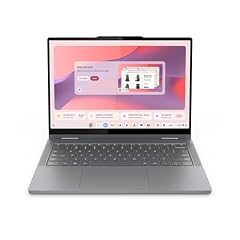
Lenovo Chromebook 2-in-1
- Screen size
- 14 in
- Memory
- 4 GB or less
- Storage
- 128 GB
- Processor
- Intel N-series
- Touchscreen
- Yes
- 2-in-1
- Yes
With an Intel N150 processor and 128GB storage, this Lenovo convertible is the most future-proof pick in the 4GB category. Its 14-inch WUXGA IPS touchscreen and lightweight build make it a strong choice for both work and play.
Pros
- Intel N150, the latest Celeron-class chip in this roundup
- 128GB storage, tied for the highest in this list
- 14-inch WUXGA IPS touchscreen with 1920x1200 resolution
- Convertible design with 360-degree hinge
Cons
- 4GB RAM limits high-end multitasking
- Weight not stated by the seller
- No USB-C charging port mentioned in the listing
Good fit if
- People who want a fast, touch-enabled convertible for note-taking and browsing
- Those who need large storage for offline files or Android apps
Skip if
- You require a non-touch clamshell to save weight or cost
- You need a detached tablet mode like a detachable design
Verdict: The most capable 2-in-1 in this price class, thanks to the newer N150 chip and 128GB storage.
3 Best large screen

Acer Chromebook 315 Laptop
- Screen size
- 15 in or more
- Memory
- 4 GB or less
- Storage
- 128 GB
- Processor
- Intel Celeron or Pentium
$249.99 price as of 2026-10-09 05:24 UTC (Details)
A 15.6-inch Full HD display makes this Acer Chromebook 315 stand out among 4GB models. The Celeron N4500 and 128GB storage provide a balanced package for home and student use.
Pros
- 15.6-inch Full HD (1920x1080) display, larger than most picks
- 128GB eMMC storage, tied for the highest in this roundup
- Celeron N4500 is a modern dual-core chip
- Acer's 315 series is known for solid build quality
Cons
- 4GB RAM may cause slowdowns with many tabs open
- No touchscreen option on this model
- Heavier than smaller-screen pick
Good fit if
- Users who prioritize a large, crisp display for spreadsheets or streaming
- Students who prefer a spacious keyboard and do not need portability
Skip if
- You need a compact or lightweight laptop
- You want a touchscreen or convertible form factor
Verdict: A roomy 15.6-inch Full HD Chromebook with generous storage for a very reasonable price.
4 Best storage for the price

ASUS Chromebook CX1
- Screen size
- 15 in or more
- Memory
- 4 GB or less
- Storage
- 128 GB
- Processor
- Intel Celeron or Pentium
This ASUS CX1 pairs a 15.6-inch Full HD display with 128GB storage and a Celeron N4500, hitting a sweet spot for budget-conscious users who need local space for apps and files.
Pros
- 128GB eMMC, one of the largest in this list
- 15.6-inch Full HD NanoEdge display
- Compact design despite the large screen
- Celeron N4500 with Intel UHD Graphics
Cons
- 4GB RAM is the same as every other 4GB pick
- No touchscreen option
- Storage is eMMC, not a faster NVMe SSD
Good fit if
- People who download many Android apps or offline videos
- Those who want a large-screen Chromebook without paying extra for a premium CPU
Skip if
- You need a convertible for tablet mode
- You prefer a smaller, more portable 11-inch design
Verdict: A cost-effective 15.6-inch Chromebook with double the base storage of many 4GB rivals.
5 Best for students

Samsung 14" Galaxy Chromebook Go Laptop PC Computer
- Screen size
- 14 in
- Memory
- 4 GB or less
- Storage
- 64 GB
- Processor
- Intel Celeron or Pentium
- For students
- Yes
The Samsung Galaxy Chromebook Go is built for classrooms with a durable 14-inch design, a Celeron N4500, and 64GB storage. Its "student" label and lightweight frame make it a dependable daily driver for education.
Pros
- 14-inch HD display, good for note-taking and Google Meet
- Celeron N4500 provides snappy web performance
- 64GB eMMC storage is adequate for schoolwork
- Known Samsung reliability and wide availability
Cons
- 64GB storage may fill quickly with large apps
- HD (1366x768) resolution is lower than some 1080p competitors
- No touchscreen or 2-in-1 hinge
Good fit if
- Students who need a reliable, affordable laptop for Google Classroom and research
- Parents looking for a durable first Chromebook
Skip if
- You need a touchscreen for drawing or interactive apps
- You plan to store large video files locally
Verdict: A solid, student-focused 14-inch Chromebook with dependable performance and a familiar brand.
6 Best budget clamshell

HP Chromebook 14 Laptop
- Screen size
- 14 in
- Memory
- 4 GB or less
- Storage
- 64 GB
- Processor
- Intel Celeron or Pentium
With a Celeron N4120 and 64GB storage, this HP 14 delivers dependable everyday performance at a low price. It is a straightforward clamshell for browsing, email, and streaming.
Pros
- Celeron N4120 quad-core processor
- 64GB eMMC storage is adequate for light use
- 14-inch HD display with thin design
- HP's reputation for affordable laptops
Cons
- HD (1366x768) screen is not Full HD
- 4GB RAM and a slower CPU than Intel N-series picks
- No touchscreen or convertible option
Good fit if
- Budget buyers who need a simple, reliable web browsing machine
- Second laptops for light tasks like video calls and email
Skip if
- You need a Full HD display or a faster processor
- You plan to run heavy Android games or Linux container
Verdict: A no-frills 14-inch Chromebook that covers the basics without breaking the bank.
7 Best portable 11.6-inch

acer Chromebook 311 CBOA311-1H-C90F 11.6" HD Display
- Screen size
- 11 in or less
- Memory
- 4 GB or less
- Storage
- 64 GB
- Processor
- Intel Celeron or Pentium
$240.00 price as of 2026-10-09 05:24 UTC (Details)
The Acer Chromebook 311 packs a Celeron N4500 and 64GB storage into an 11.6-inch chassis, making it the easiest to carry. It is ideal for commuters or students who want a pocketable laptop.
Pros
- 11.6-inch HD display, highly portable form factor
- Celeron N4500, a modern dual-core chip
- 64GB storage, above the 32GB base on some smaller Chromebooks
- Acer's education-focused design
Cons
- Small screen may feel cramped for long document work
- HD (1366x768) resolution, not Full HD
- No touchscreen or backlit keyboard
Good fit if
- Users who prioritize portability over screen size
- Students in classrooms with small desks
Skip if
- You need a large display for multitasking
- You want a touchscreen for note-taking
Verdict: A compact and quick 11.6-inch Chromebook that slips into a backpack and handles schoolwork with ease.
8 Best detachable tablet
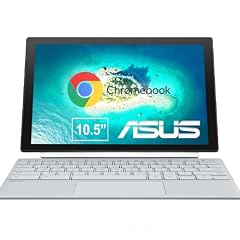
ASUS Chromebook CM30 Detachable 10.5 Inch 2-in-1 Laptop and Tablet
- Screen size
- 11 in or less
- Memory
- 4 GB or less
- Storage
- 64 GB
- Touchscreen
- Yes
- 2-in-1
- Yes
The ASUS Chromebook CM30 is a 10.5-inch detachable with a Full HD touchscreen and a built-in stylus. Its tablet form factor makes it a flexible choice for reading, sketching, and quick note-taking.
Pros
- 10.5-inch Full HD touchscreen with stylus support
- Detachable design: use as a tablet or with the keyboard
- 64GB storage
- Lightweight and portable, ideal for travel
Cons
- Small 10.5-inch display limits productivity
- 4GB RAM is shared with the operating system
- Keyboard may need to be purchased separately (not stated by seller)
Good fit if
- Artists or note-takers who want a stylus-enabled tablet
- Users who want a secondary device for media consumption
Skip if
- You need a full-sized keyboard for long typing sessions
- You prefer a standard clamshell or convertible laptop
Verdict: A versatile detachable that turns into a tablet with a pen, perfect for on-the-go creativity.
9 Best with touchscreen and large storage
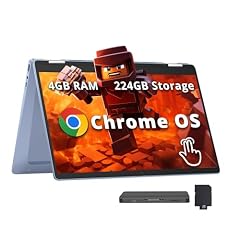
HP Chromebook x360 14" FHD Touchscreen Laptop
- Screen size
- 14 in
- Memory
- 4 GB or less
- Storage
- 64 GB
- Processor
- Intel N-series
- Touchscreen
- Yes
- 2-in-1
- Yes
The HP Chromebook x360 14 combines a 14-inch Full HD touchscreen, an Intel N100 processor, and a 224GB combined storage (64GB eMMC plus a 160GB docking station). This gives you a responsive touch experience and plenty of room for files.
Pros
- 14-inch Full HD IPS touchscreen
- Intel N100 processor, fast for a 4GB machine
- 224GB total storage (64GB eMMC + 160GB docking drive)
- Convertible 360-degree hinge
Cons
- Storage split between eMMC and external docking drive
- 4GB RAM may still limit heavy multitasking
- Price likely higher due to bundled docking station
Good fit if
- Users who want a touchscreen with extra storage for media libraries
- Those who need a convertible for both laptop and tent modes
Skip if
- You prefer a single built-in storage solution without extra peripherals
- You do not plan to use the touchscreen often
Verdict: A touch-enabled convertible that stands out for its bundled docking storage and capable N100 chip.
10 Best for tablet-style portability

Lenovo Chromebook Duet Gen 9 11" Tablet
- Screen size
- 11 in or less
- Memory
- 4 GB or less
- Storage
- 128 GB
- 2-in-1
- Yes
The Lenovo Chromebook Duet Gen 9 is an 11-inch detachable with 128GB storage and a kickstand, giving you a tablet experience with a detachable keyboard. It is one of the lightest and most versatile picks here.
Pros
- 11-inch detachable design with included kickstand
- 128GB storage, highest in this list
- Lightweight and compact for travel
- Lenovo's strong build quality
Cons
- Small screen size may not suit all users
- 4GB RAM is standard but limits intense multitasking
- Detachable keyboard may feel less sturdy than a clamshell
Good fit if
- Travelers who want a laptop-tablet hybrid for media and light work
- Students who need a compact device for notes and reading
Skip if
- You need a full-size 14-inch or larger screen
- You prefer a traditional laptop hinge for lap use
Verdict: A compact detachable that offers generous storage and maximum portability in the 4GB category.
11 Best 360-degree convertible display

Samsung Chromebook Plus V2 360 2-in-1 Laptop w/Dual Webcam
- Screen size
- 12 to 13 in
- Memory
- 4 GB or less
- Storage
- 64 GB
- Processor
- Intel Celeron or Pentium
- Touchscreen
- Yes
- 2-in-1
- Yes
- For students
- Yes
The Samsung Chromebook Plus V2 360 is a 12.2-inch convertible with a Full HD+ touchscreen and a dual webcam setup. Its smaller size and crisp display make it a nice choice for meetings and photo viewing.
Pros
- 12.2-inch Full HD+ (2160x1440) touchscreen with good resolution
- Dual webcams, one for video calls and one for document capture
- 360-degree 2-in-1 hinge
- Includes an active stylus (stated in listing)
Cons
- Celeron 3965Y is an older, slower processor
- 64GB storage is below some competitors
- Heavier than 11-inch models
Good fit if
- Users who want a high-resolution touchscreen for creative work
- People who need a built-in stylus for note-taking or drawing
Skip if
- You need the fastest processor in this list
- You prefer a larger 14-inch or 15.6-inch display
Verdict: A unique 2-in-1 with a sharp screen and stylus, though its CPU lags behind newer N-series chips.
12 Best for fast charging
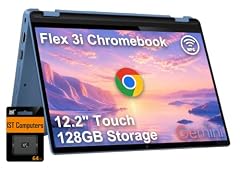
Lenovo IdeaPad Flex 3i Chromebook 12.2" 2-in-1 Laptop
- Screen size
- 12 to 13 in
- Memory
- 4 GB or less
- Processor
- Intel N-series
- 2-in-1
- Yes
The Lenovo IdeaPad Flex 3i is a 12.2-inch convertible with an Intel N100 processor and a low starting weight. Its compact size and modern chip make it a solid performer, although the seller does not specify storage capacity.
Pros
- Intel N100 processor, fast for a 4GB Chromebook
- 12.2-inch touchscreen with 360-degree hinge
- Lightweight and compact
- Lenovo's reputation for durable build
Cons
- Storage capacity not stated by the seller
- 4GB RAM is fixed and cannot be upgraded
- Smaller screen than 14-inch picks
Good fit if
- Users who need a compact convertible with a quick processor
- Students who want a touchscreen for note-taking without a heavy device
Skip if
- You need to know the exact storage capacity before buying
- You prefer a larger display for productivity
Verdict: A nimble 12.2-inch convertible with a current CPU, but check the listing for storage details.
13 Best budget large-screen
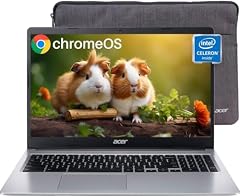
acer Chromebook 315 Laptop
- Screen size
- 15 in or more
- Memory
- 4 GB or less
- Storage
- 64 GB
- Processor
- Intel Celeron or Pentium
$235.99 price as of 2026-10-09 05:24 UTC (Details)
This Acer Chromebook 315 offers a 15.6-inch HD display and 64GB storage at a very accessible price point. The Celeron N4020 processor handles basic tasks smoothly, making it a good value for home use.
Pros
- 15.6-inch display, large and easy to read
- 64GB eMMC storage
- Celeron N4020 dual-core processor
- Acer's extensive Chromebook lineup
Cons
- HD (1366x768) resolution lacks sharpness of Full HD
- N4020 is slower than N4500 or N100
- No touchscreen or convertible option
Good fit if
- Budget buyers who need a large screen for streaming and email
- Users who prefer a roomy keyboard for typing
Skip if
- You need Full HD resolution for detailed work
- You want a faster processor for app-heavy tasks
Verdict: An economical 15.6-inch Chromebook that gives you a big screen at a low cost.
14 Best budget touchscreen

HP 14-inch Chromebook HD Touchscreen Laptop PC
- Screen size
- 14 in
- Memory
- 4 GB or less
- Storage
- 32 GB or less
- Processor
- Intel Celeron or Pentium
- Touchscreen
- Yes
The HP 14-inch Chromebook offers a touchscreen HD display in a clamshell body, rare at this price. Its Celeron N3350 is older, but it adds touch input for an affordable price.
Pros
- 14-inch HD touchscreen adds interactivity
- 32GB eMMC storage (small but functional)
- HP build quality and warranty
- Sturdy clamshell design
Cons
- Celeron N3350 is a low-power, older chip
- 32GB storage may be limiting for many users
- Only HD resolution, not Full HD
Good fit if
- Budget buyers who want a touchscreen for basic use
- Children or seniors who prefer tap interaction
Skip if
- You need a faster processor or more storage
- You plan to run Linux or Android games
Verdict: A cost-effective way to get touch input on a Chromebook, though you trade performance and storage.
15 Best Full HD compact

ASUS Chromebook CX1
- Screen size
- 14 in
- Memory
- 4 GB or less
- Storage
- 64 GB
- Processor
- Intel Celeron or Pentium
The ASUS Chromebook CX1 brings a 14-inch Full HD display and 64GB storage in a lightweight package with a Celeron N4500. It offers a sharp screen at a reasonable price for those who want high resolution without a large footprint.
Pros
- 14-inch Full HD (1920x1080) NanoEdge display
- Celeron N4500 with Intel UHD Graphics
- 64GB eMMC storage
- Thin and light design (weight not stated by seller)
Cons
- 4GB RAM is standard but not upgradeable
- No touchscreen or convertible hinge
- Storage is eMMC, slower than NVMe
Good fit if
- Users who want Full HD clarity in a 14-inch body
- Students and business users who need a reliable daily driver
Skip if
- You need a 2-in-1 form factor
- You prefer a larger 15.6-inch display
Verdict: A sharp Full HD Chromebook that balances price, portability, and display quality.
Comparison table
| # | Chromebook | Screen size | Memory | Storage | Processor | Touchscreen | 2-in-1 |
|---|---|---|---|---|---|---|---|
| 1 | HP Chromebook X360 14b | 14 in | 4 GB or less | 128 GB | Intel N-series | not stated | Yes |
| 2 | Lenovo Chromebook 2-in-1 | 14 in | 4 GB or less | 128 GB | Intel N-series | Yes | Yes |
| 3 | Acer Chromebook 315 Laptop | 15 in or more | 4 GB or less | 128 GB | Intel Celeron or Pentium | not stated | not stated |
| 4 | ASUS Chromebook CX1 | 15 in or more | 4 GB or less | 128 GB | Intel Celeron or Pentium | not stated | not stated |
| 5 | Samsung 14" Galaxy Chromebook Go Laptop PC Computer | 14 in | 4 GB or less | 64 GB | Intel Celeron or Pentium | not stated | not stated |
| 6 | HP Chromebook 14 Laptop | 14 in | 4 GB or less | 64 GB | Intel Celeron or Pentium | not stated | not stated |
| 7 | acer Chromebook 311 CBOA311-1H-C90F 11.6" HD Display | 11 in or less | 4 GB or less | 64 GB | Intel Celeron or Pentium | not stated | not stated |
| 8 | ASUS Chromebook CM30 Detachable 10.5 Inch 2-in-1 Laptop and Tablet | 11 in or less | 4 GB or less | 64 GB | not stated | Yes | Yes |
| 9 | HP Chromebook x360 14" FHD Touchscreen Laptop | 14 in | 4 GB or less | 64 GB | Intel N-series | Yes | Yes |
| 10 | Lenovo Chromebook Duet Gen 9 11" Tablet | 11 in or less | 4 GB or less | 128 GB | not stated | not stated | Yes |
| 11 | Samsung Chromebook Plus V2 360 2-in-1 Laptop w/Dual Webcam | 12 to 13 in | 4 GB or less | 64 GB | Intel Celeron or Pentium | Yes | Yes |
| 12 | Lenovo IdeaPad Flex 3i Chromebook 12.2" 2-in-1 Laptop | 12 to 13 in | 4 GB or less | not stated | Intel N-series | not stated | Yes |
| 13 | acer Chromebook 315 Laptop | 15 in or more | 4 GB or less | 64 GB | Intel Celeron or Pentium | not stated | not stated |
| 14 | HP 14-inch Chromebook HD Touchscreen Laptop PC | 14 in | 4 GB or less | 32 GB or less | Intel Celeron or Pentium | Yes | not stated |
| 15 | ASUS Chromebook CX1 | 14 in | 4 GB or less | 64 GB | Intel Celeron or Pentium | not stated | not stated |
How this list was made
We started with 60 Chromebooks listed with 4 GB or less RAM, then narrowed to 15 based on maker reputation, new condition, and a spread of screen sizes and form factors. For each shortlisted model we compared its stated processor generation, storage capacity, whether it has a touchscreen or convertible hinge, and any special labels like "student" or "business". We did not physically test any unit; all specifications come from the seller's listing and the maker's published pages. Prices are read live from the listing and update automatically.
Choosing the right one
What 4GB RAM means for daily use
Chromebooks with 4GB RAM are designed for web browsing, Google Workspace, streaming video, and light Android apps. ChromeOS is efficient, so 4GB is enough for most school and home tasks. You may notice slowdowns when keeping dozens of tabs open or running heavy Linux applications. For casual use, 4GB is a fine choice; for heavy multitasking, consider a model with 8GB if your budget allows.
Processor generation matters more than core count
Older Celeron chips like the N3350 or 3965Y are slower than the newer N4500 or N100. Intel's N-series (N100, N150) is the current entry-level line and offers a noticeable performance bump over previous Celeron designs. MediaTek Kompanio chips are also common in 4GB Chromebooks and generally give good battery efficiency. When comparing, look for the chip model, not just the number of cores. A dual-core N4500 can outrun a quad-core N3350 in real web tasks.
Storage: eMMC, SSD, and expansion
Most 4GB Chromebooks use eMMC storage, which is slower than an NVMe SSD but adequate for ChromeOS. Capacities range from 16GB to 128GB. Go for at least 64GB if you plan to install Android apps or keep files locally. Some models include a microSD slot or a USB drive for expansion. If you see a listing with 128GB, it may be a combination of internal eMMC and an external card; check the details.
Screen size and resolution
Screen sizes vary from 10.5-inch tablets to 15.6-inch laptops. A 14-inch Full HD (1920x1080) panel offers a good balance of portability and clarity. Smaller 11.6-inch models are lighter but often have 1366x768 resolution, which can feel cramped. For extended reading or spreadsheet work, prioritize a Full HD display. If you often watch movies, a 15.6-inch screen with Full HD is more immersive.
Touchscreen and 2-in-1 formats
A touchscreen or convertible (360-degree) hinge adds flexibility. Convertibles let you use the laptop in tent or tablet mode, which is handy for presentations or watching videos. Detachable designs like the Chromebook Duet or CM30 allow the screen to separate entirely from the keyboard. These are excellent for note-taking with a stylus but sometimes have smaller screens and may require an external keyboard for long typing sessions.
Update support and longevity
ChromeOS devices receive automatic updates for 10 years from the platform's release date, but older models may have already used part of that window. To maximize security, check the Auto Update Expiration (AUE) date before buying. You can find this in chrome://system or on the Google support page. Buying a recent model with a newer processor ensures you get the longest possible update support and access to the latest features.
Questions
Is 4GB RAM enough for a Chromebook in 2026?
Yes, for most everyday tasks like web browsing, email, Google Docs, and video streaming, 4GB is sufficient. ChromeOS is optimized to use memory efficiently. However, if you often keep 20+ tabs open or run Android games, you may notice slower performance. For a first Chromebook or a student device, 4GB is a solid choice; for heavy multitasking or Linux development, consider an 8GB model.
Can I upgrade the RAM on a 4GB Chromebook?
Most Chromebooks have RAM soldered to the motherboard, so it is not user-upgradeable. If you think you might need more memory later, buy an 8GB model from the start. Some older Chromebooks allowed RAM upgrades, but they are rare. Always check the manufacturer's specifications before purchasing if upgradeability is important to you.
What is the difference between eMMC and SSD storage on a Chromebook?
eMMC is a slower flash storage used in budget devices; SSDs are faster and more reliable. For everyday tasks like browsing and document editing, eMMC is often sufficient. However, if you run Linux apps or need faster app loading, an SSD is better. In the 4GB category, most Chromebooks use eMMC, but some higher-end models include NVMe SSDs.
How long will my 4GB Chromebook receive software updates?
ChromeOS devices receive automatic updates for 10 years from the platform's release date, depending on the model. Older devices may have shorter support windows. To check your device's Auto Update Expiration (AUE) date, go to Settings > About ChromeOS > Additional details. Buying a recent model with a newer processor typically ensures you get the full update period.
Can a 4GB Chromebook run Linux apps?
Yes, you can turn on Linux on most Chromebooks, but performance will depend on the CPU and storage. With 4GB RAM, you can run lightweight Linux tools and code editors, but heavy applications like Android Studio may be sluggish. Linux uses a shared sandbox, so you have access to a Debian environment. Expect limitations for memory-intensive tasks.
What changed
- : First published.