
Best 15-Inch Chromebooks in 2026: 15 Picks Compared on Specs
Looking for a 15-inch Chromebook? The Lenovo Chromebook Plus 15.3 with its 120Hz touchscreen and Intel Core 3 processor is our top pick. It delivers a vivid display and enough power for most daily tasks. We compared the specifications of 15-inch Chromebooks in our catalogue, using only the maker's listed specs and Google's Chromebook Plus guidelines, to bring you 15 of the best options across use cases.
15 picks from 19 Chromebooks that match this guide with a price we can quote today, made by 6 makers. Each price below is read live and stamped with the time it was read.
The short list
Who each pick suits
- For students on a budget: The Acer Chromebook 315 with a Celeron N4500 and 64GB of storage handles homework and video calls without breaking the bank. See pick 5
- For Chromebook Plus features: The Lenovo Chromebook Plus for Business brings a touchscreen, 8GB RAM, and AI assistance to your daily work. See pick 4
- For a large touch display: The Acer 15.6-inch FHD Touch Chromebook offers an 8GB RAM and a touchscreen for flexible note-taking and entertainment. See pick 8
The 15 picks, one by one
1 Best overall

Lenovo Chromebook Plus Laptop
- Screen size
- 15 in or more
- Processor
- Intel Core
- Touchscreen
- Yes
- Chromebook Plus
- Yes
The Lenovo Chromebook Plus 15.3 stands out with a 120Hz touchscreen, an Intel Core 3 N355 processor, and 8GB of RAM (the standard for Chromebook Plus models). This combination makes it the most capable all-round 15-inch Chromebook in this guide.
Pros
- 120Hz touchscreen display
- Chromebook Plus with AI and Gemini features
- Intel Core 3 processor for smooth multitasking
- Touch support for easy navigation
Cons
- Storage not stated by the seller
- Heavier than some 15-inch models
Good fit if
- Users who want a premium Chromebook experience with a large, high-refresh display
- People who multitask with many browser tabs and Android apps
Skip if
- You need very long battery life; battery specifications are not listed
- You prefer a clamshell without touch input to save weight
Verdict: The best balance of performance, display quality, and Chromebook Plus features on a 15-inch screen.
2 Best for productivity

Acer Chromebook Plus 515 Laptop
- Screen size
- 15 in or more
- Processor
- Intel Core
- Touchscreen
- Yes
- Chromebook Plus
- Yes
$599.99 price as of 2026-10-09 05:24 UTC (Details)
With an Intel Core i3-1305U, 8GB of RAM, and a 15.6-inch touchscreen, the Acer Chromebook Plus 515 is built for demanding workflows like document editing, video calls, and light coding, often outperforming Celeron-based rivals in this list.
Pros
- Intel Core i3 processor, a step above Celeron
- 8GB RAM handles many tabs and apps
- Touchscreen for flexible input
- Chromebook Plus includes AI features
Cons
- Storage is 384GB, but this is an unusual configuration
- Heavier than non-touch models
Good fit if
- Professionals and students who need faster performance than basic Chromebooks
- Users who appreciate a touchscreen for note-taking and presentations
Skip if
- You are on a tight budget
- You need all-day battery life; battery hours are not specified
Verdict: A solid choice for productivity-focused users who want a responsive 15-inch Chromebook.
3 Best display

Lenovo Chromebook Plus 15.3" 2K Touchscreen Laptop
- Screen size
- 15 in or more
- Memory
- 6 to 8 GB
- Storage
- 128 GB
- Processor
- Intel Core
- Touchscreen
- Yes
- Chromebook Plus
- Yes
This Lenovo Chromebook Plus offers a 15.3-inch 2K touchscreen, the highest resolution in this guide, along with an Intel Core 3 N355 and 8GB RAM, making it ideal for enjoying detailed content and working with large spreadsheets.
Pros
- 2K resolution touchscreen for sharp visuals
- Intel Core 3 processor
- 8GB RAM for smooth performance
- Chromebook Plus with AI enhancements
Cons
- Weight not stated by the seller
- Storage and RAM are fixed; no upgrade options
Good fit if
- Users who prioritize screen clarity for photo browsing or graphic design
- Those who want a high-performance Chromebook Plus for work and play
Skip if
- You need a very portable laptop; weight is unknown
- You prefer a matte display to reduce glare
Verdict: The sharpest 15-inch display among the picks, backed by solid performance.
4 Best for business

Lenovo Chromebook Plus Laptop for Business & Student
- Screen size
- 15 in or more
- Memory
- 6 to 8 GB
- Storage
- 128 GB
- Processor
- Intel Core
- Touchscreen
- Yes
- Chromebook Plus
- Yes
- For students
- Yes
- For business
- Yes
The Lenovo Chromebook Plus for Business adds a touchscreen, 8GB RAM, and a Core 3 N355, along with substantial storage (640GB), making it a versatile workhorse for professionals who need to store many files locally and take advantage of Chromebook Plus AI tools.
Pros
- Large 640GB storage (the most in this list)
- Touchscreen and Chromebook Plus AI features
- Intel Core 3 processor for reliable performance
- Designed with business and student use in mind
Cons
- Heavier due to larger storage and display
- Price is higher than other picks
Good fit if
- Business professionals who keep large files offline
- Users who need a premium Chromebook Plus with convertible-like features
Skip if
- You only need cloud storage and want a lighter device
- You are on a budget
Verdict: A powerful and spacious Chromebook Plus that suits intensive business use.
5 Best for essential use

Acer Chromebook 315 15.6" FHD Laptop for Home & Students
- Screen size
- 15 in or more
- Memory
- 4 GB or less
- Storage
- 64 GB
- Processor
- Intel Celeron or Pentium
- For students
- Yes
$239.00 price as of 2026-10-09 05:24 UTC (Details)
With an Intel Celeron N4500 and 64GB of storage, the Acer Chromebook 315 offers essential Chromebook functionality for basic tasks, making it a straightforward choice for everyday use.
Pros
- FHD display for clear text
- Dual-core Celeron is sufficient for web browsing
- Student-friendly design
- Straightforward clamshell design
Cons
- 4GB RAM may feel limiting with many tabs
- 64GB storage is modest for offline media
Good fit if
- Students and users who need a basic, large-screen Chromebook for school or home
- Those who want a simple device for email and browsing
Skip if
- You do heavy multitasking or run many apps
- You plan to store large files locally
Verdict: A reliable and straightforward 15-inch Chromebook for everyday tasks.
6 Best for battery efficiency

ASUS Chromebook CM15 Laptop
- Screen size
- 15 in or more
- Memory
- 4 GB or less
- Storage
- 64 GB
- Processor
- MediaTek
The ASUS Chromebook CM15 uses the MediaTek Kompanio 540 processor, which is designed for power efficiency, making it a strong candidate for long battery life, though the seller does not specify hours. It also offers a compact 15.6-inch FHD display with a light design.
Pros
- MediaTek processor is power-efficient
- FHD display
- Lightweight for a 15-inch model
- 64GB storage and 4GB RAM keep costs down
Cons
- 4GB RAM may be limiting
- Storage is limited to 64GB
Good fit if
- Users who value battery life and basic tasks like email and web browsing
- Those who want a large screen without a heavy device
Skip if
- You need more than 4GB RAM for multitasking
- You want a Chromebook Plus model with AI features
Verdict: A lightweight, efficient 15-inch Chromebook for everyday use.
7 Best storage capacity in its class

Samsung XE350XBA-K05US Chromebook 4 + Chrome OS 15.6" Full HD Intel
- Screen size
- 15 in or more
- Memory
- 4 GB or less
- Storage
- 128 GB
- Processor
- Intel Celeron or Pentium
The Samsung Chromebook 4+ includes a 128GB SSD, which is significantly more than the typical 64GB on many Celeron-based 15-inch models, offering faster boot and better reliability for storing documents and downloads.
Pros
- 128GB SSD (fast storage)
- Full HD display
- Samsung build quality
- Celeron N4000 is adequate for web use
Cons
- 4GB RAM is on the low side
- No touchscreen
Good fit if
- Users who keep many files locally and want fast storage
- Students who need reliable durability for school
Skip if
- You want a touchscreen or convertible design
- You need more than 4GB RAM for heavy apps
Verdict: A dependable 15-inch Chromebook with extra SSD storage for peace of mind.
8 Best budget touchscreen

Acer 15.6” FHD Touch Chromebook
- Screen size
- 15 in or more
- Memory
- 6 to 8 GB
- Storage
- 128 GB
- Processor
- Intel N-series
- Touchscreen
- Yes
$299.00 price as of 2026-10-09 05:24 UTC (Details)
The Acer 15.6-inch FHD Touch Chromebook brings a touchscreen and 8GB of RAM to a budget-friendly price point, making it an excellent value for users who want the convenience of touch without breaking the bank.
Pros
- Touchscreen display
- 8GB RAM, double that of many budget models
- 128GB storage for larger local files
- FHD resolution
Cons
- Intel N50 processor is basic
- No Chromebook Plus designation
Good fit if
- Users who prefer tapping and swiping on a large screen
- Students who need more memory for school projects
Skip if
- You need a powerful processor for demanding apps
- You dislike glossy touchscreens
Verdict: An affordable way to get a 15-inch touchscreen with ample RAM and storage.
9 Best for Google Gemini integration
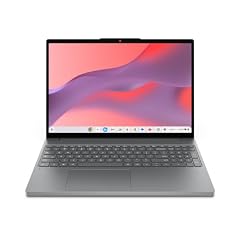
Lenovo Chromebook m 15"
- Screen size
- 15 in or more
- Memory
- 6 to 8 GB
- Storage
- 128 GB
- Processor
- MediaTek
The Lenovo Chromebook M15 is marketed with Google Gemini, meaning it likely supports the latest AI features in ChromeOS. It pairs a MediaTek Kompanio 540 with 8GB RAM and a 15.3-inch WUXGA IPS display, offering a smooth experience for AI-assisted tasks and note-taking.
Pros
- Explicitly features Google Gemini
- 8GB RAM for efficient multitasking
- WUXGA IPS display for wide viewing angles
- 128GB storage
Cons
- MediaTek processor may not match Core chips in raw performance
- Battery life not specified
Good fit if
- Users who want entry-level AI features
- Students who need a reliable, large-screen laptop for everyday use
Skip if
- You need the highest processing power
- You prefer an Intel or AMD processor
Verdict: A capable 15-inch Chromebook that leverages Google's AI tools at a moderate price.
10 Best for students

ASUS Chromebook CX15 Laptop
- Screen size
- 15 in or more
- Memory
- 6 to 8 GB
- Storage
- 128 GB
- Processor
- Intel N-series
The ASUS Chromebook CX15 combines an Intel N50 processor, 8GB RAM, and 128GB storage with a 15.6-inch anti-glare FHD display, making it a practical and comfortable choice for lectures, reading, and group work.
Pros
- Anti-glare display reduces reflections
- 8GB RAM for homework and research
- 128GB storage
- Intel N50 is newer than Celeron N4000
Cons
- No touchscreen
- Weight not stated
Good fit if
- College and high school students who need a reliable laptop for classes
- Users who work in bright environments
Skip if
- You want a touchscreen for note-taking
- You need convertibility
Verdict: A well-rounded 15-inch Chromebook with anti-glare screen and good specs for school.
11 Best for extra storage bundles
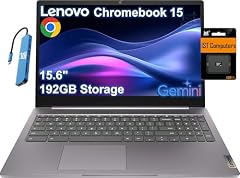
Lenovo IdeaPad 3i Chromebook 15 Laptop
- Screen size
- 15 in or more
- Processor
- Intel Celeron or Pentium
This Lenovo IdeaPad 3i Chromebook 15 includes 192GB of storage (64GB eMMC plus 128GB SD card), providing flexibility to expand storage without extra purchases, though the base 4GB RAM is limited.
Pros
- 192GB total storage (64GB eMMC + 128GB SD card)
- FHD display
- Celeron N4500 for basic tasks
Cons
- 4GB RAM limits multitasking
- Storage is partly on a microSD card, which may be slower
Good fit if
- Users who like having ample storage out of the box
- Students who need to store many documents and media
Skip if
- You need more than 4GB RAM
- You want an SSD for faster data access
Verdict: A budget 15-inch Chromebook with generous storage options.
12 Best for a larger display

acer Chromebook Plus 516 Laptop
- Screen size
- 15 in or more
- Memory
- 6 to 8 GB
- Storage
- 128 GB
- Processor
- Intel Core
- Chromebook Plus
- Yes
$479.99 price as of 2026-10-09 05:24 UTC (Details)
The Acer Chromebook Plus 516 offers a 16-inch WUXGA IPS display (slightly larger than 15-inch), with an Intel Core i3-1315U and 8GB LPDDR5 RAM, making it a compelling choice for those who want a bit more screen real estate and robust performance.
Pros
- 16-inch WUXGA IPS display
- Intel Core i3 processor
- 8GB LPDDR5 RAM (fast)
- Chromebook Plus with AI features
Cons
- Larger than 15-inch, so it may not fit smaller bags
- Storage is 128GB, which is modest for a premium model
Good fit if
- Users who prioritize screen size for productivity
- Those who want Chromebook Plus performance
Skip if
- You specifically want a 15-inch form factor
- You need more than 128GB of storage
Verdict: A powerful Chromebook Plus with a slightly larger display for those who want extra room.
13 Best convertible

Lenovo C340 15.6" FHD Touchscreen 2-in-1 Chromebook Laptop
- Screen size
- 15 in or more
- Memory
- 4 GB or less
- Storage
- 64 GB
- Processor
- Intel Core
- Touchscreen
- Yes
- 2-in-1
- Yes
- For business
- Yes
The Lenovo C340 is a 2-in-1 with a 15.6-inch FHD touchscreen that converts into tablet and tent modes, powered by an Intel Core i3 CPU. This makes it one of the most versatile 15-inch Chromebooks, ideal for presentations and media consumption.
Pros
- Convertible design (2-in-1)
- Intel Core i3 processor
- Touchscreen
- FHD display
Cons
- 4GB RAM may struggle with heavy multitasking
- 64GB storage is limited
Good fit if
- Users who want to use their Chromebook as a tablet for reading or drawing
- Business users who present frequently
Skip if
- You need more RAM and storage
- You prefer a traditional clamshell for durability
Verdict: A flexible 15-inch convertible with a capable Core i3, despite lower RAM and storage.
14 Best basic 15-inch with 128GB

ASUS Chromebook CX1
- Screen size
- 15 in or more
- Memory
- 4 GB or less
- Storage
- 128 GB
- Processor
- Intel Celeron or Pentium
The ASUS Chromebook CX1 offers a 15.6-inch FHD display, an Intel Celeron N4500, and 128GB eMMC storage at a budget price, providing double the storage of many entry-level models without sacrificing the essentials.
Pros
- 128GB eMMC storage
- FHD NanoEdge display
- Celeron N4500 for everyday tasks
- Lightweight design
Cons
- 4GB RAM
- No touchscreen
Good fit if
- Buyers who want extra storage on a tight budget
- Students who need a simple, reliable laptop
Skip if
- You need a touch screen
- You plan to run many applications simultaneously
Verdict: A cost-effective 15-inch Chromebook with generous storage for the price.
15 Best for simplicity

Samsung Chromebook 4 + Chrome OS 15.6" Full HD Intel® Celeron® Processor
- Screen size
- 15 in or more
- Memory
- 4 GB or less
- Storage
- 64 GB
- Processor
- Intel Celeron or Pentium
The Samsung Chromebook 4+ with Celeron N4000 and 64GB storage is a straightforward, reliable 15-inch Chromebook that covers the basics without extra frills, ideal for users who want a no-nonsense device.
Pros
- Simple, durable design
- Full HD display
- 64GB storage
- Samsung reputation for build quality
Cons
- Celeron N4000 is older and slower
- 4GB RAM
Good fit if
- Older users or children who need a basic laptop for web browsing
- Those who prefer a minimalist experience
Skip if
- You want modern performance
- You need more storage or RAM
Verdict: A straightforward 15-inch Chromebook that does the essentials well.
Comparison table
| # | Chromebook | Screen size | Memory | Storage | Processor | Touchscreen | 2-in-1 |
|---|---|---|---|---|---|---|---|
| 1 | Lenovo Chromebook Plus Laptop | 15 in or more | not stated | not stated | Intel Core | Yes | not stated |
| 2 | Acer Chromebook Plus 515 Laptop | 15 in or more | not stated | not stated | Intel Core | Yes | not stated |
| 3 | Lenovo Chromebook Plus 15.3" 2K Touchscreen Laptop | 15 in or more | 6 to 8 GB | 128 GB | Intel Core | Yes | not stated |
| 4 | Lenovo Chromebook Plus Laptop for Business & Student | 15 in or more | 6 to 8 GB | 128 GB | Intel Core | Yes | not stated |
| 5 | Acer Chromebook 315 15.6" FHD Laptop for Home & Students | 15 in or more | 4 GB or less | 64 GB | Intel Celeron or Pentium | not stated | not stated |
| 6 | ASUS Chromebook CM15 Laptop | 15 in or more | 4 GB or less | 64 GB | MediaTek | not stated | not stated |
| 7 | Samsung XE350XBA-K05US Chromebook 4 + Chrome OS 15.6" Full HD Intel | 15 in or more | 4 GB or less | 128 GB | Intel Celeron or Pentium | not stated | not stated |
| 8 | Acer 15.6” FHD Touch Chromebook | 15 in or more | 6 to 8 GB | 128 GB | Intel N-series | Yes | not stated |
| 9 | Lenovo Chromebook m 15" | 15 in or more | 6 to 8 GB | 128 GB | MediaTek | not stated | not stated |
| 10 | ASUS Chromebook CX15 Laptop | 15 in or more | 6 to 8 GB | 128 GB | Intel N-series | not stated | not stated |
| 11 | Lenovo IdeaPad 3i Chromebook 15 Laptop | 15 in or more | not stated | not stated | Intel Celeron or Pentium | not stated | not stated |
| 12 | acer Chromebook Plus 516 Laptop | 15 in or more | 6 to 8 GB | 128 GB | Intel Core | not stated | not stated |
| 13 | Lenovo C340 15.6" FHD Touchscreen 2-in-1 Chromebook Laptop | 15 in or more | 4 GB or less | 64 GB | Intel Core | Yes | Yes |
| 14 | ASUS Chromebook CX1 | 15 in or more | 4 GB or less | 128 GB | Intel Celeron or Pentium | not stated | not stated |
| 15 | Samsung Chromebook 4 + Chrome OS 15.6" Full HD Intel® Celeron® Processor | 15 in or more | 4 GB or less | 64 GB | Intel Celeron or Pentium | not stated | not stated |
How this list was made
To build this guide, we started with the pool of 15-inch Chromebooks listed on our site, which contained 48 entries. After removing near-duplicate configurations, we selected 15 that span from entry-level Celeron models to Chromebook Plus devices with Core processors and touch screens. Each pick is chosen based on its stated specifications: processor generation, RAM, storage, display resolution, and Chromebook Plus designation. We have not tested any of these units. Prices shown are live from the listing and may change.
Choosing the right one
Consider the processor: Celeron vs. Core
The processor is the biggest driver of performance. Entry-level models commonly use Intel Celeron N4000 or N4500 processors, which are fine for web browsing, email, and productivity apps like Google Docs. If you plan to run many tabs, use Android apps, or do light coding, look for an Intel Core i3 or a newer Intel N50 processor. Chromebook Plus models typically require at least a Core i3 or better, so they are a good indicator of faster performance.
RAM: 4GB is the minimum, 8GB is comfortable
Most budget 15-inch Chromebooks come with 4GB of RAM, which is workable for light use but can become sluggish if you keep many tabs open or use web apps that consume memory. For a smoother experience, especially on a large screen with split-screen windows, choose a model with 8GB of RAM. In this guide, several picks including the Lenovo Chromebook Plus and Acer Chromebook 315 offer 8GB.
Storage: eMMC vs. SSD and capacity
Storage on 15-inch Chromebooks varies from 32GB to 640GB. eMMC is a flash storage type that is slower than SSD but adequate for ChromeOS. Many budget models have 64GB eMMC, while some offer 128GB or more. If you store many local files or install Linux applications, aim for at least 128GB. SSD storage, as found on the Samsung Chromebook 4+, provides faster boot and app loading.
Display: Full HD or higher
All picks in this guide have at least a 1920x1080 (Full HD) resolution, which is sharp on a 15-inch panel. Some models, like the Lenovo Chromebook Plus 15.3, offer a 2K resolution for even more detail. Touchscreens are available on certain models, which are useful for navigating with your fingers or using a stylus (note: no stylus is included in most cases). Consider a matte (anti-glare) display if you work near windows or bright lights.
Chromebook Plus: what it means
Chromebook Plus is a designation for higher-spec Chromebooks that meet Google's performance and AI requirements. These devices generally have at least 8GB of RAM and 128GB of storage, as well as an Intel Core or equivalent processor. They come with features like Gemini integration and AI-assisted editing in ChromeOS. If you value cutting-edge software features, prioritize a Chromebook Plus model, such as the Lenovo Chromebook Plus 15.3 or the Acer Chromebook Plus 515.
Portability and form factor
While 15-inch Chromebooks are larger and heavier than their 13-inch counterparts, they offer more screen real estate. If you plan to carry your laptop daily, check the weight, though it is not always stated by the seller. Some 15-inch models are convertible, like the Lenovo C340, allowing you to use them as tablets. Think about whether you need a touchscreen and flexible modes for your typical use.
Questions
What is the best 15-inch Chromebook for a student?
For most students, we recommend the ASUS Chromebook CX15 or the Acer Chromebook 315. They offer a Celeron processor and 4GB of RAM, which is enough for schoolwork like writing papers and doing research. If you can stretch your budget, models with 8GB of RAM, such as the Acer 15.6 FHD Touch Chromebook, provide smoother multitasking and are worth considering.
Do 15-inch Chromebooks have good battery life?
Battery life varies by model. Some Chromebooks, especially those with power-efficient MediaTek processors like the ASUS Chromebook CM15, may last longer on a charge. However, we do not list specific battery hours because the sellers do not provide them for all models. In general, Chromebooks are designed for all-day use, but heavy tasks like video streaming will reduce battery life. Always check the manufacturer's specifications for more details.
Are Chromebook Plus models worth the extra cost?
Chromebook Plus models come with better hardware, typically at least 8GB of RAM and an Intel Core processor, and they include advanced AI features in ChromeOS. If you use your computer for productivity, photo editing, or need reliable performance with many apps, the extra cost can be justified. For basic web browsing and documents, a standard Chromebook may be sufficient and more budget-friendly.
Can I use a 15-inch Chromebook for gaming?
Chromebooks are not designed for high-end gaming, but they can run Android games and browser-based games. For cloud gaming, Chromebook Plus models can stream PC games via services like GeForce NOW, as mentioned on the Chromebook Plus page. If you plan to cloud game, look for a model with a good display and at least 8GB of RAM. None of the picks in this guide have discrete GPUs, so local gaming will be limited to lighter titles.
How long will a Chromebook receive updates?
According to Google's Auto Update policy, ChromeOS devices receive automatic updates for 10 years from the platform release date. You can check the exact end date for your Chromebook by going to Settings > About ChromeOS > Additional details and looking for 'This device will get automatic updates until'. This is an important factor if you plan to keep your Chromebook for many years.
What changed
- : First published.