
Best Intel Core Chromebooks in 2026: 15 Picks Compared on Specs
The Acer Chromebook Plus Spin 714 takes the top spot for its Intel Core Ultra 5 processor, convertible design, and 8GB of RAM. To build this list, 15 Intel Core Chromebooks from the catalogue were matched and compared on stated specs across processor tier, memory, storage, display, and form factor. Prices are live from the store listing and update automatically.
15 picks from 14 Chromebooks that match this guide with a price we can quote today, made by 6 makers. Each price below is read live and stamped with the time it was read.
The short list
Who each pick suits
- For students: A sturdy 14-inch convertible with touchscreen, enough RAM for classes, and Chromebook Plus AI study tools. See pick 6
- For two-in-one flexibility: A convertible Intel Core i5 with a 360-degree hinge and solid storage for media and light work. See pick 3
- For maximum memory: The only pick with 16GB of RAM, for heavy multitaskers and Linux containers. See pick 2
- For a large screen: A 16-inch IPS display with an Intel Core i3, ideal for split-screen work and extended reading. See pick 14
The 15 picks, one by one
1 Best overall

acer Chromebook Plus Spin 714 Laptop with Google AI
- Screen size
- 14 in
- Memory
- 6 to 8 GB
- Storage
- 256 GB
- Processor
- Intel Core
- Touchscreen
- Yes
- 2-in-1
- Yes
- Chromebook Plus
- Yes
$637.00 price as of 2026-10-09 05:24 UTC (Details)
The only pick with an Intel Core Ultra 5 processor, it also combines a 14-inch touchscreen and a convertible hinge. It stands apart in raw processor tier while still holding 8GB of RAM and 256GB of storage, matching several rivals in memory.
Pros
- Intel Core Ultra 5 115U, the most advanced processor in this list
- Convertible 360-degree hinge with touchscreen
- Chromebook Plus designation includes Gemini AI features
- 8GB of LPDDR5 RAM, on par with most picks
Cons
- 256GB storage, not the highest available here
- No stated battery capacity
- RAM is not upgradeable
Good fit if
- Buyers who want the strongest Intel Core performance in a convertible
- Users planning to keep the device for several years
Skip if
- You need more than 8GB of RAM
- You prefer a non-touch clamshell for simplicity
Verdict: The best blend of processor power and hinge flexibility among Intel Core Chromebooks.
2 Most memory
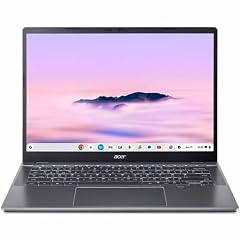
Acer Chromebook Plus 514 CBE594-2 CBE594-2-32TU 14" Chromebook
- Screen size
- 14 in
- Storage
- 256 GB
- Processor
- Intel Core
- Chromebook Plus
- Yes
With 16GB of RAM, this is the only pick that doubles the standard 8GB found in the rest of the list. The Intel Core 3 100U and 256GB SSD make it a solid choice for memory-heavy tasks like running Linux containers or many browser tabs.
Pros
- 16GB RAM, the most in this list
- 256GB SSD storage
- Chromebook Plus certification
- 14-inch WUXGA display
Cons
- Not a touchscreen model
- Intel Core 3 processor, not a Core i5 or Ultra
- Price position may be high for the specs
Good fit if
- Users who run Linux apps or Android development
- People who keep 30+ browser tabs open
Skip if
- You want a touchscreen
- You prefer a faster processor over extra RAM
Verdict: The right choice when memory is the priority over raw CPU speed.
3 Best 2-in-1

Lenovo Flex 5i Chromebook Plus 14" WUXGA Touchscreen 2-in-1 Laptop
- Screen size
- 14 in
- Memory
- 6 to 8 GB
- Storage
- 256 GB
- Processor
- Intel Core
- Touchscreen
- Yes
- 2-in-1
- Yes
- Chromebook Plus
- Yes
The Lenovo Flex 5i Chromebook Plus pairs an Intel Core i5-1334U with a 14-inch touchscreen and a convertible design. Its 8GB RAM and 256GB storage match most competitors, while the i5 processor gives it an edge over i3-based convertibles.
Pros
- Intel Core i5-1334U processor
- Convertible 14-inch touchscreen
- 256GB storage, standard for the category
- Chromebook Plus includes AI features
Cons
- 8GB RAM, not upgradeable
- No stated battery size
- Storage is not the highest option
Good fit if
- Students who need a laptop and tablet in one
- Users who type often and want a backlit keyboard
Skip if
- You need more than 256GB of storage
- You want a non-touch lighter clamshell
Verdict: A well-rounded convertible with a strong Intel Core i5 and all the Chromebook Plus extras.
4 Best refresh rate

ASUS Chromebook Plus Touchscreen Laptop Flip 2-in-1-14" WUXGA Touch
- Screen size
- 14 in
- Memory
- 6 to 8 GB
- Storage
- 256 GB
- Processor
- Intel Core
- Touchscreen
- Yes
- 2-in-1
- Yes
- Chromebook Plus
- Yes
This ASUS Chromebook Plus Flip is the only pick with a 144Hz display, offering smoother scrolling and animations. The Intel Core i5-1235U, 8GB RAM, and 256GB SSD keep performance competitive, and the convertible design adds versatility.
Pros
- 144Hz touchscreen, the highest refresh rate in this list
- Intel Core i5-1235U processor
- 8GB RAM and 256GB storage
- Convertible 2-in-1 design
Cons
- Storage is 256GB, not the largest option
- No stated battery capacity
- Screen is 14 inches, smaller than some picks
Good fit if
- Users who notice screen smoothness in everyday scrolling
- People who want a fast-feeling convertible
Skip if
- You prefer a standard 60Hz display to save cost
- You need more than 256GB of storage
Verdict: The best choice for a fluid display in a convertible Intel Core Chromebook.
5 Best display

SAMSUNG 13.3" Galaxy Chromebook Laptop Computer w/ 256GB Storage
- Screen size
- 12 to 13 in
- Memory
- 6 to 8 GB
- Storage
- 256 GB
- Processor
- Intel Core
- Touchscreen
- Yes
The Samsung Galaxy Chromebook stands out with a 13.3-inch 4K AMOLED touchscreen, the highest resolution and best panel type in this list. Its 8GB RAM and 256GB storage are standard, but the display sets it apart for media consumption.
Pros
- 4K AMOLED touchscreen, unique among these picks
- 256GB storage
- 8GB RAM
- Compact 13.3-inch form factor
Cons
- Processor is listed only as 'Intel Core' without a specific tier
- Smaller screen than most picks
- No convertible hinge
Good fit if
- Media lovers who want vibrant colors and deep blacks
- Travelers who prioritize a compact display
Skip if
- You need a larger screen for work
- You want a specific Intel Core i5 or i7 processor
Verdict: The best screen quality in a small, portable Intel Core Chromebook.
6 Best for students

HP Chromebook Plus x360 Laptop 14" 2 in 1 Touchscreen Business Laptop
- Screen size
- 14 in
- Memory
- 6 to 8 GB
- Storage
- 256 GB
- Processor
- Intel Core
- Touchscreen
- Yes
- 2-in-1
- Yes
- Chromebook Plus
- Yes
- For students
- Yes
The HP Chromebook Plus x360 combines an Intel Core i3-N305, 8GB RAM, and 256GB storage in a 14-inch convertible. It also carries student and business tags, and its Chromebook Plus status means AI study tools are included.
Pros
- 14-inch touchscreen with 2-in-1 hinge
- 256GB storage, above the 128GB baseline
- Chromebook Plus AI features
- Tagged for student and business use
Cons
- Intel Core i3, less powerful than i5 options
- No stated battery capacity
- Plastic build may not be as durable as metal
Good fit if
- High school and college students
- Anyone who wants a versatile first Chromebook
Skip if
- You need a faster processor for heavy Linux work
- You prefer a non-convertible clamshell
Verdict: A dependable, well-equipped convertible for the classroom.
7 Best 15-inch touchscreen

Acer Chromebook Plus 515 Laptop
- Screen size
- 15 in or more
- Processor
- Intel Core
- Touchscreen
- Yes
- Chromebook Plus
- Yes
$599.99 price as of 2026-10-09 05:24 UTC (Details)
The Acer Chromebook Plus 515 offers a 15.6-inch touchscreen with an Intel Core i3-1305U and 8GB RAM. Its storage combination of 128GB eMMC and 256GB SSD (total 384GB) exceeds the flash storage of many peers.
Pros
- 15.6-inch touchscreen, one of the largest in this list
- 384GB total storage (128GB eMMC + 256GB SSD)
- 8GB RAM
- Chromebook Plus certification
Cons
- Core i3 processor, not the fastest in this list
- No convertible hinge
- Weight may be higher due to the large screen
Good fit if
- Users who want a roomy display without a 2-in-1
- People who need extra storage for offline files
Skip if
- You want a touchscreen convertible
- You prefer a lighter 14-inch model
Verdict: A spacious touchscreen Chromebook with generous total storage.
8 Best 2K resolution

Lenovo Chromebook Plus 15.3" 2K Touchscreen Laptop
- Screen size
- 15 in or more
- Memory
- 6 to 8 GB
- Storage
- 128 GB
- Processor
- Intel Core
- Touchscreen
- Yes
- Chromebook Plus
- Yes
This Lenovo Chromebook Plus packs a 15.3-inch 2K touchscreen, making it one of only two picks with a resolution above full HD. The Intel Core 3 N355, 8GB RAM, and 128GB SSD keep performance solid for everyday tasks.
Pros
- 15.3-inch 2K (2560x1600) touchscreen
- Chromebook Plus with AI features
- 8GB LPDDR5 RAM
- Intel Core 3 N355 processor
Cons
- 128GB storage, the lowest in this list
- Not a convertible
- Core 3 is entry-level for Intel Core
Good fit if
- Users who want a crisp large display for reading and video
- People who prefer a clamshell with high resolution
Skip if
- You need more than 128GB of local storage
- You want a 2-in-1 form factor
Verdict: The best pick for a high-resolution 15-inch screen in a clamshell.
9 Most storage

acer Chromebook Plus 514 Laptop with Google AI
- Screen size
- 14 in
- Memory
- 6 to 8 GB
- Storage
- 512 GB or more
- Processor
- Intel Core
- Touchscreen
- Yes
- Chromebook Plus
- Yes
$448.00 price as of 2026-10-09 05:24 UTC (Details)
The Acer Chromebook Plus 514 is the only pick with 512GB of SSD storage. Its Intel Core i3-N305, 8GB RAM, and 14-inch FHD IPS touchscreen cover the basics, while the large drive makes it ideal for offline media and local app libraries.
Pros
- 512GB SSD, the largest storage in this list
- 14-inch FHD touchscreen
- 8GB LPDDR5 RAM
- Chromebook Plus certification
Cons
- Core i3 processor, not the fastest
- No convertible hinge
- Heavier than some 14-inch models
Good fit if
- Users who download movies or use large Linux packages
- Photographers who store many RAW files locally
Skip if
- You rely on cloud storage and want a lighter laptop
- You need a faster processor over large storage
Verdict: The clear winner for local storage without sacrificing touch.
10 Best backlit keyboard

HP Chromebook Plus 14 Laptop
- Screen size
- 14 in
- Memory
- 6 to 8 GB
- Storage
- 256 GB
- Processor
- Intel Core
- Touchscreen
- Yes
- Chromebook Plus
- Yes
The HP Chromebook Plus 14 includes a backlit keyboard, a feature not stated for most picks. Its 14-inch touchscreen, Intel Core i3-N305, 8GB RAM, and 256GB storage make it a practical daily driver.
Pros
- Backlit keyboard, not common in this list
- 256GB UFS storage
- 1080p webcam
- 14-inch touchscreen
Cons
- Core i3 processor
- No convertible hinge
- No stated battery capacity
Good fit if
- People who type in dim rooms
- Users who want a straightforward clamshell with a bright screen
Skip if
- You need a 2-in-1
- You want a higher resolution display
Verdict: A well-rounded clamshell with a keyboard backlight that many rivals omit.
11 Best performance in 14-inch

ASUS Chromebook Plus CX34 Laptop
- Screen size
- 14 in
- Memory
- 6 to 8 GB
- Storage
- 256 GB
- Processor
- Intel Core
- Touchscreen
- Yes
- Chromebook Plus
- Yes
The ASUS Chromebook Plus CX34 is one of only three picks with an Intel Core i5-1335U, giving it a step up from i3 models. Its 14-inch touchscreen, 8GB RAM, and 256GB storage keep it competitive, and it holds that power in a compact size.
Pros
- Intel Core i5-1335U, a higher tier than i3 picks
- 14-inch touchscreen
- 256GB storage
- Chromebook Plus certification
Cons
- 8GB RAM, not upgradable
- No convertible hinge
- Storage not maximum
Good fit if
- Users who want fast web and Android performance in a 14-inch size
- Professionals running multiple apps at once
Skip if
- You need a convertible
- You prefer a larger screen
Verdict: A powerful 14-inch clamshell for those who prioritize processor speed.
12 Best convertible with large storage

Acer Chromebook Plus Spin 514 2-in-1 Laptop 14" WUXGA IPS Touchscreen
- Screen size
- 14 in
- Memory
- 6 to 8 GB
- Storage
- 512 GB or more
- Processor
- Intel Core
- Touchscreen
- Yes
- 2-in-1
- Yes
- Chromebook Plus
- Yes
$629.00 price as of 2026-10-09 05:24 UTC (Details)
The Acer Chromebook Plus Spin 514 combines an Intel Core i5-1334U, 8GB RAM, and 512GB SSD in a 14-inch touchscreen convertible. It offers the rare pairing of a fast i5 processor with a large drive, making it a versatile all-rounder.
Pros
- 512GB SSD, the largest in any convertible here
- Intel Core i5-1334U processor
- 14-inch IPS touchscreen with 100% sRGB
- Convertible design
Cons
- 8GB RAM, not upgradeable
- No stated battery capacity
- Slightly heavier than non-convertible i5 models
Good fit if
- People who need both processor speed and local storage
- Art users who want a touchscreen for sketching
Skip if
- You only need a clamshell
- You want a smaller 13-inch body
Verdict: The best convertible for users who refuse to compromise on processor or storage.
13 Best entry-level 2-in-1
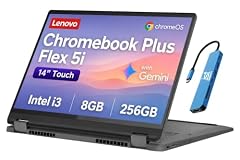
Lenovo IdeaPad Flex 5i Chromebook Plus
- Screen size
- 14 in
- Storage
- 256 GB
- Processor
- Intel Core
- 2-in-1
- Yes
- Chromebook Plus
- Yes
The Lenovo IdeaPad Flex 5i Chromebook Plus is the most approachable convertible here, with an Intel Core i3, 8GB RAM, and 256GB storage. It lacks a stated touchscreen, but the 360-degree hinge allows tent and tablet modes, making it a budget-friendly hinge option.
Pros
- Convertible hinge for multiple modes
- 256GB storage
- 8GB RAM
- Chromebook Plus certification
Cons
- Touchscreen not stated by the seller
- Core i3 processor, not the fastest
- No stated display resolution
Good fit if
- First-time Chromebook buyers who want a flexible hinge
- Users who rarely use touch but like the tent mode
Skip if
- You want a confirmed touchscreen
- You need a faster processor
Verdict: A sensible, low-key convertible that covers the essentials.
14 Best 16-inch display

acer Chromebook Plus 516 Laptop
- Screen size
- 15 in or more
- Memory
- 6 to 8 GB
- Storage
- 128 GB
- Processor
- Intel Core
- Chromebook Plus
- Yes
$479.99 price as of 2026-10-09 05:24 UTC (Details)
The Acer Chromebook Plus 516 is the only pick with a 16-inch WUXGA IPS screen. Its Intel Core i3-1315U and 8GB RAM are enough for daily use, and the large display offers extra space for side-by-side windows.
Pros
- 16-inch WUXGA IPS display, the largest in this list
- 8GB LPDDR5 RAM
- 128GB UFS storage
- Chromebook Plus certification
Cons
- 128GB storage, on the lower end
- No touchscreen
- Core i3 processor
Good fit if
- Users who want a desktop-like viewing area
- Students with split-screen assignments
Skip if
- You need a touchscreen
- You value portability over screen size
Verdict: The go-to Chromebook for a big, crisp display at a reasonable size.
15 Best simple clamshell

HP Chromebook Plus 14 inch Laptop
- Screen size
- 14 in
- Memory
- 6 to 8 GB
- Storage
- 128 GB
- Processor
- Intel Core
- Chromebook Plus
- Yes
The HP Chromebook Plus 14 strips away the hinge and touch options to deliver a straightforward 14-inch clamshell. With an Intel Core i3-N305, 8GB RAM, and 128GB storage, it covers the basics without extra moving parts.
Pros
- Simple clamshell design, fewer failure points
- 8GB RAM
- Intel Core i3-N305 processor
- Chromebook Plus with AI features
Cons
- 128GB storage, the lowest here
- No touchscreen
- No stated display resolution
Good fit if
- Users who never use touch or tablet modes
- Buyers who want the lightest, most basic Intel Core model
Skip if
- You want a touchscreen
- You need more than 128GB of storage
Verdict: The reliable, no-frills Intel Core Chromebook for pure typing and browsing.
Comparison table
| # | Chromebook | Screen size | Memory | Storage | Processor | Touchscreen | 2-in-1 |
|---|---|---|---|---|---|---|---|
| 1 | acer Chromebook Plus Spin 714 Laptop with Google AI | 14 in | 6 to 8 GB | 256 GB | Intel Core | Yes | Yes |
| 2 | Acer Chromebook Plus 514 CBE594-2 CBE594-2-32TU 14" Chromebook | 14 in | not stated | 256 GB | Intel Core | not stated | not stated |
| 3 | Lenovo Flex 5i Chromebook Plus 14" WUXGA Touchscreen 2-in-1 Laptop | 14 in | 6 to 8 GB | 256 GB | Intel Core | Yes | Yes |
| 4 | ASUS Chromebook Plus Touchscreen Laptop Flip 2-in-1-14" WUXGA Touch | 14 in | 6 to 8 GB | 256 GB | Intel Core | Yes | Yes |
| 5 | SAMSUNG 13.3" Galaxy Chromebook Laptop Computer w/ 256GB Storage | 12 to 13 in | 6 to 8 GB | 256 GB | Intel Core | Yes | not stated |
| 6 | HP Chromebook Plus x360 Laptop 14" 2 in 1 Touchscreen Business Laptop | 14 in | 6 to 8 GB | 256 GB | Intel Core | Yes | Yes |
| 7 | Acer Chromebook Plus 515 Laptop | 15 in or more | not stated | not stated | Intel Core | Yes | not stated |
| 8 | Lenovo Chromebook Plus 15.3" 2K Touchscreen Laptop | 15 in or more | 6 to 8 GB | 128 GB | Intel Core | Yes | not stated |
| 9 | acer Chromebook Plus 514 Laptop with Google AI | 14 in | 6 to 8 GB | 512 GB or more | Intel Core | Yes | not stated |
| 10 | HP Chromebook Plus 14 Laptop | 14 in | 6 to 8 GB | 256 GB | Intel Core | Yes | not stated |
| 11 | ASUS Chromebook Plus CX34 Laptop | 14 in | 6 to 8 GB | 256 GB | Intel Core | Yes | not stated |
| 12 | Acer Chromebook Plus Spin 514 2-in-1 Laptop 14" WUXGA IPS Touchscreen | 14 in | 6 to 8 GB | 512 GB or more | Intel Core | Yes | Yes |
| 13 | Lenovo IdeaPad Flex 5i Chromebook Plus | 14 in | not stated | 256 GB | Intel Core | not stated | Yes |
| 14 | acer Chromebook Plus 516 Laptop | 15 in or more | 6 to 8 GB | 128 GB | Intel Core | not stated | not stated |
| 15 | HP Chromebook Plus 14 inch Laptop | 14 in | 6 to 8 GB | 128 GB | Intel Core | not stated | not stated |
How this list was made
From a pool of 27 Intel Core Chromebooks currently listed, the guide covers 15 models that represent the range of form factors and specifications buyers often consider. The shortlist was built from the catalog by filtering for clear Intel Core processors, including both Chromebook Plus and standard models, and prioritizing machines from major brands. No device was tested for this guide. Every specification comes from the seller's listing or the maker's published material. Prices shown are pulled live from the store and may change. Google's public documentation for update support and Chromebook Plus feature definitions informs the guidance.
Choosing the right one
Understand the Intel Core tiers
Intel Core processors in Chromebooks range from Core i3 for everyday tasks to Core i5 for faster multitasking, and Core Ultra for advanced features. In this list, Core i3 models like the HP Chromebook Plus 14 are fine for web browsing, docs, and Android apps. Core i5 models such as the ASUS CX34 handle heavier multitasking and more demanding web apps. Core Ultra 5, as in the Spin 714, adds newer efficiency cores and is the most future-proof of the group.
Check the RAM and storage
All Chromebook Plus models come with at least 8GB of RAM and 128GB of storage, which is the baseline for a smooth experience. If you run Linux containers or many Chrome tabs, consider the Acer Plus 514 with 16GB. Storage varies from 128GB to 512GB; the Acer Plus 514 has the most. Most users can rely on cloud storage, but heavy offline users should aim for 256GB or more.
Touchscreen or clamshell?
Convertibles like the Lenovo Flex 5i offer tent, tablet, and laptop modes, which are handy for presentations or sketching. Clamshells like the HP Plus 14 are lighter and often more affordable, but lack touch. If you rarely use touch, a clamshell with a high-resolution display, such as the Lenovo Plus 15 with 2K, might serve better. The Samsung Galaxy has a 4K AMOLED touchscreen, but it is not a convertible.
Look at the display quality
Resolution and panel type affect sharpness and color. The Samsung Galaxy leads with 4K AMOLED, while the Lenovo Plus 15 offers 2K. The Acer Spin 514 and Plus 515 have IPS panels with full HD, which are sufficient for most. Refresh rates matter for smoothness: the ASUS Flip has 144Hz, while most others are 60Hz. For photo editing, look for a high sRGB coverage, as stated on the Spin 514.
Consider software updates
Chromebooks receive automatic updates for 10 years from their release, according to Google's policy. This means a new Intel Core model purchased today will keep getting security and feature updates well into the 2030s. Before buying, check the release date and the model's update expiration date in the ChromeOS settings or Google's Auto Update policy page to ensure you get the full support window.
Questions
What does Chromebook Plus mean?
Chromebook Plus is a hardware standard for Chromebooks that meet certain specifications, such as at least 8GB of RAM, 128GB of storage, and a modern Intel Core or AMD Ryzen processor. These devices include Gemini AI features like Help me write and Magic Eraser, plus exclusive app perks. All Plus models in this list deliver a smoother experience than older entry-level Chromebooks.
Can I run Linux apps on these Chromebooks?
Yes, all Chromebooks with an Intel Core processor support Linux development environment through ChromeOS settings. You can install code editors, containers, and other tools. However, hardware acceleration for GPU is not yet supported in the Linux container, so heavy 3D applications may be slow. For basic development, 8GB of RAM is sufficient, but 16GB such as in the Acer Plus 514 helps.
How long will my Intel Core Chromebook receive updates?
ChromeOS devices receive automatic updates for 10 years from their platform release date, as stated in Google's Auto Update policy. This applies to all Chromebooks, including Intel Core models. After that, the device still works but no longer gets security patches. To check the expiration, go to Settings > About ChromeOS > Additional details and look at the update schedule.
Is a touchscreen necessary on a Chromebook?
No, it depends on your workflow. Touchscreens are useful for drawing, navigation, and Android apps optimized for touch. Convertibles add flexibility with tent and tablet modes. If you primarily type and use a mouse, a clamshell with a high-resolution display may be a better investment. The HP Plus 14 is a good non-touch option, while the Lenovo Plus 15 offers 2K without touch.
Can I upgrade RAM or storage later?
Most Chromebooks have soldered RAM and storage that cannot be upgraded after purchase. This is true for all picks in this list. Choose the configuration that meets your needs from the start, especially for RAM. Storage can be expanded via microSD cards or external drives, but memory is fixed. If you expect heavy multitasking, consider the 16GB Acer Plus 514.
What changed
- : First published.