
Best ASUS Chromebooks in 2026: 15 Picks Compared on Specs
The ASUS Chromebook Plus CX34 with an Intel Core i5-1335U is our top pick in this list, thanks to its 8GB of RAM, 256GB of storage, and Chromebook Plus AI features. To choose the rest, we compared the specifications of 33 ASUS Chromebooks and narrowed them to the 15 models that cover distinct uses, from compact tablets to 15.6-inch productivity laptops. Prices shown are live from the store listing and were read at the time of writing.
15 picks from 0 Chromebooks that match this guide with a price we can quote today, made by 6 makers. Each price below is read live and stamped with the time it was read.
The short list
Who each pick suits
- For students who need a touchscreen: A 14-inch touchscreen with 8GB of RAM gives you enough power for note-taking and apps, without the bulk of a larger laptop. See pick 7
- For frequent travelers who want a compact size: A 10.5-inch screen and 8GB of RAM keep the weight down while still offering a full ChromeOS experience. See pick 6
- For power users who want Chromebook Plus: Chromebook Plus models come with faster Intel Core processors and built-in AI tools, ideal for multitasking and creative work. See pick 1
The 15 picks, one by one
1 Best overall

ASUS Chromebook Plus CX34 Laptop
- Screen size
- 14 in
- Memory
- 6 to 8 GB
- Storage
- 256 GB
- Processor
- Intel Core
- Touchscreen
- Yes
- Chromebook Plus
- Yes
The Chromebook Plus CX34 pairs an Intel Core i5-1335U with 8GB of RAM and 256GB of storage, matching the highest capacity in this list. Its 14-inch touchscreen and Chromebook Plus certification bring AI features like Gemini. This makes it the most capable all-rounder for daily work and school.
Pros
- 8GB RAM and 256GB storage, matching the highest capacity in this list
- Chromebook Plus certified with AI features
- Touchscreen display
- Intel Core i5 processor for responsive performance
Cons
- No stylus included (not stated by the seller)
- Screen size is 14 inches, not the largest available
Good fit if
- Students and professionals who want a fast Chromebook for multitasking
- Users who want the latest Chromebook Plus AI tools
Skip if
- You need a 2-in-1 form factor
- You require a screen larger than 14 inches
Verdict: The best all-around ASUS Chromebook for everyday power.
2 Best 2-in-1

ASUS Chromebook Plus Touchscreen Laptop Flip 2-in-1-14" WUXGA Touch
- Screen size
- 14 in
- Memory
- 6 to 8 GB
- Storage
- 256 GB
- Processor
- Intel Core
- Touchscreen
- Yes
- 2-in-1
- Yes
- Chromebook Plus
- Yes
The Chromebook Plus Flip combines a 14-inch WUXGA touchscreen with a 144Hz refresh rate, the highest in this list, and an Intel Core i5-1235U. Its convertible design and 256GB SSD plus 128GB SD card make it a flexible choice for both work and play.
Pros
- 144Hz touchscreen, the highest refresh rate in this list
- Convertible design with 360-degree hinge
- 256GB SSD plus 128GB SD card
- Chromebook Plus certified with AI features
Cons
- Heavier than non-convertible 14-inch models
- Price may be higher than other picks (price not compared here)
Good fit if
- Users who want a laptop and tablet in one
- Gamers who stream titles with high refresh rates
Skip if
- You prefer a traditional clamshell design
- You need a lighter device for travel
Verdict: The most versatile ASUS Chromebook for those who want a 2-in-1.
3 Best 15.6 inch for productivity

ASUS Chromebook CX15 Laptop
- Screen size
- 15 in or more
- Memory
- 6 to 8 GB
- Storage
- 128 GB
- Processor
- Intel N-series
The CX15 offers a 15.6-inch Full HD display, an Intel Processor N50, 8GB of RAM, and 128GB of storage. It provides a large screen and ample memory for spreadsheets, document editing, and multitasking, making it a solid choice for desk-bound work.
Pros
- 15.6-inch Full HD display
- 8GB RAM for smooth multitasking
- 128GB storage for local files
- Intel N50 processor for efficient performance
Cons
- Not a touchscreen
- No convertible design
Good fit if
- Office workers who need a large screen
- Users who prefer a traditional clamshell laptop
Skip if
- You need a 2-in-1 or touchscreen
- You travel frequently and need a lighter device
Verdict: A large-screen ASUS Chromebook with enough RAM for productive daily use.
4 Best MediaTek large screen

ASUS Chromebook CM15 Laptop
- Screen size
- 15 in or more
- Memory
- 6 to 8 GB
- Storage
- 128 GB
- Processor
- MediaTek
The CM15 pairs a MediaTek Kompanio 540 processor with 8GB of RAM and 128GB of storage, offering a smooth ChromeOS experience on a 15.6-inch Full HD screen. It is a good alternative to Intel models for those who prefer ARM-based efficiency.
Pros
- 15.6-inch Full HD display
- 8GB RAM and 128GB storage
- MediaTek Kompanio 540 processor
- Pure Grey finish
Cons
- Performance may be lower than Intel Core models
- No touchscreen option
Good fit if
- Users who want a large screen with energy-efficient ARM processor
- Students who need a budget-friendly 15.6-inch Chromebook
Skip if
- You need powerful Intel Core performance
- You require a touchscreen
Verdict: A spacious and efficient ASUS Chromebook for everyday tasks.
5 Best 2-in-1 for storage

ASUS Chromebook Flip CX1
- Screen size
- 14 in
- Storage
- 256 GB
- Processor
- Intel Celeron or Pentium
- 2-in-1
- Yes
The Flip CX1 offers 256GB of storage and 8GB of RAM, matching the highest capacity in this list, along with a 14-inch convertible design. It provides ample space for downloads and offline files, making it a practical pick for users who need local storage.
Pros
- 256GB storage, matching the highest in this list
- 8GB RAM for smooth multitasking
- 2-in-1 convertible design
- 14-inch display
Cons
- Uses Intel Celeron processor, not as fast as Core i5
- Heavier than non-convertible 14-inch models
Good fit if
- Users who need large local storage on a convertible
- Students who take notes and want a touchscreen
Skip if
- You need high-performance for demanding apps
- You prefer a lightweight clamshell
Verdict: A convertible with generous storage for its class.
6 Best compact

ASUS Chromebook 10.5" WUXGA Touch Laptop MediaTek Kompanio 520 2.0 GHz
- Screen size
- 11 in or less
- Memory
- 6 to 8 GB
- Storage
- 128 GB
- Processor
- MediaTek
- Touchscreen
- Yes
The 10.5-inch Chromebook with WUXGA touchscreen and 8GB of RAM is the smallest and lightest pick in this list, yet it still offers 128GB of storage. Its size makes it easy to carry, while the touchscreen compensates for the smaller keyboard.
Pros
- 10.5-inch touchscreen, the smallest in this list
- 8GB RAM and 128GB storage
- Portable and lightweight
- MediaTek Kompanio 520 processor
Cons
- Small screen may not suit long typing sessions
- No built-in stylus (not stated by the seller)
Good fit if
- Travelers who need a small, light Chromebook
- Users who want a touchscreen for tablet-like use
Skip if
- You need a larger screen for productivity
- You prefer a traditional clamshell with keyboard
Verdict: The most portable ASUS Chromebook without giving up memory.
7 Best for students

ASUS 14" FHD Touchscreen Students Chromebook
- Screen size
- 14 in
- Memory
- 6 to 8 GB
- Storage
- 128 GB
- Processor
- Intel Celeron or Pentium
- Touchscreen
- Yes
- For students
- Yes
This 14-inch touchscreen Chromebook is marketed specifically for students, with an Intel Celeron N4500, 8GB of RAM, and 128GB of storage. The touchscreen and student-oriented design make it easy for note-taking and classroom use.
Pros
- 14-inch touchscreen
- 8GB RAM for smooth multitasking
- 128GB storage
- Student-friendly design
Cons
- Intel Celeron processor is entry-level
- Not a convertible design
Good fit if
- School and college students
- Users who want a touchscreen for interactive learning
Skip if
- You need a 2-in-1 for tablet mode
- You require high performance for media creation
Verdict: A reliable touchscreen Chromebook tailored for education.
8 Best lightweight clamshell

ASUS Chromebook C425 Clamshell Laptop
- Screen size
- 14 in
- Memory
- 4 GB or less
- Storage
- 128 GB
- Processor
- Intel Core
The C425 features an Intel Core m3-8100Y, a fanless and efficient processor, along with 4GB of RAM and 128GB of storage. Its 14-inch clamshell design is thin and light, making it a great travel companion.
Pros
- Fanless Intel Core m3 processor for silent operation
- 14-inch Full HD display with 4-way NanoEdge
- 128GB storage
- Lightweight clamshell design
Cons
- 4GB RAM may limit extensive multitasking
- Not a touchscreen
Good fit if
- Business travelers who need a light laptop
- Users who prefer a silent, fanless design
Skip if
- You need more than 4GB of RAM
- You want a touchscreen or 2-in-1
Verdict: A slim and quiet ASUS Chromebook for on-the-go use.
9 Best for business basics

ASUS CX14 Chromebook Laptop for Business & Student
- Processor
- Intel Celeron or Pentium
- For students
- Yes
- For business
- Yes
The CX14 is positioned for business and student use, with an Intel Celeron N50 processor. While the seller does not state the screen size, RAM, or storage, it is a basic, budget-friendly option for users who need a straightforward Chromebook for email, web, and documents.
Pros
- Intel Celeron N50 processor
- Marketed for business and student use
- Low-cost entry point
Cons
- Screen size not stated by the seller
- RAM and storage not stated by the seller
Good fit if
- Businesses seeking low-cost Chromebooks for simple tasks
- Students on a tight budget
Skip if
- You need a known screen size
- You require specific RAM or storage amounts
Verdict: A basic ASUS Chromebook for essential tasks, but check the listing for full specs.
10 Best for classroom
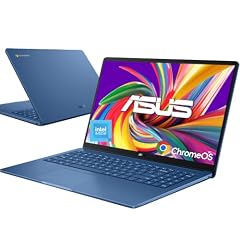
ASUS 15.6" FHD Chromebook
- Screen size
- 15 in or more
- Memory
- 4 GB or less
- Storage
- 128 GB
- Processor
- Intel Celeron or Pentium
- For students
- Yes
- For business
- Yes
This 15.6-inch Chromebook combines an Intel Celeron N50, 128GB of storage, and 4GB of RAM, making it a solid choice for classrooms and business environments. Its large screen and anti-glare display support all-day battery life, though the exact battery hours are not stated.
Pros
- 15.6-inch Full HD anti-glare display
- 128GB storage
- Marketed for students and business
- Intel Celeron N50 processor
Cons
- 4GB RAM may limit heavy multitasking
- No touchscreen
Good fit if
- Students in shared environments
- Users who want a large screen for reading and lectures
Skip if
- You need 8GB of RAM
- You prefer a touchscreen
Verdict: A practical large-screen Chromebook for educational settings.
11 Best detachable
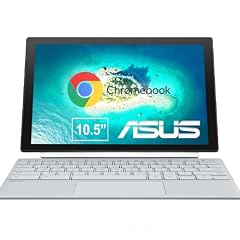
ASUS Chromebook CM30 Detachable 10.5 Inch 2-in-1 Laptop and Tablet
- Screen size
- 11 in or less
- Memory
- 4 GB or less
- Storage
- 64 GB
- Touchscreen
- Yes
- 2-in-1
- Yes
The CM30 is a 10.5-inch detachable 2-in-1 with a Full HD touchscreen and a stylus. It offers 64GB of storage and 4GB of RAM, making it a flexible option for tablet-first users who occasionally need a keyboard.
Pros
- Detachable design with stylus included
- Touchscreen display
- 10.5-inch size for portability
- Convertible to tablet mode
Cons
- 4GB RAM and 64GB storage are entry-level
- Screen size is small for laptop use
Good fit if
- Users who want a tablet with a detachable keyboard
- Artists who use a stylus for drawing
Skip if
- You need a traditional laptop form factor
- You require more storage or memory
Verdict: A flexible detachable Chromebook for mobile use.
12 Best entry-level large screen

ASUS Chromebook CX1
- Screen size
- 15 in or more
- Memory
- 4 GB or less
- Storage
- 128 GB
- Processor
- Intel Celeron or Pentium
The CX1 offers a 15.6-inch Full HD display with an Intel Celeron N4500, 4GB of RAM, and 128GB of storage. It is a basic large-screen Chromebook for users who prioritize screen size over performance.
Pros
- 15.6-inch Full HD NanoEdge display
- 128GB storage
- Intel Celeron N4500
- Low-cost option
Cons
- 4GB RAM only
- No touchscreen
Good fit if
- Users who want a large screen for basic tasks
- Budget-conscious shoppers who need a 15-inch display
Skip if
- You need more RAM for multitasking
- You want a touchscreen
Verdict: A straightforward large-screen Chromebook for simple use.
13 Best basic 14 inch

ASUS Chromebook CX1
- Screen size
- 14 in
- Memory
- 4 GB or less
- Storage
- 64 GB
- Processor
- Intel Celeron or Pentium
The CX1 14-inch model pairs an Intel Celeron N4500 with 4GB of RAM and 64GB of storage, offering a no-frills ChromeOS experience. It is a reliable entry point for users who just need a web browser and email machine.
Pros
- 14-inch Full HD display
- 64GB storage
- Intel Celeron N4500
- Simple clamshell design
Cons
- 4GB RAM
- Limited storage (64GB)
Good fit if
- First-time Chromebook users
- Users who need a secondary device for browsing
Skip if
- You plan to store many files locally
- You need more than 4GB of RAM
Verdict: An affordable 14-inch Chromebook for basic everyday tasks.
14 Best small and light

ASUS Chromebook CX1
- Screen size
- 11 in or less
- Memory
- 4 GB or less
- Storage
- 32 GB or less
- Processor
- Intel Celeron or Pentium
The 11.6-inch CX1 is the smallest and lightest clamshell in this list, with an Intel Celeron N3350, 4GB of RAM, and 32GB of storage. Its compact size makes it extremely portable, though storage is limited.
Pros
- 11.6-inch display, among the smallest in this list
- Lightweight and portable
- Budget-friendly
Cons
- 32GB storage is the smallest in this list
- Intel Celeron N3350 is an older processor
Good fit if
- Users who need a very portable Chromebook
- Young students with basic needs
Skip if
- You need more storage
- You require a larger screen
Verdict: A highly portable Chromebook for basic tasks, but check storage needs.
15 Best for portability on a budget

ASUS 14" Chromebook Portable Laptop
- Screen size
- 14 in
- Memory
- 4 GB or less
- Storage
- 64 GB
- Processor
- MediaTek
This 14-inch Chromebook uses a MediaTek Kompanio 520 processor with 4GB of RAM and 64GB of storage. It is a budget-friendly option that balances portability with a mid-size screen, suitable for users who want a 14-inch display without extra weight.
Pros
- 14-inch Full HD display
- Intel Celeron N4500 processor
- 64GB storage
- Lightweight design
Cons
- 4GB RAM
- No touchscreen
Good fit if
- Users who want a 14-inch Chromebook at a low price
- Travelers who need a light device
Skip if
- You need more RAM
- You prefer a touchscreen or 2-in-1
Verdict: A compact and affordable 14-inch Chromebook for everyday use.
Comparison table
| # | Chromebook | Screen size | Memory | Storage | Processor | Touchscreen | 2-in-1 |
|---|---|---|---|---|---|---|---|
| 1 | ASUS Chromebook Plus CX34 Laptop | 14 in | 6 to 8 GB | 256 GB | Intel Core | Yes | not stated |
| 2 | ASUS Chromebook Plus Touchscreen Laptop Flip 2-in-1-14" WUXGA Touch | 14 in | 6 to 8 GB | 256 GB | Intel Core | Yes | Yes |
| 3 | ASUS Chromebook CX15 Laptop | 15 in or more | 6 to 8 GB | 128 GB | Intel N-series | not stated | not stated |
| 4 | ASUS Chromebook CM15 Laptop | 15 in or more | 6 to 8 GB | 128 GB | MediaTek | not stated | not stated |
| 5 | ASUS Chromebook Flip CX1 | 14 in | not stated | 256 GB | Intel Celeron or Pentium | not stated | Yes |
| 6 | ASUS Chromebook 10.5" WUXGA Touch Laptop MediaTek Kompanio 520 2.0 GHz | 11 in or less | 6 to 8 GB | 128 GB | MediaTek | Yes | not stated |
| 7 | ASUS 14" FHD Touchscreen Students Chromebook | 14 in | 6 to 8 GB | 128 GB | Intel Celeron or Pentium | Yes | not stated |
| 8 | ASUS Chromebook C425 Clamshell Laptop | 14 in | 4 GB or less | 128 GB | Intel Core | not stated | not stated |
| 9 | ASUS CX14 Chromebook Laptop for Business & Student | not stated | not stated | not stated | Intel Celeron or Pentium | not stated | not stated |
| 10 | ASUS 15.6" FHD Chromebook | 15 in or more | 4 GB or less | 128 GB | Intel Celeron or Pentium | not stated | not stated |
| 11 | ASUS Chromebook CM30 Detachable 10.5 Inch 2-in-1 Laptop and Tablet | 11 in or less | 4 GB or less | 64 GB | not stated | Yes | Yes |
| 12 | ASUS Chromebook CX1 | 15 in or more | 4 GB or less | 128 GB | Intel Celeron or Pentium | not stated | not stated |
| 13 | ASUS Chromebook CX1 | 14 in | 4 GB or less | 64 GB | Intel Celeron or Pentium | not stated | not stated |
| 14 | ASUS Chromebook CX1 | 11 in or less | 4 GB or less | 32 GB or less | Intel Celeron or Pentium | not stated | not stated |
| 15 | ASUS 14" Chromebook Portable Laptop | 14 in | 4 GB or less | 64 GB | MediaTek | not stated | not stated |
How this list was made
We started with a pool of 33 ASUS Chromebooks listed on the store, each with its stated specifications. We removed near-duplicate configurations and selected 15 models that cover the range of sizes, processors, and form factors. For each pick, we relied only on the seller's listed specs and the manufacturer's published information. We did not test these machines; instead, we compared the specs to identify which model best fits each use case. All prices are live and read from the store listing, so they may change.
Choosing the right one
Chromebook Plus vs standard Chromebook
Chromebook Plus is a Google certification that guarantees a minimum of 8GB of RAM, 128GB of storage, and an Intel Core or equivalent processor, along with AI features like Gemini integration. Standard Chromebooks can have lower specs, such as 4GB of RAM and 64GB of storage, which are fine for basic browsing and document editing. If you plan to multitask heavily or use Android apps extensively, a Chromebook Plus model will offer a smoother experience.
In this list, the Chromebook Plus models are the CX34 and the Flip, both with 8GB of RAM and Intel Core processors.
Processor: Intel Celeron, Intel Core, or MediaTek
The processor determines how quickly your Chromebook can handle tasks. Intel Celeron processors (like the N4500 or N50) are entry-level and suitable for web browsing, email, and Google Docs. Intel Core processors (like the i3 or i5) offer higher performance for multitasking, video calls, and lighter creative work. MediaTek Kompanio processors are ARM-based and often provide better battery efficiency, but may have less software compatibility for some Linux apps.
For most users, a Celeron or N50 is sufficient, but if you need faster performance, choose a model with an Intel Core i3 or i5.
RAM and storage: how much do you need?
ChromeOS is efficient with memory, but having at least 8GB of RAM is recommended for heavy multitasking, many open tabs, or Android apps. 4GB is acceptable for light use but may become limiting. Storage is used for offline files, downloads, and Android apps; 64GB is the baseline, while 128GB or 256GB provides more space. If you primarily use cloud storage, 64GB is often enough.
In this list, the highest storage is 256GB, found on the Chromebook Plus CX34 and the Flip, and the highest RAM is 8GB across several models.
Screen size and form factor: clamshell, 2-in-1, or detachable
ASUS offers three main form factors: clamshell (traditional laptop), 2-in-1 (screen rotates or flips into tablet mode), and detachable (tablet with a removable keyboard). Consider how you plan to use the device: if you need a touchscreen for note-taking, a 2-in-1 like the Flip CX1 or the Chromebook Plus Flip is ideal; if you want a light tablet for reading, a detachable like the CM30 works well. For heavy typing, a 15.6-inch clamshell provides a full-sized keyboard.
Screen size affects portability: 10.5-inch models are the most portable, while 15.6-inch models are better for productivity but heavier.
Updates and security: how long will your Chromebook be supported?
All ChromeOS devices receive automatic updates for at least 10 years from the platform release date, according to Google's Auto Update policy. This ensures your ASUS Chromebook stays secure and gets new features for a decade. However, older models may no longer receive updates, so it's important to check the specific model's end-of-life date. You can find this by navigating to Settings > About ChromeOS > Additional details on your device.
In this list, all models are current and will receive updates for years, but always verify the exact date for your specific configuration.
Questions
What is Chromebook Plus and why should I choose it?
Chromebook Plus is a Google certification that ensures a minimum hardware specification, including at least 8GB of RAM, 128GB of storage, and an Intel Core or equivalent processor. It also includes built-in AI features like Gemini, which help with writing, image editing, and productivity. If you want a faster and more future-proof Chromebook, look for the Plus label.
How long will an ASUS Chromebook receive updates?
Google's Auto Update policy guarantees at least 10 years of automatic updates for Chromebooks released after 2021. ASUS Chromebooks, including the models in this list, will receive security and feature updates for many years. You can check the exact date in your device's settings under 'Update schedule'.
Can I use Linux on an ASUS Chromebook?
Yes, most Chromebooks support Linux development environment, allowing you to install code editors, IDEs, and command-line tools. The feature is available in Settings under 'Developers'. Note that hardware acceleration is not yet supported, so graphically intensive Linux apps may run slower.
Do all ASUS Chromebooks have touchscreens?
No, only certain models have touchscreens, such as the 2-in-1 and detachable models. Clamshell models like the CX15 and C425 do not have touchscreens. Check the product specifications to see if a model includes a touchscreen.
What changed
- : First published.