
Best 14-Inch Chromebooks in 2026: 15 Picks Compared on Specs
The Acer Chromebook Plus Spin 714 is the 14-inch Chromebook to start with: it combines an Intel Core Ultra 5 processor, 8GB of RAM, 256GB of storage and a WUXGA touchscreen in a convertible body, while meeting every Chromebook Plus requirement. This guide compares 15 current 14-inch models on the specifications the seller states: processor family, RAM, storage, display features, convertible hinges and Google's Chromebook Plus designation. Prices shown on the page are live and come from the current listings; these are specification-based picks, not direct-use evaluations.
15 picks from 12 Chromebooks that match this guide with a price we can quote today, made by 6 makers. Each price below is read live and stamped with the time it was read.
The short list
Who each pick suits
- For students who want a touchscreen convertible: The Lenovo Chromebook 2-in-1 gives you a 14-inch WUXGA IPS touchscreen and a folding hinge, with 128GB of storage and an Intel N150 processor. It is the simplest touchscreen convertible in this list if you do not need Chromebook Plus. See pick 7
- For Chromebook Plus power: Start with the Acer Chromebook Plus Spin 714 for Core Ultra 5 performance, 8GB of RAM and a WUXGA touchscreen. It covers the Plus hardware bar and is the most processor-heavy pick here. See pick 1
- For heavy local storage: The Acer Chromebook Plus Spin 514 has a 512GB SSD and 8GB of RAM, so it suits users who keep videos, photos and projects on the laptop. The Lenovo IdeaPad Flex 5i is the non-Plus alternative with a Core i5. See pick 2
- For video calls and meetings: The HP Chromebook Plus 14 lists a 1080p webcam and a backlit keyboard, which makes it the pick for long video meetings and typed notes. It uses an Intel Core i3-N305 with 8GB of RAM. See pick 4
The 15 picks, one by one
1 Best overall

acer Chromebook Plus Spin 714 Laptop with Google AI
- Screen size
- 14 in
- Memory
- 6 to 8 GB
- Storage
- 256 GB
- Processor
- Intel Core
- Touchscreen
- Yes
- 2-in-1
- Yes
- Chromebook Plus
- Yes
$637.00 price as of 2026-10-09 05:24 UTC (Details)
It is the only pick with an Intel Core Ultra 5 115U processor, and it pairs that with 8GB of RAM, 256GB of storage and a 14-inch WUXGA touchscreen that folds into a tablet. The Chromebook Plus badge means it meets Google's baseline hardware for current AI features, which makes it the most complete 14-inch package in this list.
Pros
- Intel Core Ultra 5 115U, the most advanced processor among the picks
- 14-inch WUXGA touchscreen in a convertible body
- 256GB storage and 8GB RAM with Chromebook Plus status
- Chromebook Plus badge for current AI and hardware requirements
Cons
- 8GB RAM, not 16GB
- 256GB storage is half the 512GB found elsewhere in this list
Good fit if
- Anyone who wants the strongest processor in a 14-inch Chromebook without stepping up to a 15-inch or 16-inch chassis
- Buyers who want a convertible touchscreen and Chromebook Plus AI features in one machine
Skip if
- You need more than 256GB of internal storage
- You expect 16GB of RAM for heavy Linux or Android workloads
Verdict: The Acer Chromebook Plus Spin 714 is the best all-around 14-inch Chromebook in this list because it combines the fastest processor with a convertible touchscreen and Chromebook Plus features.
2 Best Plus 2-in-1 with 512GB storage

Acer Chromebook Plus Spin 514 2-in-1 Laptop 14" WUXGA IPS Touchscreen
- Screen size
- 14 in
- Memory
- 6 to 8 GB
- Storage
- 512 GB or more
- Processor
- Intel Core
- Touchscreen
- Yes
- 2-in-1
- Yes
- Chromebook Plus
- Yes
$629.00 price as of 2026-10-09 05:24 UTC (Details)
This Chromebook Plus convertible pairs an Intel Core i5-1334U with 8GB of RAM and a 512GB SSD, the largest storage among convertible picks here. Its 14-inch WUXGA IPS touchscreen is listed with 100% sRGB coverage, so it suits color-sensitive work.
Pros
- 512GB SSD, the largest storage among convertible picks in this list
- Intel Core i5-1334U 10-core processor with 8GB RAM
- WUXGA IPS touchscreen listed at 100% sRGB in a 2-in-1
- Chromebook Plus badge
Cons
- 8GB RAM, not 16GB
- Intel Core i5-1334U is a step below the Core Ultra 5 on our top pick
- 512GB is more local storage than a cloud-first user usually needs
Good fit if
- People who keep large files locally and want a touchscreen convertible
- Editors and students working with photos or presentations who can use the sRGB-rated display
Skip if
- You want the fastest CPU in this list, which is on the Spin 714
- 512GB is more storage than you need and you prefer a simpler machine
Verdict: Choose the Acer Chromebook Plus Spin 514 when local storage matters more than raw processor speed.
3 Best Plus clamshell with Core i5

ASUS Chromebook Plus CX34 Laptop
- Screen size
- 14 in
- Memory
- 6 to 8 GB
- Storage
- 256 GB
- Processor
- Intel Core
- Touchscreen
- Yes
- Chromebook Plus
- Yes
The ASUS Chromebook Plus CX34 is a traditional clamshell with an Intel Core i5-1335U, 8GB of RAM and 256GB of storage, plus a 14-inch touchscreen. It is the pick for users who want Chromebook Plus performance and touch input without a convertible hinge.
Pros
- Intel Core i5-1335U with 8GB RAM
- 14-inch touchscreen in a clamshell body
- 256GB storage
- Chromebook Plus badge
Cons
- No convertible hinge is listed for this model
- 256GB storage, less than the 512GB options in this list
- Screen resolution is not stated by the seller
Good fit if
- People who want a touchscreen but rarely use tablet or tent modes
- Chromebook Plus users who prefer a conventional laptop shape
Skip if
- You need a 360-degree hinge for presentations or note taking
- You want a higher-resolution display confirmed in the listing
Verdict: The ASUS Chromebook Plus CX34 is the simplest way to get Core i5 performance and a touchscreen in a Chromebook Plus clamshell.
4 Best Plus touchscreen for video calls and typing

HP Chromebook Plus 14 Laptop
- Screen size
- 14 in
- Memory
- 6 to 8 GB
- Storage
- 256 GB
- Processor
- Intel Core
- Touchscreen
- Yes
- Chromebook Plus
- Yes
This HP Chromebook Plus 14 lists a 1080p webcam and a backlit keyboard, two features that matter for video meetings and late-night typing. It combines an Intel Core i3-N305, 8GB of RAM, a 14-inch FHD touchscreen and 256GB UFS storage.
Pros
- 1080p webcam listed
- Backlit keyboard listed
- 14-inch FHD touchscreen with 256GB UFS storage
- 8GB RAM and Chromebook Plus status
Cons
- Intel Core i3-N305 is below the Core i5 models in this list
- Not a convertible
- 256GB storage, not 512GB
Good fit if
- Remote workers and students who spend hours in video calls
- Typists who want a backlit keyboard on a Plus model
Skip if
- You need a 2-in-1 hinge
- You want a Core i5 or faster processor
Verdict: The HP Chromebook Plus 14 is the best 14-inch pick when the webcam and keyboard matter as much as the processor.
5 Best Plus convertible for students and work

HP Chromebook Plus x360 Laptop 14" 2 in 1 Touchscreen Business Laptop
- Screen size
- 14 in
- Memory
- 6 to 8 GB
- Storage
- 256 GB
- Processor
- Intel Core
- Touchscreen
- Yes
- 2-in-1
- Yes
- Chromebook Plus
- Yes
- For students
- Yes
This HP Chromebook Plus x360 is the only Plus convertible in the list with both student and business use cases called out. It has an Intel Core i3-N305, 8GB of RAM, 256GB of storage and a 14-inch touchscreen that folds back for tablet use.
Pros
- Chromebook Plus convertible with a 14-inch touchscreen
- Intel Core i3-N305 with 8GB RAM
- 256GB UFS storage
- Listed for both student and business use
Cons
- Core i3-N305, not Core i5 or Core Ultra 5
- 8GB RAM, not 16GB
- Screen resolution is not stated by the seller
Good fit if
- Students who need a Plus machine that can also sit in a business setting
- Users who want ChromeOS AI features and a 2-in-1 form
Skip if
- You want a confirmed FHD or WUXGA resolution
- You need more than 8GB of RAM
Verdict: The HP Chromebook Plus x360 balances Chromebook Plus features, a convertible design and student-and-business credentials in one 14-inch package.
6 Best non-Plus convertible with Core i3

Acer Chromebook Spin 314 CP314-2HN-30V1 Convertible Laptop
- Screen size
- 14 in
- Memory
- 6 to 8 GB
- Storage
- 128 GB
- Processor
- Intel Core
- Touchscreen
- Yes
- 2-in-1
- Yes
$499.99 price as of 2026-10-09 05:24 UTC (Details)
The Acer Chromebook Spin 314 gives you an Intel Core i3-N305, 8GB of RAM and a 14-inch WUXGA IPS touchscreen with Corning Gorilla Glass, all without the Chromebook Plus label. It is our pick for buyers who want a solid convertible but do not need Plus-specific extras.
Pros
- Intel Core i3-N305 with 8GB RAM
- 14-inch WUXGA IPS display with Corning Gorilla Glass listed
- 128GB storage
- 360-degree convertible touchscreen
Cons
- No Chromebook Plus badge in the listing
- 128GB storage, less than 256GB and 512GB alternatives
- Core i3-N305, not Core i5
Good fit if
- People who want strong specs without the Chromebook Plus designation
- Students who like the safety of Gorilla Glass on a touchscreen
Skip if
- You want Chromebook Plus AI features
- You need 256GB or more storage
Verdict: The Acer Chromebook Spin 314 is the best way to get a Core i3 convertible outside the Chromebook Plus tier.
7 Best entry-level convertible with a touchscreen
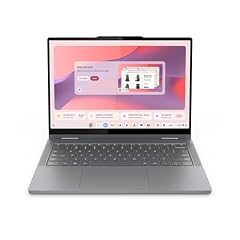
Lenovo Chromebook 2-in-1
- Screen size
- 14 in
- Memory
- 4 GB or less
- Storage
- 128 GB
- Processor
- Intel N-series
- Touchscreen
- Yes
- 2-in-1
- Yes
This Lenovo Chromebook 2-in-1 lists an Intel N150 processor, a 14-inch WUXGA IPS touchscreen and 128GB of storage in a convertible body. It is the recommended starting point for a touchscreen convertible without the Chromebook Plus designation.
Pros
- 14-inch WUXGA IPS touchscreen
- Intel N150 processor with 128GB storage
- Convertible 2-in-1 design
- Listed as lightweight with Google Gemini integration
Cons
- 4GB or less RAM, not 8GB
- No Chromebook Plus badge
- Entry-level N-series processor
Good fit if
- Students who want a touchscreen for notes
- Home users who want a convertible for web apps and media
Skip if
- You regularly keep many tabs or Android apps open, since 4GB RAM will limit you
- You need Chromebook Plus performance
Verdict: The Lenovo 2-in-1 is the best touchscreen convertible for users who want the form factor without the Chromebook Plus designation.
8 Best 2-in-1 display
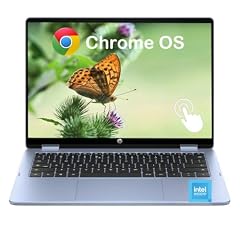
HP 2-in-1 Chromebook Laptop
- Screen size
- 14 in
- Memory
- 6 to 8 GB
- Storage
- 64 GB
- Processor
- Intel N-series
- Touchscreen
- Yes
- 2-in-1
- Yes
The HP 2-in-1 Chromebook lists a 14-inch 2K IPS touchscreen, the highest listed resolution among convertible picks in this group, alongside an Intel N150 and 8GB of RAM. It is the pick for people who want a sharp panel and a flexible hinge.
Pros
- 14-inch 2K IPS touchscreen, the highest listed resolution among convertible picks here
- 8GB LPDDR5 RAM
- Intel N150 processor
- Convertible 2-in-1
Cons
- 64GB eMMC storage is tied for the smallest among 8GB picks
- No Chromebook Plus badge
- N150 is below the Core i3 and Core i5 models
Good fit if
- Media viewers and note takers who notice screen resolution
- Users who want a convertible with 8GB RAM at an N150 level
Skip if
- You need more than 64GB of internal storage
- You want Chromebook Plus features
Verdict: The HP 2-in-1 is the 14-inch convertible to pick when display sharpness matters most.
9 Best Celeron convertible with 256GB storage

ASUS Chromebook Flip CX1
- Screen size
- 14 in
- Storage
- 256 GB
- Processor
- Intel Celeron or Pentium
- 2-in-1
- Yes
The ASUS Chromebook Flip CX1 is a 14-inch 2-in-1 with an Intel Celeron N4500 and 256GB of storage, the most in a Celeron convertible in this list. It is for buyers who want a foldable laptop and can accept a Celeron-class processor.
Pros
- 256GB storage, the largest among Celeron convertibles here
- 14-inch 2-in-1 design
- 8GB RAM as listed
- Intel Celeron N4500
Cons
- Intel Celeron N4500, well below the Core i3 and Core i5 options
- No Chromebook Plus badge
- Touchscreen is not expressly stated in the listing
Good fit if
- Users who want a convertible and will keep large files locally
- Those who are comfortable with a Celeron processor for web and document work
Skip if
- You need a Core-class processor for heavy multitasking
- You want Chromebook Plus features
Verdict: The ASUS Flip CX1 is the Celeron convertible with the most storage in this list.
10 Best Plus clamshell with 512GB SSD

acer Chromebook Plus 514 Laptop with Google AI
- Screen size
- 14 in
- Memory
- 6 to 8 GB
- Storage
- 512 GB or more
- Processor
- Intel Core
- Touchscreen
- Yes
- Chromebook Plus
- Yes
$448.00 price as of 2026-10-09 05:24 UTC (Details)
This Acer Chromebook Plus 514 combines an Intel Core i3-N305, 8GB of RAM and a 512GB SSD in a 14-inch FHD IPS touchscreen clamshell. It offers the largest storage among non-convertible Plus picks in this list.
Pros
- 512GB SSD, the most storage among clamshell Plus picks here
- Intel Core i3-N305 8-core processor with 8GB RAM
- 14-inch FHD 1920x1080 IPS touchscreen
- Chromebook Plus badge
Cons
- Clamshell, not a 2-in-1
- Core i3-N305, not Core i5
- 8GB RAM, not 16GB
Good fit if
- Users who want a Plus laptop with a large local SSD
- People who rarely fold a screen but like touch input
Skip if
- You need a convertible or Core i5
- 512GB is more storage than you want to manage
Verdict: The Acer Chromebook Plus 514 is the clamshell to choose when local storage is the priority.
11 Best N-series clamshell with 8GB RAM

HP Chromebook 14 inch Laptop
- Screen size
- 14 in
- Memory
- 6 to 8 GB
- Storage
- 128 GB
- Processor
- Intel N-series
The HP Chromebook 14 keeps things simple with an Intel N100 processor, 8GB of RAM and 128GB UFS storage in a conventional clamshell. It is the most straightforward 8GB Chromebook in this list for users who do not want a touchscreen or convertible.
Pros
- 8GB RAM with an Intel N100 processor
- 128GB UFS storage
- Simple clamshell design
- Listed with UHD Graphics
Cons
- HD display, not FHD or WUXGA
- No touchscreen
- No Chromebook Plus badge
Good fit if
- Users who want 8GB RAM in a no-frills 14-inch clamshell
- People who do not need a touchscreen
Skip if
- You want a sharper display
- You need touch input or a convertible hinge
Verdict: The HP Chromebook 14 is the pick when 8GB of RAM matters more than extras like touch and high resolution.
12 Best MediaTek clamshell with WUXGA display

The Lenovo Chromebook m 14 uses a MediaTek Kompanio 540 processor, 8GB of RAM and a 14-inch WUXGA IPS display, with 64GB of storage. It is the pick in the MediaTek group for users who value a sharp screen over internal capacity.
Pros
- 14-inch WUXGA IPS display
- 8GB RAM
- MediaTek Kompanio 540 processor
- Listed with Google Gemini integration
Cons
- 64GB internal storage, the smallest capacity in this group
- No touchscreen
- No Chromebook Plus badge
Good fit if
- Everyday users who see the screen more than they see the storage
- People who prefer a MediaTek processor in a simple clamshell
Skip if
- You need 128GB or more internal storage
- You want touch input
Verdict: The Lenovo Chromebook m 14 is the best MediaTek clamshell for a clear 14-inch display and 8GB RAM.
13 Best student clamshell with extra storage card

Samsung Galaxy Chromebook Go Laptop
- Screen size
- 14 in
- Storage
- 64 GB
- Processor
- Intel Celeron or Pentium
- For students
- Yes
The Samsung Galaxy Chromebook Go is listed for home and student use with an Intel Celeron N4500, 64GB eMMC and a 128GB SD card, giving you more combined storage than a typical 64GB Chromebook. Its 14-inch LED screen and listed 12-hour battery keep the package simple.
Pros
- 64GB eMMC plus a 128GB SD card as listed
- Student-oriented listing
- 14-inch LED display
- 12-hour battery listed
Cons
- RAM is not stated by the seller
- No touchscreen
- No Chromebook Plus badge
Good fit if
- Students who want a simple clamshell with room for files on the bundled card
- Home users who prefer a clamshell over a 2-in-1
Skip if
- You need the RAM amount confirmed before buying
- You want a touchscreen or Chromebook Plus features
Verdict: The Samsung Galaxy Chromebook Go is the student clamshell to consider when the listing already bundles extra storage on an SD card.
14 Best Chromebook Plus with AMD processor

Acer Chromebook Plus 514 Laptop with Google AI
- Screen size
- 14 in
- Memory
- 6 to 8 GB
- Storage
- 128 GB
- Processor
- AMD
- Chromebook Plus
- Yes
$439.97 price as of 2026-10-09 05:24 UTC (Details)
This Acer Chromebook Plus 514 is the only Chromebook Plus in the list with an AMD processor, an AMD Ryzen 3 7320C, plus 8GB of RAM and 128GB of storage. It shows that the Plus tier is not limited to Intel machines.
Pros
- AMD Ryzen 3 7320C processor, the only AMD Plus pick in this list
- 14-inch WUXGA 1920x1200 IPS display
- 8GB LPDDR5X RAM as listed
- Chromebook Plus badge
Cons
- 128GB storage, smaller than 256GB and 512GB options
- No touchscreen in the listing
- Clamshell, not a convertible
Good fit if
- Buyers who prefer AMD processors in a Plus Chromebook
- Users who want a high-resolution 14-inch display without touch
Skip if
- You need touch or a 2-in-1 hinge
- You want 256GB or more storage
Verdict: The Acer Chromebook Plus 514 AMD is the Plus pick for AMD fans who want a 1920x1200 display.
15 Best non-Plus 2-in-1 with Core i5

Lenovo IdeaPad Flex 5i 14" WUXGA 2-in-1 Touchscreen Chromebook
- Screen size
- 14 in
- Memory
- 6 to 8 GB
- Storage
- 128 GB
- Processor
- Intel Core
- Touchscreen
- Yes
- 2-in-1
- Yes
The Lenovo IdeaPad Flex 5i is a 14-inch WUXGA 2-in-1 with an Intel Core i5-1334U, 8GB of RAM and 128GB of internal storage. It is the strongest non-Plus convertible in this list on processor power.
Pros
- Intel Core i5-1334U with 8GB RAM
- 14-inch WUXGA touchscreen and 2-in-1 hinge
- 128GB internal storage
- Strong processor alternative to the Chromebook Plus tier
Cons
- No Chromebook Plus badge
- 128GB internal storage, less than 256GB or 512GB options
- 8GB RAM, not 16GB
Good fit if
- Users who want Core i5 performance in a convertible without Plus branding
- People who prefer a Lenovo IdeaPad form factor
Skip if
- You want Chromebook Plus features
- You need more internal storage than 128GB
Verdict: The Lenovo IdeaPad Flex 5i is the non-Plus convertible with the most processor power in this list.
Comparison table
| # | Chromebook | Screen size | Memory | Storage | Processor | Touchscreen | 2-in-1 |
|---|---|---|---|---|---|---|---|
| 1 | acer Chromebook Plus Spin 714 Laptop with Google AI | 14 in | 6 to 8 GB | 256 GB | Intel Core | Yes | Yes |
| 2 | Acer Chromebook Plus Spin 514 2-in-1 Laptop 14" WUXGA IPS Touchscreen | 14 in | 6 to 8 GB | 512 GB or more | Intel Core | Yes | Yes |
| 3 | ASUS Chromebook Plus CX34 Laptop | 14 in | 6 to 8 GB | 256 GB | Intel Core | Yes | not stated |
| 4 | HP Chromebook Plus 14 Laptop | 14 in | 6 to 8 GB | 256 GB | Intel Core | Yes | not stated |
| 5 | HP Chromebook Plus x360 Laptop 14" 2 in 1 Touchscreen Business Laptop | 14 in | 6 to 8 GB | 256 GB | Intel Core | Yes | Yes |
| 6 | Acer Chromebook Spin 314 CP314-2HN-30V1 Convertible Laptop | 14 in | 6 to 8 GB | 128 GB | Intel Core | Yes | Yes |
| 7 | Lenovo Chromebook 2-in-1 | 14 in | 4 GB or less | 128 GB | Intel N-series | Yes | Yes |
| 8 | HP 2-in-1 Chromebook Laptop | 14 in | 6 to 8 GB | 64 GB | Intel N-series | Yes | Yes |
| 9 | ASUS Chromebook Flip CX1 | 14 in | not stated | 256 GB | Intel Celeron or Pentium | not stated | Yes |
| 10 | acer Chromebook Plus 514 Laptop with Google AI | 14 in | 6 to 8 GB | 512 GB or more | Intel Core | Yes | not stated |
| 11 | HP Chromebook 14 inch Laptop | 14 in | 6 to 8 GB | 128 GB | Intel N-series | not stated | not stated |
| 12 | Lenovo Chromebook m 14" | 14 in | 6 to 8 GB | 64 GB | MediaTek | not stated | not stated |
| 13 | Samsung Galaxy Chromebook Go Laptop | 14 in | not stated | 64 GB | Intel Celeron or Pentium | not stated | not stated |
| 14 | Acer Chromebook Plus 514 Laptop with Google AI | 14 in | 6 to 8 GB | 128 GB | AMD | not stated | not stated |
| 15 | Lenovo IdeaPad Flex 5i 14" WUXGA 2-in-1 Touchscreen Chromebook | 14 in | 6 to 8 GB | 128 GB | Intel Core | Yes | Yes |
How this list was made
This guide starts with the current catalogue of 87 14-inch Chromebook listings, then shortlists 15 that cover the main configurations: entry-level Celeron and N-series models, mid-range Intel Core and MediaTek Chromebooks, and Chromebook Plus machines with 8GB RAM or more. The picks were chosen from stated specifications and the maker's published information, not from direct use by this site. Prices on this page are live, read from the store listing, and can change; the awards and comparisons are based on specs that do not move with the price. Models with the same chassis and similar specs were folded into one entry so you see one configuration per family.
Choosing the right one
Why screen size matters at 14 inches
A 14-inch display sits between the smallest Chromebooks and the 15-inch and 16-inch desktop replacements. ENERGY STAR's computer guidance describes 14- to 16-inch laptops as a balance of performance, portability and price, easily configured as a desktop replacement. For a Chromebook, 14 inches is the practical middle: large enough for split-screen documents, small enough to carry to class or a meeting. All picks in this guide use a 14-inch screen, so the buying decision comes down to the other components.
Chromebook Plus versus standard Chromebook
Chromebook Plus is a hardware tier that Google defines on its Chromebook Plus page: Plus models have 8GB or more of RAM and 128GB or more of storage, and they include Gemini-based AI features in ChromeOS. In this list, Plus picks include Acer, ASUS, HP and Lenovo convertibles and clamshells. Standard Chromebooks can still be fine for web apps, docs and classroom work, but if you want current AI tools and a guaranteed baseline of hardware, choose a Plus model.
Processor and RAM: what the model names mean
The processor families in this list tell most of the story. Intel Celeron and N-series chips handle browsing, email, Google Docs and video; Core i3, Core i5 and Core Ultra chips handle more tabs, Android apps and Linux workloads; MediaTek Kompanio chips appear in everyday clamshells here. RAM matters just as much: 4GB is workable for light use, while 8GB is the common point for Chromebook Plus and for users who multitask. The comparisons here come from the stated specifications.
Touchscreens and convertible hinges
A convertible Chromebook has a hinge that folds the 14-inch screen into tablet, tent or stand positions. Some touchscreen Chromebooks are clamshells, which means you can tap the screen but cannot fold it back. If you take handwritten notes, present to a group, or watch video in tablet mode, look for a 2-in-1 listing. If you mostly type on a desk, a touchscreen clamshell can still be useful without the extra hinge.
Storage sizes and what they mean
Storage in this list ranges from small 64GB-class drives to 512GB-class SSDs, with some listings adding an SD card for extra space. Chromebooks are cloud-first, so 64GB is enough for many users, but local files, Android games and Linux containers fill space quickly. For offline work or large media collections, choose 128GB, 256GB or 512GB. The listing may specify eMMC, UFS or SSD; those terms describe the type of storage, not just the capacity.
Updates: how long the Chromebook stays current
Google's Auto Update policy says ChromeOS devices receive 10 years of automatic updates. An older 14-inch Chromebook may have fewer years left, so the update schedule is worth checking before purchase: the device settings show the automatic update expiration date. More updates mean more features and security fixes over the life of the machine. For a school Chromebook expected to last several years, confirm the update schedule before buying.
Questions
What is a Chromebook Plus?
Chromebook Plus is Google's current hardware tier for Chromebooks. Google's Chromebook Plus page lists the baseline as 8GB or more of RAM and 128GB or more of storage, and Plus models add Gemini features such as Help me read, Magic Editor and the Quick Insert key. In this guide, Plus picks appear from Acer, ASUS, HP and Lenovo, all with at least 8GB of RAM and at least 128GB of storage. If those hardware guarantees matter, choose a Plus badge.
How much RAM do I need in a 14-inch Chromebook?
4GB can handle light browsing and Google Docs, but 8GB is the safer choice if you keep many tabs open, run Android apps, or use Linux. Google's Chromebook Plus hardware bar is 8GB or more, so Plus models in this guide all have 8GB. Entry-level picks with 4GB are best for single-tasking school or home use. If you plan to edit video or work with large files, look for the 8GB Core-class models in this list.
Do I need a touchscreen or 2-in-1 14-inch Chromebook?
Not necessarily. A 14-inch clamshell keeps the design simple if most of your work is typing. A touchscreen lets you tap, swipe and scroll directly on the display. A 2-in-1 adds a hinge so you can fold the screen into tablet, tent or stand modes. That is useful for handwritten notes, presentations, and watching video. If you rarely fold the screen, a touchscreen clamshell or a plain clamshell may be a better fit.
How long will a 14-inch Chromebook receive updates?
Google says ChromeOS devices receive 10 years of automatic updates, and every update adds features and security fixes. The exact end date depends on the model, so check Settings, then About ChromeOS, then Additional details to see the update schedule. Older Chromebooks may receive fewer years of support, which is one reason to confirm the model was released recently before buying.
Can 14-inch Chromebooks run Android apps and Linux?
Chromebooks run Android apps from the Google Play Store, and Linux is available as a separate development feature you can turn on in Settings. Linux lets you install command-line tools, code editors and IDEs. Google notes some limitations in the Linux environment, including no camera support, no Android emulator, and no hardware acceleration for GPU and video decode. For most 14-inch Chromebook buyers, the Google Play Store is enough.
Are 14-inch Chromebooks good for students?
Yes, for most classroom work. A 14-inch screen is large enough for split-screen notes and assignments, while the laptop remains easier to carry than a 15-inch or 16-inch model. The student-oriented listings in this guide include touchscreens, bundled SD cards, and Chromebook Plus models with AI features. For a school Chromebook, prioritize at least 8GB of RAM if the school uses Android apps or Google Workspace heavily.
What changed
- : First published.