
Best Chromebooks Under $700: 7 Picks by Specs
The Acer Chromebook Plus Spin 714 is the best Chromebook under $700 for most people, thanks to its Intel Core Ultra 5 processor, touch display, and 2-in-1 design. We selected this list from the current catalogue of Chromebooks priced under $700, comparing each model on specifications such as CPU, memory, storage, and display features. All prices are read live from the store listings and may change.
7 picks from 4 Chromebooks that match this guide with a price we can quote today, made by 6 makers. Each price below is read live and stamped with the time it was read.
The short list
| # | Pick | Chromebook | Price |
|---|---|---|---|
| 1 | Best overall | acer Chromebook Plus Spin 714 Laptop with Google AI | $637.00 price as of 2026-10-09 05:24 UTC (Details) |
| 2 | Best 2-in-1 for students | Lenovo Flex 5i Chromebook Plus 14" WUXGA Touchscreen 2-in-1 Laptop | |
| 3 | Best storage with touch | Acer Chromebook Plus Spin 514 2-in-1 Laptop 14" WUXGA IPS Touchscreen | $629.00 price as of 2026-10-09 05:24 UTC (Details) |
| 4 | Best storage without touch | Acer Chromebook Plus Spin 514 | $649.99 price as of 2026-10-09 05:24 UTC (Details) |
| 5 | Best for daily productivity | ASUS Chromebook Plus Touchscreen Laptop Flip 2-in-1-14" WUXGA Touch | |
| 6 | Best entry-level 2-in-1 | Lenovo IdeaPad Flex 5i Chromebook Plus | |
| 7 | Best for business | Lenovo Chromebook Plus Laptop for Business & Student |
Who each pick suits
- For students on a budget: The Lenovo Flex 5i Chromebook Plus 14 combines a touchscreen, 2-in-1 flexibility, and a solid Intel Core i5 processor, making it ideal for note-taking, research, and light gaming. See pick 2
- For business professionals: The Lenovo Chromebook Plus Laptop for Business offers a larger 15-inch touchscreen and a keyboard designed for productivity, with a focus on security and manageability for enterprise use. See pick 7
- For creative users needing storage: The Acer Chromebook Plus Spin 514 with 512GB of storage provides ample space for media files, manuscripts, and design projects, while its touchscreen adds a creative edge. See pick 3
- For casual daily use: The ASUS Chromebook Plus Flip is a lightweight 2-in-1 with a fast i5 processor and 8GB of RAM, covering everyday web, office, and streaming tasks efficiently. See pick 5
The 7 picks, one by one
1 Best overall

acer Chromebook Plus Spin 714 Laptop with Google AI
- Screen size
- 14 in
- Memory
- 6 to 8 GB
- Storage
- 256 GB
- Processor
- Intel Core
- Touchscreen
- Yes
- 2-in-1
- Yes
- Chromebook Plus
- Yes
$637.00 price as of 2026-10-09 05:24 UTC (Details)
The Acer Chromebook Plus Spin 714 leads this list with an Intel Core Ultra 5 processor, the most advanced CPU among the picks. Its 14-inch WUXGA touchscreen and 2-in-1 design offer versatility, while 8GB of RAM and 256GB of storage cover everyday needs.
Pros
- Intel Core Ultra 5 processor, the most advanced CPU in this list
- 14-inch WUXGA touchscreen with 2-in-1 convertible design
- Chromebook Plus certified with AI features and performance standards
- 8GB LPDDR5 RAM for smooth multitasking
Cons
- 256GB storage is less than the 512GB options in this list
- No dedicated Ethernet port (not stated by seller)
Good fit if
- Users who want the latest processor generation for demanding web apps and light productivity
- Those who value a touchscreen and convertible form factor for note-taking and presentations
Skip if
- You need more than 256GB of local storage
- You prioritize a larger display over portability (this is 14 inches)
Verdict: The Acer Chromebook Plus Spin 714 is the most powerful Chromebook under $700, offering the best balance of performance, features, and design.
2 Best 2-in-1 for students

Lenovo Flex 5i Chromebook Plus 14" WUXGA Touchscreen 2-in-1 Laptop
- Screen size
- 14 in
- Memory
- 6 to 8 GB
- Storage
- 256 GB
- Processor
- Intel Core
- Touchscreen
- Yes
- 2-in-1
- Yes
- Chromebook Plus
- Yes
The Lenovo Flex 5i Chromebook Plus 14 pairs a touchscreen and 360-degree hinge with an Intel Core i5-1334U processor and 8GB of RAM, making it a flexible companion for campus life. Its 14-inch WUXGA display is sharp for reading and video, and the Chromebook Plus certification ensures access to Google's AI-powered features.
Pros
- Intel Core i5-1334U processor balances performance and battery life
- 14-inch WUXGA touchscreen with 2-in-1 hinge
- 8GB RAM and 256GB storage handle typical student workloads
- Chromebook Plus certification with AI and performance benchmarks
Cons
- 256GB storage may feel tight for video-heavy projects
- No numeric keypad (not stated by seller)
Good fit if
- Students who need a versatile 2-in-1 for classes, group work, and personal projects
- Users who want the convenience of a touchscreen without sacrificing a physical keyboard
Skip if
- You require more than 256GB of local storage for media libraries
- You prefer a non-touch display to reduce glare or cost
Verdict: The Lenovo Flex 5i Chromebook Plus 14 is the ideal 2-in-1 for students, combining a reliable processor, touch interface, and the flexibility of a convertible design.
3 Best storage with touch

Acer Chromebook Plus Spin 514 2-in-1 Laptop 14" WUXGA IPS Touchscreen
- Screen size
- 14 in
- Memory
- 6 to 8 GB
- Storage
- 512 GB or more
- Processor
- Intel Core
- Touchscreen
- Yes
- 2-in-1
- Yes
- Chromebook Plus
- Yes
$629.00 price as of 2026-10-09 05:24 UTC (Details)
The Acer Chromebook Plus Spin 514 stands out with 512GB of storage, the most available among the touchscreen models in this list. Its Intel Core i5-1334U processor, 8GB of RAM, and a 100% sRGB touch display make it a strong pick for creative work and media-heavy projects.
Pros
- 512GB storage, the largest among touchscreen picks
- Intel Core i5-1334U processor with 8GB RAM
- 14-inch WUXGA IPS touchscreen with 100% sRGB coverage
- 2-in-1 design for presentation and drawing
Cons
- Storage is not expandable via microSD (not stated by seller)
- Weighs more than some 14-inch non-convertible models (weight not stated by seller)
Good fit if
- Creatives who need room for design files, photos, and videos
- Users who want a touchscreen with accurate color reproduction for editing tasks
Skip if
- You prefer a lighter, non-convertible laptop for frequent travel
- You do not need the extra storage and could save money with a smaller drive
Verdict: With the most storage among touchscreen Chromebooks here, the Acer Chromebook Plus Spin 514 is perfect for users who need space and color accuracy.
4 Best storage without touch

Acer Chromebook Plus Spin 514
- Screen size
- 14 in
- Storage
- 512 GB or more
- Processor
- Intel Core
- 2-in-1
- Yes
- Chromebook Plus
- Yes
$649.99 price as of 2026-10-09 05:24 UTC (Details)
The Acer Chromebook Plus Spin 514 (no-touch variant) offers the same 512GB storage and Intel Core i5-1334U processor as its touchscreen sibling, but without the touch layer. This makes it a focused choice for users who prefer a traditional display while still getting the largest storage capacity among the picks.
Pros
- 512GB storage, tied for the most in this list
- Intel Core i5-1334U processor with 8GB RAM
- 14-inch WUXGA IPS display (touch not stated by seller)
- 2-in-1 hinge allows tent and stand modes for media viewing
Cons
- No touchscreen, which may be a miss for some
- Similar to the touch model but missing a feature some users expect
Good fit if
- Users who want maximum storage without paying for touch functionality
- Business users who prefer a clean display for typing and presentations
Skip if
- You need touch input for drawing or interactive apps
- You are willing to accept a smaller hard drive to get a touchscreen
Verdict: For those who prioritize storage over touch, the Acer Chromebook Plus Spin 514 offers the most space without the touch premium.
5 Best for daily productivity

ASUS Chromebook Plus Touchscreen Laptop Flip 2-in-1-14" WUXGA Touch
- Screen size
- 14 in
- Memory
- 6 to 8 GB
- Storage
- 256 GB
- Processor
- Intel Core
- Touchscreen
- Yes
- 2-in-1
- Yes
- Chromebook Plus
- Yes
The ASUS Chromebook Plus Flip delivers strong all-around performance with an Intel Core i5-1235U processor and 8GB of RAM, plus a 14-inch WUXGA touchscreen and 2-in-1 design. It is a reliable workhorse for web browsing, document editing, and video streaming.
Pros
- Intel Core i5-1235U processor for responsive daily tasks
- 8GB RAM and 256GB SSD for smooth multitasking
- 14-inch WUXGA touchscreen with 2-in-1 flexibility
- Chromebook Plus certified with AI features supported
Cons
- 256GB storage is below the 512GB options
- i5-1235U is a slightly older generation than the Core Ultra in the top pick
Good fit if
- Office workers who need a dependable, versatile laptop for email, spreadsheets, and video calls
- Users who want a touchscreen and convertible design for casual interaction
Skip if
- You require the latest Intel processor for heavy multitasking or advanced AI apps
- You store large media files and need 512GB or more
Verdict: The ASUS Chromebook Plus Flip is a solid everyday choice, balancing performance, touch, and conversion in a compact package.
6 Best entry-level 2-in-1
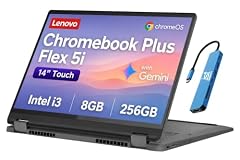
Lenovo IdeaPad Flex 5i Chromebook Plus
- Screen size
- 14 in
- Storage
- 256 GB
- Processor
- Intel Core
- 2-in-1
- Yes
- Chromebook Plus
- Yes
The Lenovo IdeaPad Flex 5i Chromebook Plus offers a 14-inch display and 2-in-1 design with an Intel Core i3 processor and 8GB of RAM. It is the most affordable option in this list for those who need a basic convertible without advanced performance demands.
Pros
- Intel Core i3 processor is sufficient for everyday computing
- 8GB RAM handles standard multitasking
- 14-inch touchscreen with 2-in-1 hinge
- Chromebook Plus certification includes AI features
Cons
- i3 processor is less powerful than i5 and Core Ultra options
- 256GB storage is less than the 512GB models
Good fit if
- Students or home users who need a simple, affordable convertible for web and Office apps
- Those who want Chromebook Plus features without paying for a high-end processor
Skip if
- You plan to use demanding Linux or Android apps that benefit from a faster CPU
- You need extra storage for media or design work
Verdict: If you want a budget-friendly 2-in-1 with Chromebook Plus, the Lenovo IdeaPad Flex 5i is a practical starting point.
7 Best for business

Lenovo Chromebook Plus Laptop for Business & Student
- Screen size
- 15 in or more
- Memory
- 6 to 8 GB
- Storage
- 128 GB
- Processor
- Intel Core
- Touchscreen
- Yes
- Chromebook Plus
- Yes
- For students
- Yes
- For business
- Yes
The Lenovo Chromebook Plus Laptop for Business & Student stands out with a larger 15-inch FHD+ touchscreen, a Intel Core 3 N355 processor, and 8GB of RAM. It is designed for professional use with a focus on durability and manageability, and comes with Chromebook Plus certification.
Pros
- 15-inch FHD+ touchscreen, the largest display in this list
- Intel Core 3 N355 processor for dependable performance
- 8GB RAM and 128GB storage (storage less than others but sufficient for cloud workflows)
- Chromebook Plus certified; seller notes business and student use cases
Cons
- 128GB storage is the smallest among the picks
- Core 3 N355 is a lower-tier processor compared to the i5 and Core Ultra models
Good fit if
- Business professionals who need a larger screen for spreadsheets and presentations
- Organizations that require a manageability-focused Chromebook with ChromeOS Enterprise Upgrade
Skip if
- You need more than 128GB of local storage for offline work
- You want a more powerful processor for demanding multitasking
Verdict: The Lenovo Chromebook Plus for Business offers a generous 15-inch display and a dependable chipset, making it a solid choice for professional environments.
Comparison table
| # | Chromebook | Screen size | Memory | Storage | Processor | Touchscreen | 2-in-1 |
|---|---|---|---|---|---|---|---|
| 1 | acer Chromebook Plus Spin 714 Laptop with Google AI | 14 in | 6 to 8 GB | 256 GB | Intel Core | Yes | Yes |
| 2 | Lenovo Flex 5i Chromebook Plus 14" WUXGA Touchscreen 2-in-1 Laptop | 14 in | 6 to 8 GB | 256 GB | Intel Core | Yes | Yes |
| 3 | Acer Chromebook Plus Spin 514 2-in-1 Laptop 14" WUXGA IPS Touchscreen | 14 in | 6 to 8 GB | 512 GB or more | Intel Core | Yes | Yes |
| 4 | Acer Chromebook Plus Spin 514 | 14 in | not stated | 512 GB or more | Intel Core | not stated | Yes |
| 5 | ASUS Chromebook Plus Touchscreen Laptop Flip 2-in-1-14" WUXGA Touch | 14 in | 6 to 8 GB | 256 GB | Intel Core | Yes | Yes |
| 6 | Lenovo IdeaPad Flex 5i Chromebook Plus | 14 in | not stated | 256 GB | Intel Core | not stated | Yes |
| 7 | Lenovo Chromebook Plus Laptop for Business & Student | 15 in or more | 6 to 8 GB | 128 GB | Intel Core | Yes | not stated |
How this list was made
We reviewed the current catalogue of Chromebooks under $700, which included 7 distinct models. Our shortlist criteria required a Chromebook Plus certification (for AI and performance standards), 8GB of RAM, and at least 128GB of storage. We then ranked picks based on processor tier, storage capacity, display size and touch capability, and overall versatility. Prices shown are live from the seller's listing and may change; we did not physically test any of these devices.
Choosing the right one
Processor: Intel Core vs Core Ultra vs Core 3
The processor determines how smoothly your Chromebook handles multitasking, Android apps, and Linux workloads. In this price range, you'll find three tiers: Intel Core 3 (like the N355), Intel Core i3/i5 (i3-1235U, i5-1235U, i5-1334U), and Intel Core Ultra (115U). The Core Ultra is the newest and fastest, offering better performance for AI features and heavy web apps. The i5 processors are a solid middle ground for most users. The Core 3 is entry-level, fine for basic browsing and office work but may struggle with demanding Linux tools or many open tabs.
RAM and storage: 8GB is the sweet spot
All picks in this list come with 8GB of RAM, which is the recommended minimum for smooth ChromeOS usage, especially if you keep many tabs open or use Android apps. Storage varies from 128GB to 512GB. If you rely heavily on cloud storage (Google Drive, OneDrive), 128GB is workable, but for offline files or media, 256GB is safer. The 512GB models provide the most local space, which is useful for video editing or large software installs in Linux. Check your usage patterns before deciding.
Display and touch: size and usability
Screen size affects portability and comfort. The 14-inch models are a balance between a comfortable viewing area and easy transport. The 15-inch Lenovo gives you more real estate for spreadsheets and split-screen work, but is bulkier. Touchscreens add flexibility: you can use the Chromebook as a tablet, take notes with a stylus (if supported), and interact with Android apps more naturally. If you rarely touch your screen, a non-touch model might save a few ounces and some cost, but all picks here are 2-in-1 convertibles, so you still get the hinge flexibility.
Chromebook Plus and AI features
Chromebook Plus is Google's certification for modern Chromebooks that meet certain hardware standards: 8GB+ RAM, 128GB+ storage, a fast processor, and a high-quality display. All picks here are Chromebook Plus, meaning they have access to AI tools like Gemini, Magic Editor, and Help me read, plus perks such as free trials of Google AI Pro. These features can boost productivity, but not all AI capabilities work identically across models. The Core Ultra processor in the Acer Spin 714 is best equipped for AI workloads, while older i5 and Core 3 chips still handle basic AI tasks without issue.
Update support and longevity
ChromeOS devices receive automatic updates for 10 years from the platform release date, according to Google's Auto Update policy. This means a Chromebook purchased today will stay secure and get new features well into the next decade. When choosing, consider the release year of the model, as newer models will have a longer support window. All picks here are recent models with multiple years of updates left. You can check the exact AUE date in the ChromeOS settings under 'Update schedule'.
Linux and developer needs
If you're a developer or like using Linux apps, all Chromebooks that meet the hardware requirements can run a Linux environment via ChromeOS's built-in support. You can install command-line tools, code editors, and more. However, not all features like hardware acceleration for graphics are fully supported, as noted in Google's Linux setup guide. The 8GB of RAM in these picks is sufficient for most development tasks, but a processor with higher cores (like the Core Ultra) will compile code faster. Check Google's list of supported devices if you rely on specific Linux features.
Questions
Do all Chromebooks under $700 have 8GB of RAM?
In this list, yes. All seven picks are Chromebook Plus certified, which requires a minimum of 8GB of RAM for decent performance with AI features and multitasking. Some older models may have 4GB or 6GB, but for the current generation, 8GB is the standard. Always check the specifications before buying, especially if you plan to run many Android apps or Linux containers.
Can I run Linux on these Chromebooks?
Yes, all Chromebooks that meet the hardware requirements can run Linux through the ChromeOS Linux development environment. You can enable it in Settings and install a Debian-based terminal with access to thousands of packages. However, note that hardware acceleration for GPU is not yet supported, so demanding graphical Linux apps might be limited. For development, coding, and general command-line work, these machines are fully capable.
How long will my Chromebook receive updates?
According to Google's Auto Update policy, Chromebooks receive automatic updates for 10 years from the platform release date. This includes security patches, feature updates, and browser updates. For models released after 2021, the 10-year window applies. You can check the exact end date on your device by going to Settings > About ChromeOS > Additional details and looking at the 'Update schedule'.
What is Chromebook Plus and why does it matter?
Chromebook Plus is a Google certification tier that guarantees a minimum level of hardware performance and access to exclusive AI features. Certified devices must have 8GB of RAM, 128GB+ storage, a modern processor, and a good display. With Chromebook Plus, you get built-in Gemini AI, Magic Editor, and special perks like 12 months of Google AI Pro. All picks in this guide are Chromebook Plus, ensuring you get a modern and capable experience.
Is a 15-inch Chromebook better than a 14-inch?
It depends on your priorities. A 15-inch screen offers more workspace for spreadsheets, video editing, and split-screen multitasking, but it typically makes the laptop larger and heavier, reducing portability. The 14-inch models in this list strike a balance between screen real estate and portability, making them easier to carry in a backpack. If you mostly work at a desk, the extra screen size can be beneficial; if you travel often, 14-inch is likely more comfortable.
What changed
- : First published.