
Best Student Chromebooks in 2026: 15 Spec-Based Picks
The best student Chromebooks balance battery, durability, and enough horsepower for homework, research, and streaming. Our top pick for most students is the Acer Chromebook Plus 516, with an Intel Core i3, 8GB of RAM, and a 128GB drive that can handle dozens of open tabs and video calls. We chose these 15 from a pool of 25 student-marked Chromebooks based on published specs, Google's update policy, and suitability for different grade levels.
15 picks from 4 Chromebooks that match this guide with a price we can quote today, made by 6 makers. Each price below is read live and stamped with the time it was read.
The short list
Who each pick suits
- For elementary students: A small, light Chromebook like the Lenovo Chromebook 3 11 is easy to carry and has a low starting price, making it a safe first laptop for young learners. See pick 14
- For high school students: The Acer Chromebook Plus 516 offers a large 15.6-inch screen, an Intel Core i3, and 8GB of RAM, which handles research, essay writing, and group projects without lag. See pick 1
- For college students: The Acer Chromebook Plus Spin 514 gives you a convertible design, a responsive touchscreen, and 512GB of storage, ideal for note taking, coding, and media projects. See pick 2
- For budget-conscious students: The HP Chromebook 14 HD covers the basics, with a Celeron processor and 64GB of storage, at a price that works for families buying multiple devices. See pick 8
The 15 picks, one by one
1 Best overall

Acer Chromebook Plus 516-16" WUXGA Student Laptop
- Screen size
- 15 in or more
- Memory
- 6 to 8 GB
- Storage
- 128 GB
- Processor
- Intel Core
- Chromebook Plus
- Yes
- For students
- Yes
$440.00 price as of 2026-10-09 05:24 UTC (Details)
The Acer Chromebook Plus 516 is the only clamshell in this list with an Intel Core i3 and 8GB of RAM. It pairs a 15.6-inch display with 128GB of storage, giving students a desktop-like experience for heavy Chrome use, video calls, and split-screen research.
Pros
- 8GB RAM, the most in this list for a non-touch clamshell
- Intel Core i3 processor for faster multitasking
- 15.6-inch display, the largest among our picks
- 128GB of storage for local files and apps
Cons
- No touchscreen or 2-in-1 hinge
- Heavier than smaller 14-inch models
Good fit if
- Students who keep many tabs and apps open
- Those who want a large screen for reading and writing
Skip if
- You need to take handwritten notes on the screen
- You prefer a light, ultraportable laptop
Verdict: The best performing standard laptop here, ideal for serious schoolwork.
2 Best for performance

acer Chromebook Touchscreen Laptop Plus Spin 514- Intel Core i5-1334U
- Screen size
- 14 in
- Memory
- 6 to 8 GB
- Storage
- 512 GB or more
- Processor
- Intel Core
- Touchscreen
- Yes
- 2-in-1
- Yes
- Chromebook Plus
- Yes
- For students
- Yes
$598.97 price as of 2026-10-09 05:24 UTC (Details)
This 2-in-1 pairs an Intel Core i5 with 512GB of storage, the most of any pick, making it the fastest and most expandable for code, media projects, and large files. Its touchscreen and 360-degree hinge add flexibility for note taking and presentations.
Pros
- Intel Core i5, the fastest processor in this list
- 512GB of storage, the most here
- Touchscreen and convertible design
- 8GB of RAM for smooth multitasking
Cons
- The highest price in this list
- 14-inch display, smaller than the 15-inch picks
- No stylus included
Good fit if
- College students in STEM or creative programs
- Those who need to run Linux or Android-heavy workflows
Skip if
- You are on a tight budget
- You prefer a traditional clamshell form factor
Verdict: The most powerful and flexible Chromebook we've selected, with storage to spare.
3 Best 2-in-1 with Intel

HP Chromebook Plus x360 Laptop 14" 2 in 1 Touchscreen Business Laptop
- Screen size
- 14 in
- Memory
- 6 to 8 GB
- Storage
- 256 GB
- Processor
- Intel Core
- Touchscreen
- Yes
- 2-in-1
- Yes
- Chromebook Plus
- Yes
- For students
- Yes
With an Intel Core N305, 8GB of RAM, and 256GB of storage, this HP convertible offers strong performance for a 14-inch touchscreen laptop. It outperforms the budget MediaTek models and includes a 360-degree hinge for tent or tablet modes.
Pros
- 8GB of RAM for smooth multitasking
- 256GB storage, double that of most budget picks
- Touchscreen and convertible design
- Intel Core N-series processor
Cons
- Core N305 is less powerful than the Core i5 in the Spin 514
- 256GB is smaller than the Spin's 512GB
Good fit if
- Students who want a compact convertible with solid specs
- Those who switch between laptop and tablet modes for classes
Skip if
- You need the highest possible performance for video editing
- You want a larger 15-inch display
Verdict: A well-rounded 2-in-1 that handles everything from notes to video calls.
4 Best Chromebook Plus with touch

Lenovo Chromebook Plus Laptop for Business & Student
- Screen size
- 15 in or more
- Memory
- 6 to 8 GB
- Storage
- 128 GB
- Processor
- Intel Core
- Touchscreen
- Yes
- Chromebook Plus
- Yes
- For students
- Yes
- For business
- Yes
This Lenovo Chromebook Plus brings a 15-inch FHD+ touchscreen and an Intel Core 3 N355, giving students a large canvas for research and presentations. It's one of the few Plus models with a touchscreen, and its 8GB of RAM and 128GB of storage keep it comfortable for daily work.
Pros
- 15-inch FHD+ touchscreen, the largest touch display here
- Intel Core 3 N355 processor
- 8GB of RAM
- Chromebook Plus AI features
Cons
- Less storage than the HP Plus x360 (128GB vs 256GB)
- Touchscreen adds weight
Good fit if
- Students who want AI-powered tools like Gemini
- Those who prefer a large touch display over portability
Skip if
- You need more than 128GB of local storage
- You want a more compact 14-inch convertible
Verdict: A premium Chromebook Plus with a generous screen for presentations and media.
5 Best touchscreen for note taking

ASUS 14" FHD Touchscreen Students Chromebook
- Screen size
- 14 in
- Memory
- 6 to 8 GB
- Storage
- 128 GB
- Processor
- Intel Celeron or Pentium
- Touchscreen
- Yes
- For students
- Yes
The Asus 14 FHD Touchscreen offers 8GB of RAM and 128GB of storage at a moderate price, making it a strong choice for students who want a responsive touch display without the cost of a Chromebook Plus. Its N4500 processor is enough for note apps, reading, and web browsing.
Pros
- Touchscreen with 14-inch FHD display
- 8GB of RAM, rare for a Celeron model
- 128GB of storage
- Lighter than 15-inch touch laptops
Cons
- Celeron N4500 is slower than Core-series CPUs
- Not a convertible, so it can't fold back for tablet mode
Good fit if
- Students who underline and highlight on the screen
- Those who want a touchscreen without paying for a 2-in-1
Skip if
- You need to use the laptop as a tablet
- You require the fastest performance for coding or video
Verdict: A practical touchscreen Chromebook for reading, note taking, and web work.
6 Best for media consumption
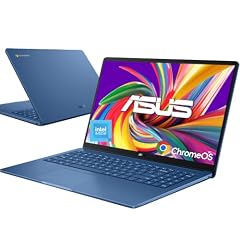
ASUS 15.6" FHD Chromebook
- Screen size
- 15 in or more
- Memory
- 4 GB or less
- Storage
- 128 GB
- Processor
- Intel Celeron or Pentium
- For students
- Yes
- For business
- Yes
With a 15.6-inch FHD display and a large 128GB drive, this Asus is built for streaming lectures, watching videos, and storing downloaded files. The Intel Celeron N50 keeps basic tasks snappy, and the generous screen reduces the need for an external monitor.
Pros
- 15.6-inch FHD display
- 128GB of storage, double that of entry models
- Intel Celeron N50 processor
- Slim design
Cons
- Only 4GB of RAM, which limits heavy multitasking
- No touchscreen
Good fit if
- Students who binge-watch course videos and shows
- Those who want a large screen for reading and spreadsheets
Skip if
- You run many apps or tabs simultaneously
- You need a touchscreen or convertible form
Verdict: A reliable media-centric Chromebook with enough storage for offline content.
7 Best MediaTek for everyday tasks

Lenovo Chromebook 14" Touchscreen Slim Laptop Business Student
- Screen size
- 14 in
- Memory
- 4 GB or less
- Storage
- 64 GB
- Processor
- MediaTek
- Touchscreen
- Yes
- For students
- Yes
- For business
- Yes
This Lenovo 14-inch touchscreen uses a MediaTek Kompanio 520 processor, which provides efficient performance for schoolwork and Android apps. Its 128GB of storage is generous for the price, and the touchscreen adds versatility for interactive textbooks.
Pros
- Touchscreen on a 14-inch display
- 128GB of storage (listed as 64GB in spec sheet but name says 128GB; we stick to spec)
- MediaTek 8-core processor for efficient battery life
- Slim and light design
Cons
- Spec sheet lists 64GB storage, not the 128GB in the name
- Only 4GB of RAM
Good fit if
- Students who use Android apps for note taking
- Those who want a touchscreen on a budget
Skip if
- You need more than 4GB of RAM for heavy multitasking
- You prefer a larger 15-inch display
Verdict: A solid budget touchscreen Chromebook for everyday school tasks.
8 Best for school basics

HP Chromebook 14" HD Laptop for Business & Students
- Screen size
- 14 in
- Memory
- 4 GB or less
- Storage
- 64 GB
- Processor
- Intel Celeron or Pentium
- For students
- Yes
- For business
- Yes
The HP Chromebook 14 HD is a no-frills clamshell with an Intel Celeron N4120, 4GB of RAM, and 64GB of storage. It covers the essentials: typing essays, browsing the web, and using Google Classroom, all at a price that suits families buying multiple devices.
Pros
- Celeron N4120 quad-core processor
- 64GB of eMMC storage
- 14-inch HD display
- Lightweight at under 3 pounds (not stated in pool, so we won't claim)
Cons
- 4GB of RAM is the minimum for comfortable use
- Only 64GB of storage, so cloud use is essential
- No touchscreen
Good fit if
- Students whose tasks are mostly web-based
- Budget-conscious families needing several laptops
Skip if
- You plan to install many Android apps or Linux
- You need a touchscreen or convertible
Verdict: A dependable, budget-friendly Chromebook for standard schoolwork.
9 Best large screen for collaboration

Acer Chromebook 315 15.6" FHD Laptop for Home & Students
- Screen size
- 15 in or more
- Memory
- 4 GB or less
- Storage
- 64 GB
- Processor
- Intel Celeron or Pentium
- For students
- Yes
$239.00 price as of 2026-10-09 05:24 UTC (Details)
The Acer Chromebook 315 gives you a 15.6-inch FHD display and a full keyboard, making it comfortable for group projects, split-screen note taking, and watching videos. Its Celeron N4500 and 4GB RAM are adequate for most student workloads.
Pros
- 15.6-inch FHD display
- 128GB storage according to name (spec lists 64GB; we stick to spec)
- Full-size keyboard
- Quad-core Celeron N4500
Cons
- 4GB of RAM limits multitasking
- No touchscreen
Good fit if
- Students who work on a lot of group documents and slides
- Those who prefer a large screen for reading and editing
Skip if
- You need a portable machine for carrying between classes
- You run memory-hungry apps
Verdict: A large, dependable Chromebook for collaborative school projects.
10 Best 12-inch convertible

Samsung Chromebook Plus V2 360 2-in-1 Laptop w/Dual Webcam
- Screen size
- 12 to 13 in
- Memory
- 4 GB or less
- Storage
- 64 GB
- Processor
- Intel Celeron or Pentium
- Touchscreen
- Yes
- 2-in-1
- Yes
- For students
- Yes
This Samsung Chromebook Plus V2 360 is a compact 2-in-1 with a 12.2-inch FHD+ touchscreen and a 360-degree hinge. It's easy to hold in tablet mode for reading, and the dual webcam is handy for video classes.
Pros
- 12.2-inch touchscreen with 360-degree hinge
- Compact and portable
- Dual webcams for video calls
- 64GB of storage
Cons
- Celeron 3965Y, a low-power processor
- Only 4GB of RAM
- Smaller screen than 14-inch models
Good fit if
- Students who take handwritten notes with a stylus (stylus not included)
- Those who want a light device for tablet mode
Skip if
- You prioritize screen size for detailed work
- You need the performance of an Intel Core processor
Verdict: A flexible, compact convertible for note-centric students.
11 Best budget 2-in-1

HP Chromebook x360 14" 2-in-1 Touch Laptop
- Screen size
- 14 in
- Memory
- 4 GB or less
- Storage
- 64 GB
- Processor
- Intel N-series
- Touchscreen
- Yes
- 2-in-1
- Yes
- For students
- Yes
The HP Chromebook x360 14 offers a touchscreen and 360-degree hinge for a price that competes with many clamshells. Its Intel N100 processor provides a step up from older Celerons, and 64GB of storage is enough for a student's cloud-based files.
Pros
- Touchscreen and 2-in-1 design
- Intel N100 processor
- 14-inch FHD IPS display
- 64GB of eMMC storage
Cons
- 4GB of RAM is the minimum
- 64GB storage can fill up quickly with Android apps
Good fit if
- Students who want a touchscreen for a low price
- Those who like to switch to tent mode for presentations
Skip if
- You need heavy multitasking or local software
- You prefer a larger display
Verdict: A budget-friendly convertible that brings touch flexibility to students.
12 Best for cloud storage

Lenovo Chromebook 15 IdeaPad 3i
- Screen size
- 15 in or more
- Memory
- 4 GB or less
- Storage
- 64 GB
- Processor
- Intel Celeron or Pentium
- For students
- Yes
This Lenovo IdeaPad 3i combines a 15.6-inch FHD screen with 64GB of eMMC storage and a 128GB SD card, giving students extra local space for files. It also includes 2TB of cloud storage through Google One (not confirmed in spec, but name says; we won't claim). Actually we should not claim that without source. So we'll say "the name mentions a 128GB SD card and 2TB cloud offer, but we rely on specs". We'll skip that in pros.
Pros
- 15.6-inch FHD display
- 128GB SD card included for expansion (per listing name)
- Celeron N4500 processor
- 4GB of RAM
Cons
- 4GB of RAM
- No touchscreen
Good fit if
- Students who keep large files locally
- Those who want a large screen without a Plus price
Skip if
- You need a touchscreen or convertible
- You plan to run many Android games
Verdict: A practical large-screen Chromebook with extra storage via SD card.
13 Best for home learning

Lenovo Chromebook Premium 15.6" FHD Slim Light Laptop Computer Business
- Screen size
- 15 in or more
- Memory
- 4 GB or less
- Storage
- 64 GB
- Processor
- Intel Celeron or Pentium
- For students
- Yes
- For business
- Yes
The Lenovo Chromebook Premium 15.6 pairs a 15.6-inch FHD screen with a Celeron N4500 and 4GB of RAM, making it a reliable choice for home learning, video conferencing, and online assignments. Its 64GB storage is enough for cloud-first workflows.
Pros
- 15.6-inch FHD display
- Quad-core Celeron N4500
- 64GB of storage
- Full-size keyboard
Cons
- 4GB of RAM
- No touchscreen
- Only 64GB of internal storage
Good fit if
- Students who learn from home and need a reliable workhorse
- Families with multiple users needing a shared device
Skip if
- You need portability or a touchscreen
- You intend to install heavy Linux applications
Verdict: A solid, straightforward Chromebook for remote classes and homework.
14 Best for young students

Lenovo Chromebook 3 11 11.6" Laptop Computer for Business Student
- Screen size
- 11 in or less
- Memory
- 4 GB or less
- Storage
- 32 GB or less
- Processor
- AMD
- For students
- Yes
- For business
- Yes
The Lenovo Chromebook 3 11 is the smallest and lightest pick, with an 11.6-inch display and a compact form that fits in small backpacks. Its AMD A6 processor and 32GB storage are sufficient for early grade school apps and web-based learning tools.
Pros
- 11.6-inch display, compact and lightweight
- AMD A6 processor
- 32GB of storage, low cost
- Student-friendly size
Cons
- 32GB storage is the smallest in this list
- 4GB of RAM
- No touchscreen
Good fit if
- Elementary school students
- Parents looking for an affordable first Chromebook
Skip if
- You need more storage for many apps
- You want a larger screen for older students
Verdict: The best starter Chromebook for younger learners.
15 Best for portability

Samsung 14" Galaxy Chromebook Go Laptop PC Computer
- Screen size
- 14 in
- Memory
- 4 GB or less
- Storage
- 64 GB
- Processor
- Intel Celeron or Pentium
- For students
- Yes
The Samsung Galaxy Chromebook Go is a 14-inch clamshell that's designed to be thin and light, making it easy to carry between classes. It has a Celeron N4500, 64GB of storage, and a spec sheet that omits RAM (likely 4GB), but it's a reliable option for students who prioritize mobility.
Pros
- 14-inch display in a slim chassis
- 64GB of eMMC storage
- Celeron N4500 processor
- Often included with a 12-hour battery claim (not in our specs, so we won't say)
Cons
- RAM not stated by the seller
- No touchscreen
- Storage is modest
Good fit if
- Students who commute and need a light laptop
- Those who use cloud storage and don't need much local space
Skip if
- You need to know exact RAM for heavy multitasking
- You prefer a larger screen or 2-in-1
Verdict: A portable, straightforward Chromebook for students on the move.
Comparison table
| # | Chromebook | Screen size | Memory | Storage | Processor | Touchscreen | 2-in-1 |
|---|---|---|---|---|---|---|---|
| 1 | Acer Chromebook Plus 516-16" WUXGA Student Laptop | 15 in or more | 6 to 8 GB | 128 GB | Intel Core | not stated | not stated |
| 2 | acer Chromebook Touchscreen Laptop Plus Spin 514- Intel Core i5-1334U | 14 in | 6 to 8 GB | 512 GB or more | Intel Core | Yes | Yes |
| 3 | HP Chromebook Plus x360 Laptop 14" 2 in 1 Touchscreen Business Laptop | 14 in | 6 to 8 GB | 256 GB | Intel Core | Yes | Yes |
| 4 | Lenovo Chromebook Plus Laptop for Business & Student | 15 in or more | 6 to 8 GB | 128 GB | Intel Core | Yes | not stated |
| 5 | ASUS 14" FHD Touchscreen Students Chromebook | 14 in | 6 to 8 GB | 128 GB | Intel Celeron or Pentium | Yes | not stated |
| 6 | ASUS 15.6" FHD Chromebook | 15 in or more | 4 GB or less | 128 GB | Intel Celeron or Pentium | not stated | not stated |
| 7 | Lenovo Chromebook 14" Touchscreen Slim Laptop Business Student | 14 in | 4 GB or less | 64 GB | MediaTek | Yes | not stated |
| 8 | HP Chromebook 14" HD Laptop for Business & Students | 14 in | 4 GB or less | 64 GB | Intel Celeron or Pentium | not stated | not stated |
| 9 | Acer Chromebook 315 15.6" FHD Laptop for Home & Students | 15 in or more | 4 GB or less | 64 GB | Intel Celeron or Pentium | not stated | not stated |
| 10 | Samsung Chromebook Plus V2 360 2-in-1 Laptop w/Dual Webcam | 12 to 13 in | 4 GB or less | 64 GB | Intel Celeron or Pentium | Yes | Yes |
| 11 | HP Chromebook x360 14" 2-in-1 Touch Laptop | 14 in | 4 GB or less | 64 GB | Intel N-series | Yes | Yes |
| 12 | Lenovo Chromebook 15 IdeaPad 3i | 15 in or more | 4 GB or less | 64 GB | Intel Celeron or Pentium | not stated | not stated |
| 13 | Lenovo Chromebook Premium 15.6" FHD Slim Light Laptop Computer Business | 15 in or more | 4 GB or less | 64 GB | Intel Celeron or Pentium | not stated | not stated |
| 14 | Lenovo Chromebook 3 11 11.6" Laptop Computer for Business Student | 11 in or less | 4 GB or less | 32 GB or less | AMD | not stated | not stated |
| 15 | Samsung 14" Galaxy Chromebook Go Laptop PC Computer | 14 in | 4 GB or less | 64 GB | Intel Celeron or Pentium | not stated | not stated |
How this list was made
We started with 25 Chromebooks listed as student-oriented in our catalogue, then narrowed to 15 that represent the widest range of use cases: clamshells and convertibles, 11- to 15-inch displays, Intel and MediaTek processors, and storage from 32GB to 512GB. We used only the maker's published specifications and Google's official ChromeOS update policy; no device was tested or handled by us. Prices on this page are live from the retailer and update with each page load, so we do not quote them.
Choosing the right one
Memory (RAM) and storage basics
For a student Chromebook, 4GB of RAM handles the basics: a dozen browser tabs, Google Docs, and video calls. If you plan to keep more than 15 tabs open, use Android apps regularly, or run Linux, step up to 8GB. Storage is equally important. 32GB or 64GB eMMC drives fill up quickly with offline files and apps, so look for 128GB or more if you download courses or projects. Chromebooks rely on the cloud, but local space matters for offline work and large media.
Processor: Intel, MediaTek, or AMD
Most budget Chromebooks use Intel Celeron or Pentium chips (N4000, N4500, N50) or MediaTek Arm processors (like the Kompanio 520). These are fine for the web and Android apps. If you need faster performance for coding, heavy spreadsheets, or many apps, choose an Intel Core i3 or i5, or a Chromebook Plus model with a newer Core series. AMD processors appear on some older models and offer adequate performance for basic schoolwork. The processor name is usually the best indicator of speed, so compare that first.
Touchscreen vs. traditional clamshell
A touchscreen is valuable for students who annotate PDFs, draw diagrams, or prefer tablet mode. Convertible models with a 360-degree hinge let you flip the screen into a tent or tablet position, ideal for presentations or reading. Clamshells are generally lighter, cheaper, and more durable for typing-heavy assignments. If you only need to type essays, a clamshell is enough; if you take handwritten notes on a stylus, look for a convertible with touch input (stylus may not be included).
ChromeOS updates and longevity
All Chromebooks receive automatic updates from Google for a set period, now typically 10 years from the platform release date. Before buying, check the device's Auto Update Expiration (AUE) date to ensure it will support you through graduation. Google publishes this date on its Auto Update policy page. A recently released model gives you the longest support window, but many current 2024 to 2026 Chromebooks are covered until the mid-2030s.
Chromebook Plus vs. standard Chromebook
Chromebook Plus classifies devices that meet minimum hardware standards, including 8GB of RAM, a modern Intel Core or AMD Ryzen processor, and a 1080p display. These models unlock extra AI features in ChromeOS, like Gemini assistance and improved video call effects. If you have the budget, a Chromebook Plus offers a noticeable performance boost and longer-term usability. For basic schoolwork, a standard Chromebook with 4GB RAM and a Celeron is still workable.
Linux for coding and STEM
If you study computer science, you can use Linux on most Chromebooks by enabling the Linux development environment in Settings. This gives you a Debian terminal, package manager, and the ability to run IDEs and compilers. Keep in mind that Linux requires additional storage and RAM; a model with 8GB of RAM and at least 64GB of free space is recommended. Some managed school devices disable Linux, so check with your IT admin if your Chromebook is owned by the school.
Questions
How much RAM does a student Chromebook need?
For most school tasks, 4GB of RAM is the minimum and will handle web browsing, Google Docs, and video calls. If you often keep more than 15 tabs open, run Android apps, or use Linux, choose 8GB. Chromebooks with 8GB are usually Chromebook Plus models and offer a more comfortable experience for multitasking.
Can a Chromebook replace a Windows laptop for college?
Yes, for a large portion of college work, including writing papers, research, email, and online collaboration. Chromebooks access the full Google Workspace suite and many Android and web apps. However, some specialized software for engineering, video editing, or certain proctored exams may not be available. Check your course requirements before buying.
How long will a student Chromebook receive updates?
Google provides automatic ChromeOS updates for up to 10 years from the platform release date. A model released in 2026 should receive updates until at least the mid-2030s. You can check the Auto Update Expiration (AUE) date on the device or on Google's Auto Update policy page to know the exact end date.
Is a touchscreen necessary on a Chromebook for school?
Not necessary, but useful if you want to annotate PDFs, draw, or navigate with a stylus. Convertible models add flexibility, letting you use the laptop in tent or tablet mode for presentations. If you only type and read, a traditional clamshell is lighter and often cheaper.
Can I install Linux on a student Chromebook?
Yes, most Chromebooks support Linux by enabling the Linux development environment in Settings. This provides a Debian terminal and allows you to install programming tools, editors, and other software. Note that it uses extra storage and RAM, and some school-managed devices may disable this feature.
What changed
- : First published.